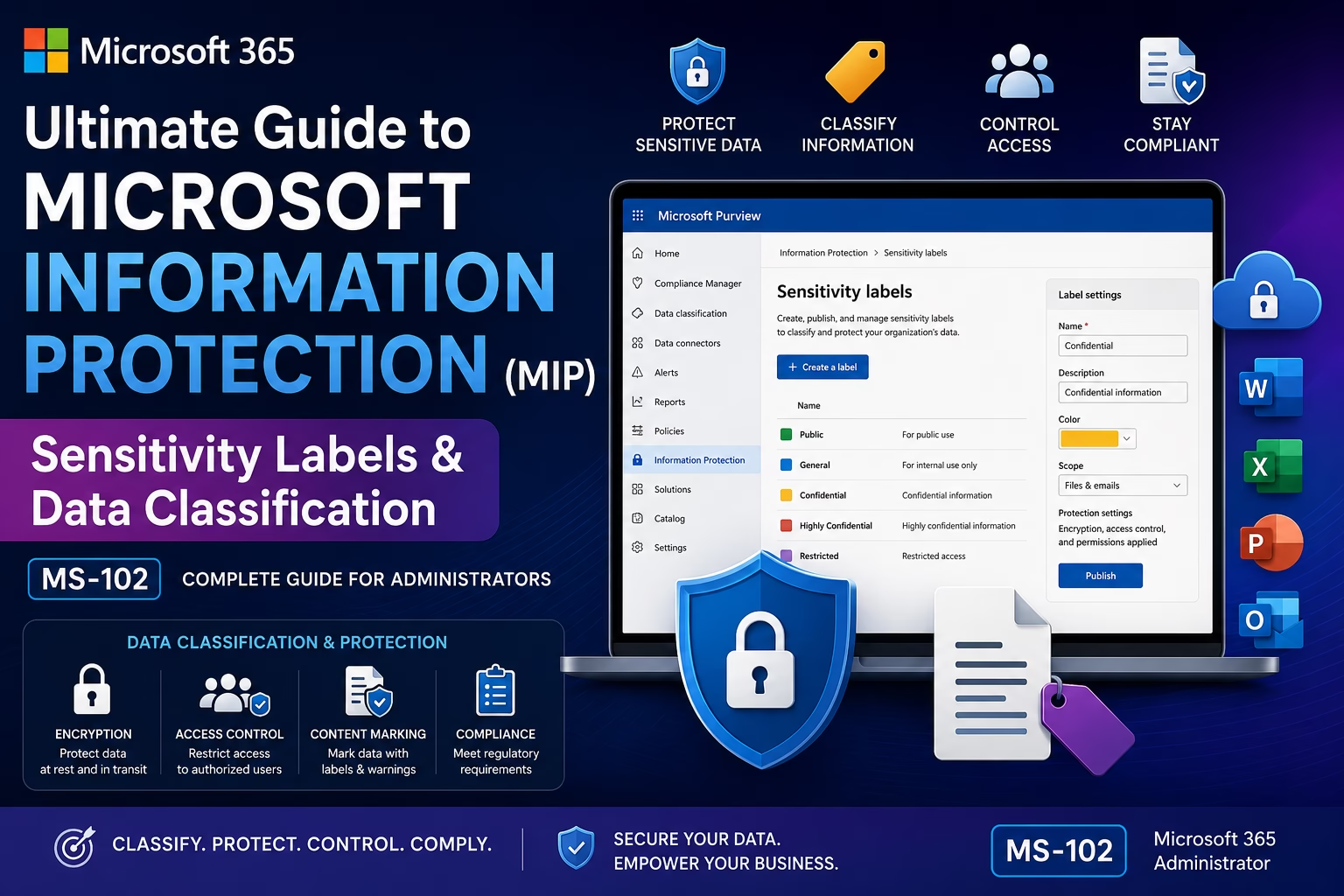
Modern organizations create and store massive amounts of sensitive data across Microsoft 365 environments.
This data may include:
- Financial records
- Customer information
- HR documents
- Legal files
- Confidential emails
- Intellectual property
Without proper classification and protection, sensitive information can easily be:
- Shared accidentally
- Exposed externally
- Downloaded insecurely
- Stored improperly
- Leaked intentionally or unintentionally
This is where Microsoft Information Protection (MIP) becomes critical.
Microsoft Information Protection helps organizations classify, label, and protect sensitive data across Microsoft 365 workloads using sensitivity labels and policy-based protection.
For the MS-102: Microsoft 365 Administrator certification, understanding Microsoft Information Protection, sensitivity labels, and data classification is essential because Microsoft heavily tests compliance and information protection concepts.
In this guide, we’ll cover:
- What Microsoft Information Protection is
- Sensitivity labels explained
- Data classification concepts
- Label protection settings
- Encryption & content marking
- Label publishing
- Auto-labeling overview
- Step-by-step lab
- Best practices
- MS-102 exam tips
Learning Objectives
After completing this guide, you will be able to:
- Explain what Microsoft Information Protection (MIP) is.
- Describe how sensitivity labels classify and protect data.
- Differentiate manual from automatic labeling.
- Identify the MIP architecture and workflow.
What is Microsoft Information Protection (MIP)?
Microsoft Information Protection (MIP) is Microsoft’s framework for:
- Classifying sensitive data
- Applying protection labels
- Encrypting content
- Controlling access
- Protecting organizational information
MIP integrates with Microsoft Purview to provide centralized information protection across Microsoft 365 environments.
Why Information Protection Matters
Organizations face increasing risks related to:
- Data leakage
- Unauthorized sharing
- Compliance violations
- Insider threats
- External exposure
- Uncontrolled collaboration
Without proper classification:
- Sensitive data becomes difficult to track
- Protection policies fail
- DLP becomes less effective
- Governance visibility decreases
Microsoft Information Protection helps organizations classify and protect sensitive data automatically and consistently.
What are Sensitivity Labels?
Sensitivity Labels help organizations classify and protect content based on sensitivity levels.
Common examples include:
| Label | Example Usage |
|---|---|
| Public | Public marketing documents |
| General | Internal business data |
| Confidential | Sensitive company data |
| Highly Confidential | Financial/legal information |
Labels can apply to:
- Emails
- Documents
- Teams
- SharePoint sites
- Microsoft 365 Groups
Microsoft Information Protection Architecture
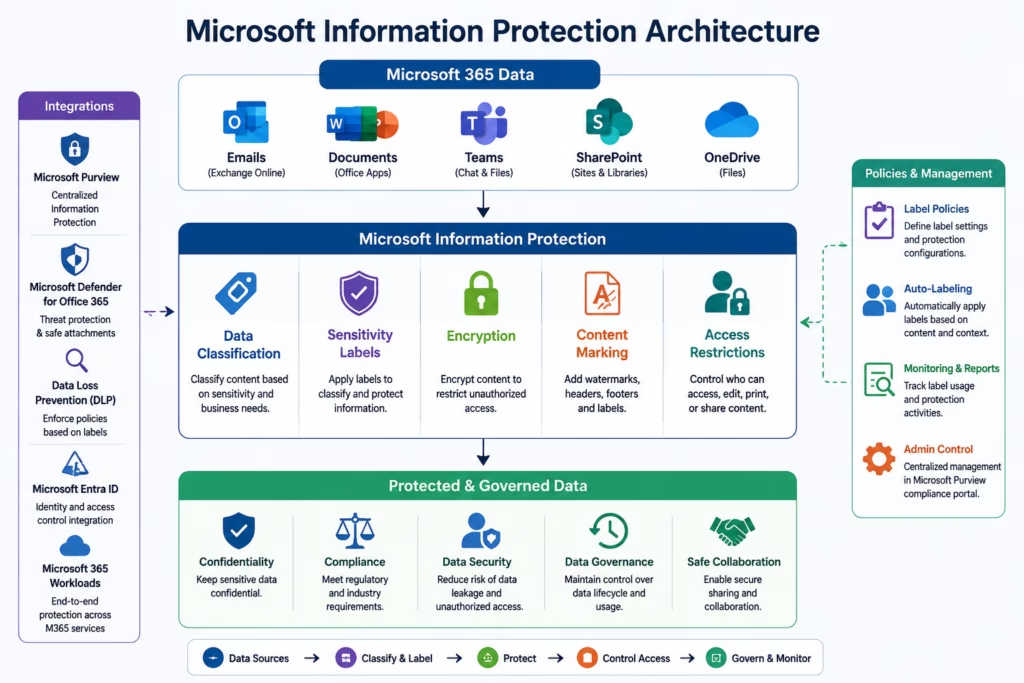
Microsoft Information Protection architecture illustrating sensitivity labels, encryption, classification, and data protection across Microsoft 365 workloads.
How Sensitivity Labels Work
Sensitivity labels help organizations:
- Classify content
- Encrypt files and emails
- Restrict access
- Add watermarks
- Apply headers/footers
- Prevent unauthorized sharing
Labels follow data even when files move between locations.
This is extremely important for cloud governance.
Manual vs Automatic Labeling
| Method | Description |
|---|---|
| Manual Labeling | Users apply labels manually |
| Automatic Labeling | Policies apply labels automatically |
Automatic labeling improves consistency and reduces human error.
Sensitivity Label Protection Features
Sensitivity labels can enforce:
| Protection Feature | Purpose |
|---|---|
| Encryption | Restrict access |
| Watermarks | Identify sensitive content |
| Headers & Footers | Visual classification |
| Access Control | Limit sharing |
| Content Marking | Improve awareness |
These protections help secure organizational data.
Microsoft Information Protection Workloads
Sensitivity labels integrate across Microsoft 365 services.
| Workload | Example |
|---|---|
| Exchange Online | Email protection |
| SharePoint Online | Document governance |
| OneDrive | File protection |
| Microsoft Teams | Collaboration protection |
| Office Apps | Document classification |
This enables organization-wide information protection.
Microsoft Information Protection Workflow
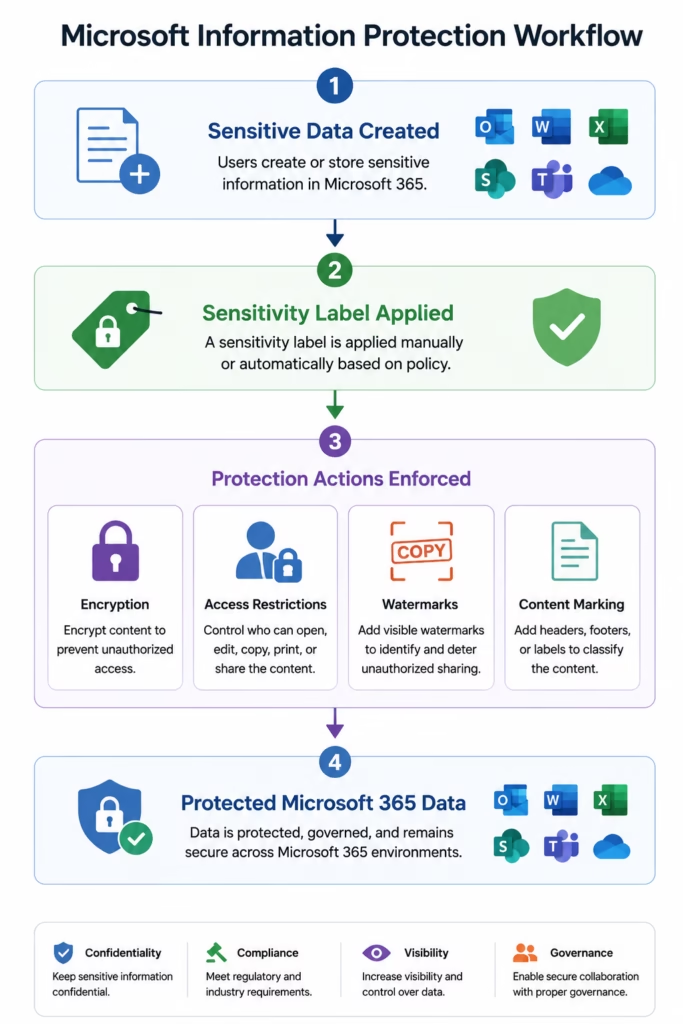
Microsoft Information Protection workflow showing sensitivity labels, encryption, and protected Microsoft 365 data governance.
Step-by-Step Microsoft Information Protection Lab
This section provides practical MS-102 administration experience.
Step 1: Open Microsoft Purview Portal
Go to:
compliance.microsoft.comSign in using:
- Global Administrator
- Compliance Administrator
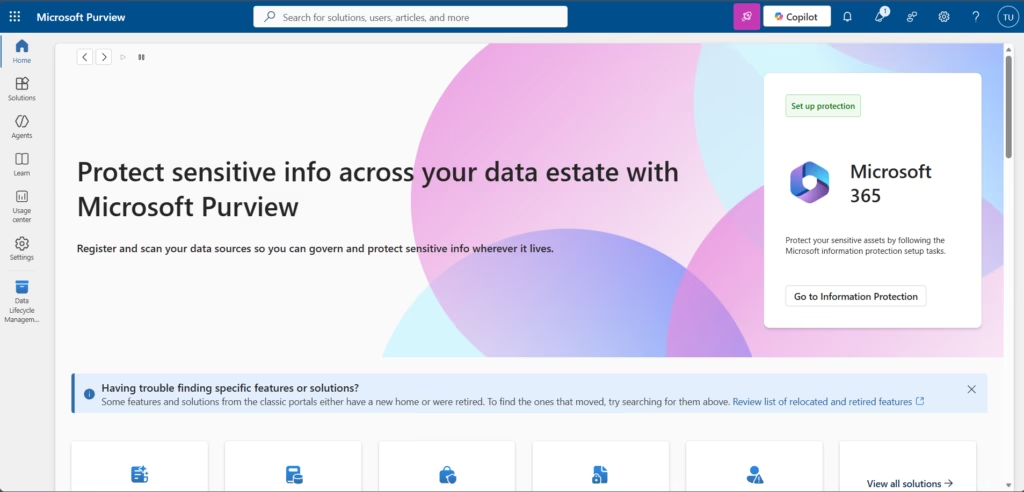
Step 2: Open Information Protection
Navigate to:
Information Protection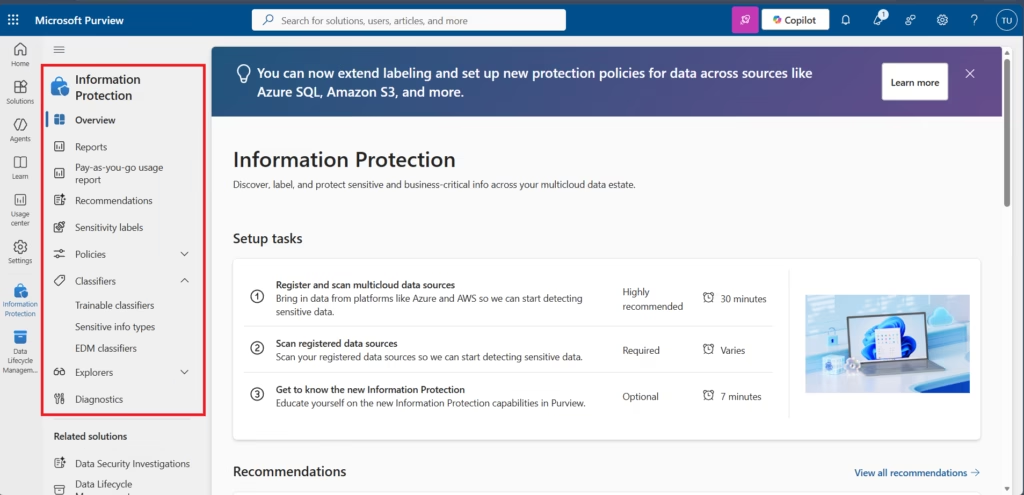
Review the sensitivity label management interface and protection configuration options
Step 3: Review Default Labels
Review labels such as:
- Public
- General
- Confidential
- Highly Confidential
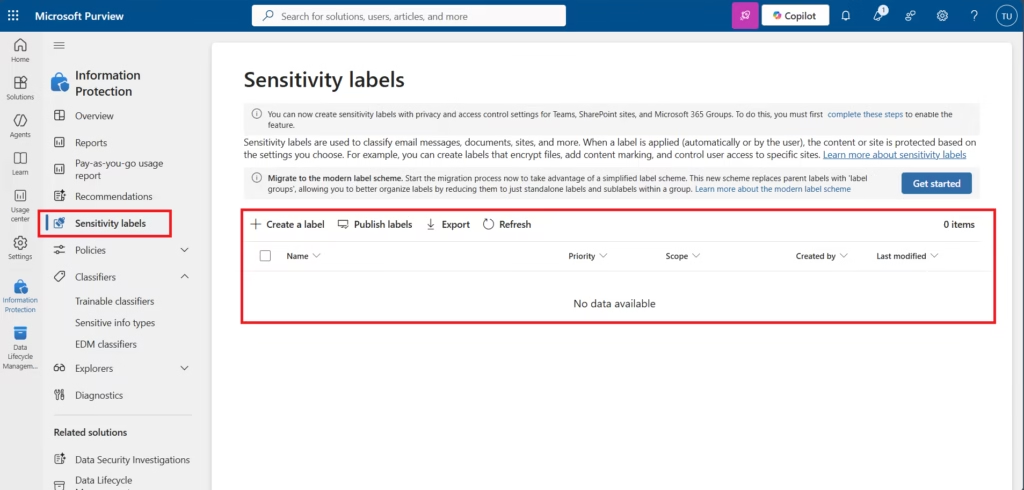
This helps administrators understand data classification and models.
In a new Microsoft 365 lab tenant, sensitivity labels may not exist by default. Administrators can create custom organizational labels based on business requirements. This helps organizations build classification models aligned with compliance and governance policies.Step 4: Create a Sensitivity Label
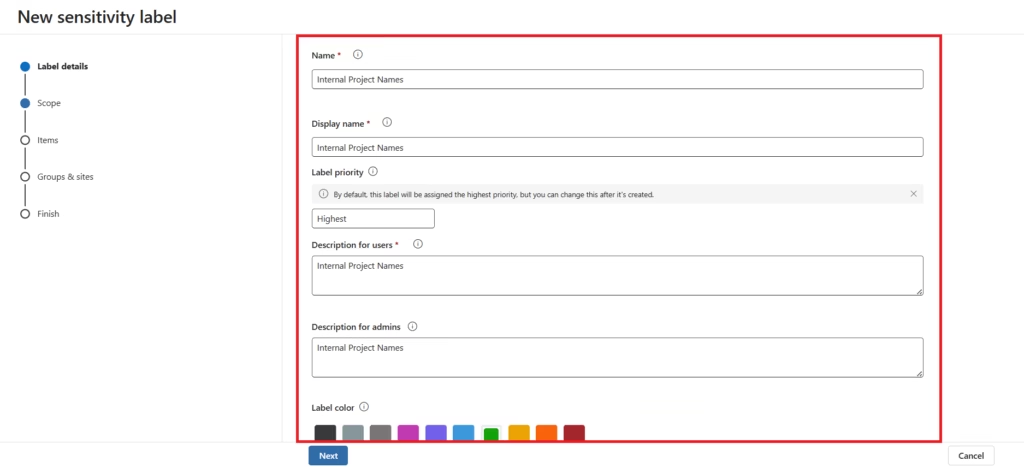
Select:
Create a labelConfigure:
- Label name
- Description
- Color
- Protection settings
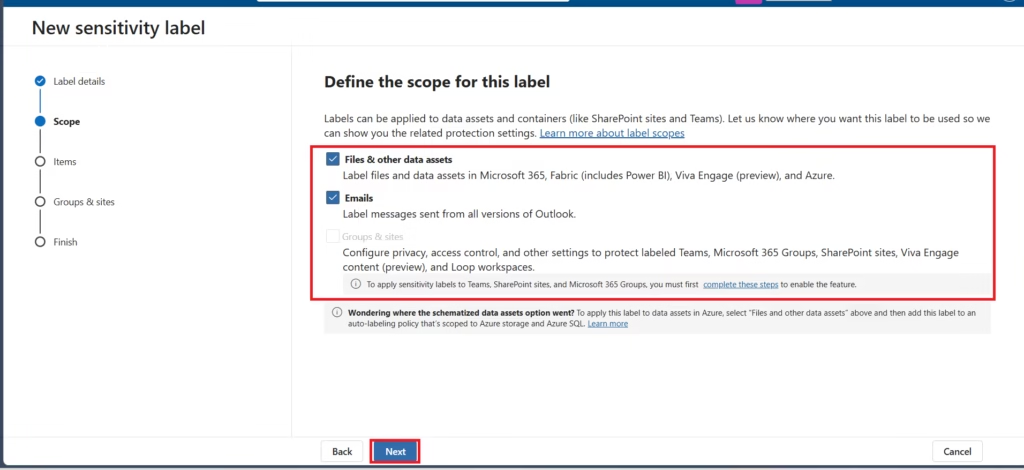
In some Microsoft 365 lab or trial tenants, sensitivity labels for Groups & Sites may appear unavailable until additional Microsoft Entra and Microsoft 365 integration settings are configured.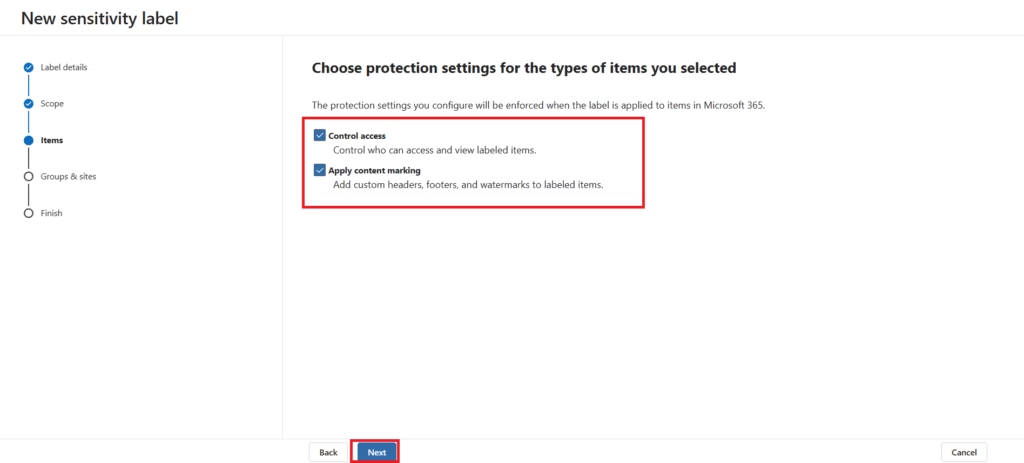
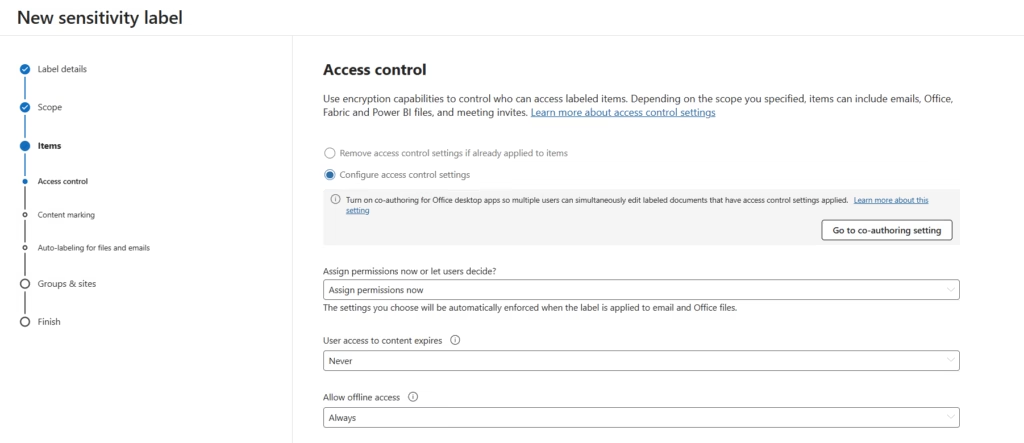
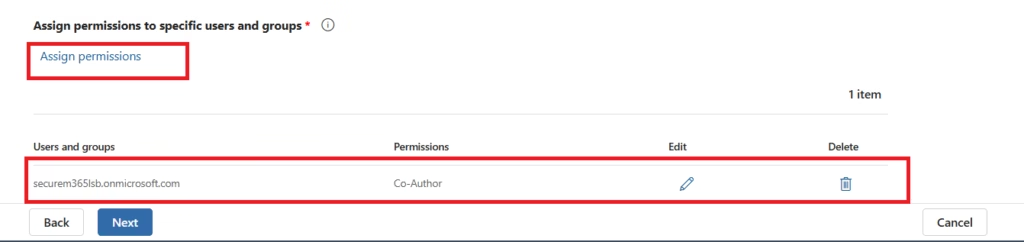
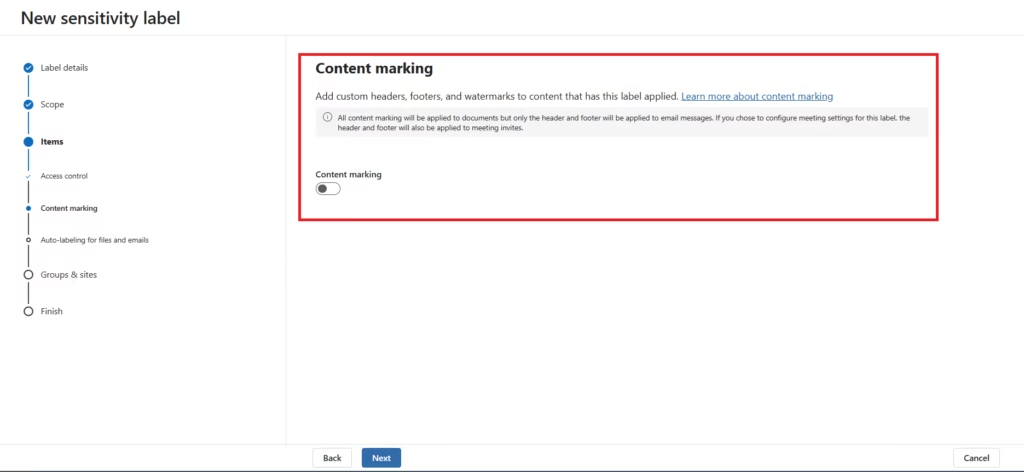
Content marking features such as watermarks, headers, and footers can be enabled if required. For this foundational Microsoft Information Protection lab, content marking is not enabled to keep the configuration simple and focused on manual sensitivity label deployment.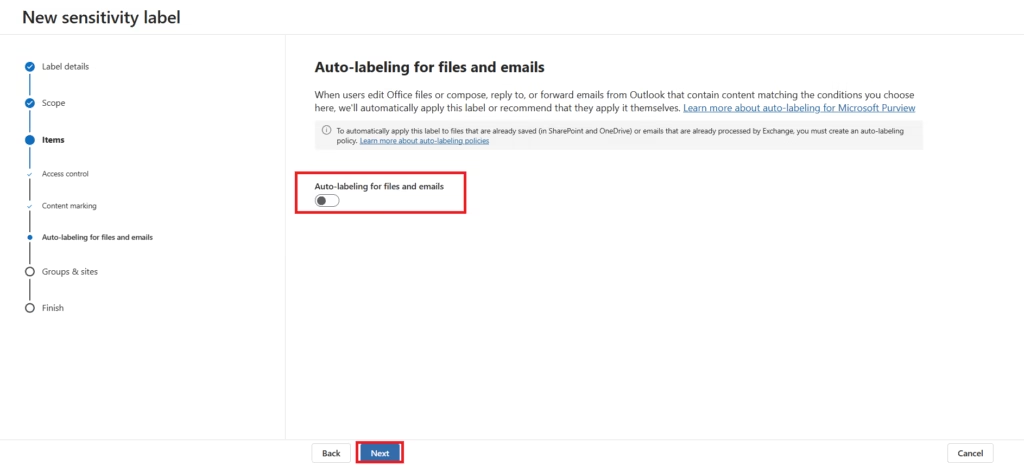
Automatic labeling capabilities are not enabled in this lab because auto-labeling policies and advanced classification workflows will be covered separately in a dedicated Microsoft Purview auto-labeling guide.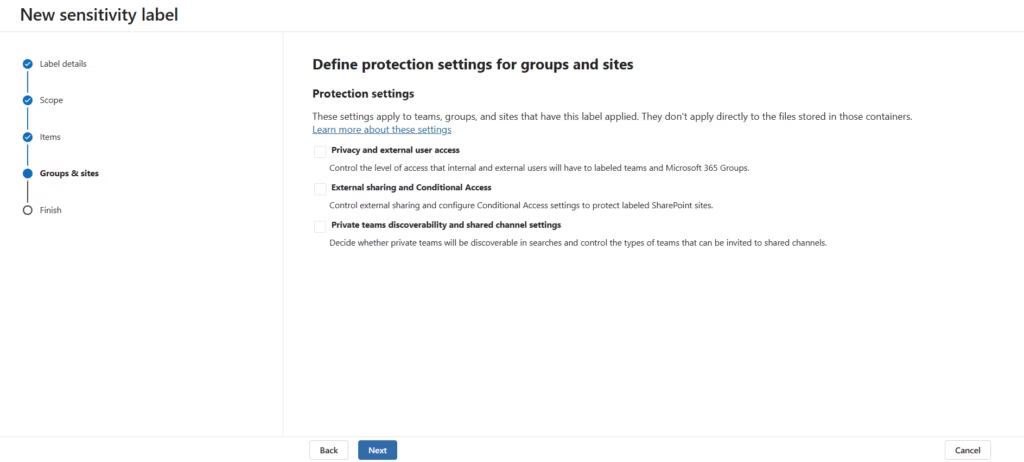
In this Microsoft 365 lab tenant, advanced protection settings for Groups & Sites are currently unavailable because additional Microsoft Entra and Microsoft 365 integration configurations are required before enabling container-level sensitivity labeling.Review your settings and Create label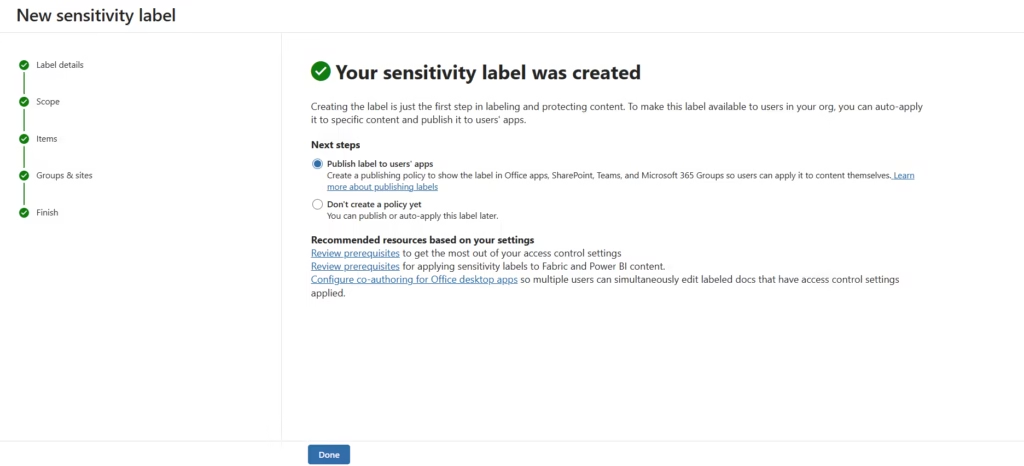
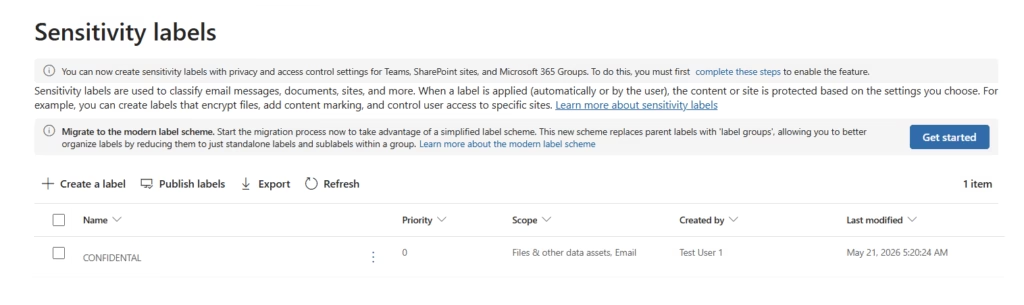
This creates organizational classification categories.
Step 5: Configure Protection Settings
Configure protection settings such as:
- Access control
- User permissions
- Content marking
- Access restrictions
Microsoft Purview uses access control settings to apply encryption and protection policies to labeled files and emails.
Step 6: Publish the Label
Publish the label to:
- Users
- Groups
- Microsoft 365 workloads
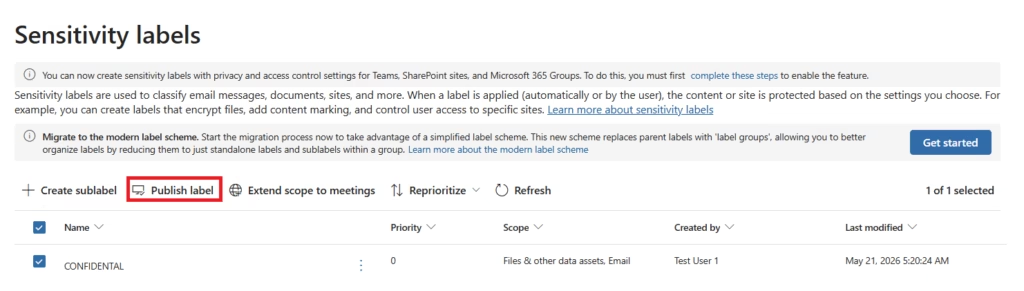
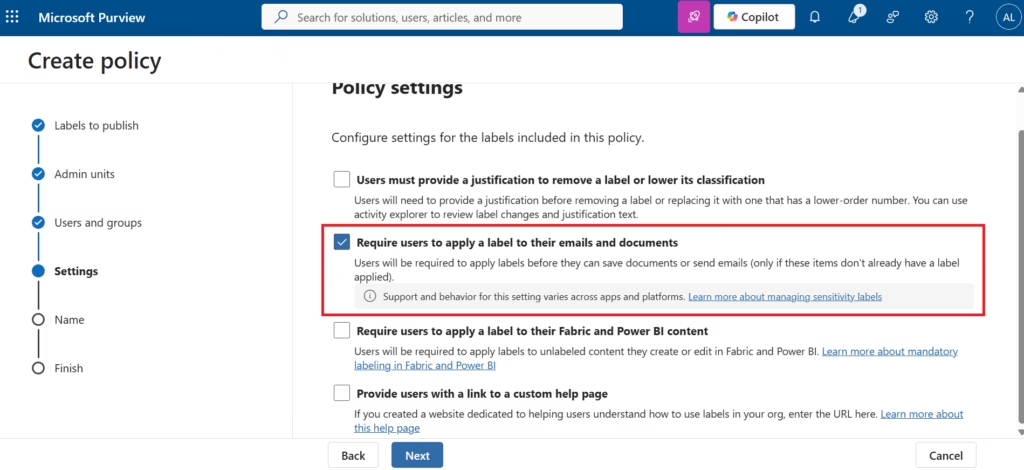
This makes the label available across the organization.
Step 7: Apply a Sensitivity Label
Open a document or email.
Apply the sensitivity label manually.
Verify:
- Label visibility
- Protection behavior
- Access restrictions
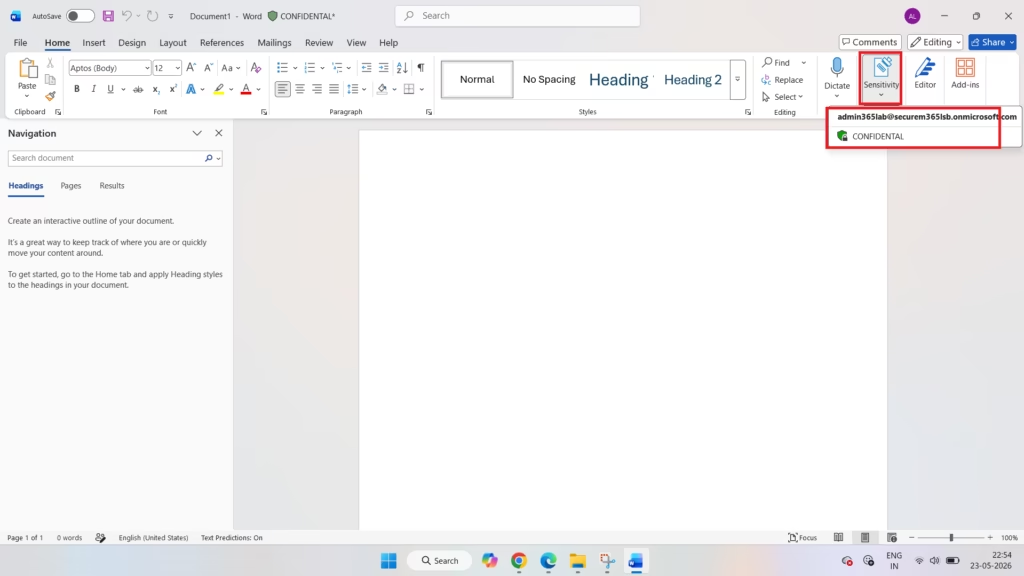
This validates information protection functionality.
Why Sensitivity Labels are Important
Sensitivity labels help organizations:
- Protect sensitive information
- Improve governance
- Meet compliance requirements
- Reduce accidental exposure
- Enforce security standards
They are foundational to Microsoft 365 data protection.
Common Sensitivity Label Scenarios
| Scenario | Recommended Action |
|---|---|
| Protect financial documents | Highly Confidential label |
| Restrict external sharing | Encryption |
| Mark sensitive files | Watermarks |
| Protect HR emails | Confidential label |
These are common MS-102 scenarios.
Best Practices for Microsoft Information Protection
- Start with Simple Classification Levels
- Avoid creating too many labels initially.
- Use Clear Label Names
- Users should easily understand classification levels.
- Apply Encryption Carefully
- Overly restrictive encryption can impact collaboration.
- Combine Labels with DLP
- Sensitivity labels improve DLP effectiveness.
- Educate End Users
- User awareness is critical for successful adoption.
Common Administrator Mistakes
- Creating Too Many Labels
- Complex classification structures confuse users.
- Applying Excessive Restrictions
- Overprotection impacts productivity.
- Ignoring User Training
- Users must understand label usage.
- Not Testing Policies
- Always validate protection settings before organization-wide deployment.
Troubleshooting Microsoft Information Protection
| Symptom | Likely Cause | Fix |
|---|---|---|
| Label doesn’t appear in Office apps | Label policy not published or not scoped to the user, or client hasn’t synced yet | Confirm the label policy is published and scoped to the user; allow time for the client to refresh, or use the Sensitivity button’s refresh option |
| Encryption isn’t applied after labeling | Label is configured for classification only, without protection settings enabled | Edit the label’s protection settings and enable encryption with specific permissions or user access controls |
| Users can remove or downgrade a label | Label policy allows label removal or downgrade without restriction | In the label policy, require users to provide a justification for removing a label or applying a lower classification |
| PDF files don’t retain the applied label | PDF labeling requires a supported client version | Verify the file was labeled using a client that supports native PDF labeling |
| Label not available for a specific workload (e.g. SharePoint sites) | Container label support not yet enabled for that workload | Enable container label support in Purview settings for Groups & sites, and allow time for propagation |
FAQ
Q: What’s the difference between sensitivity labels and retention labels?
A: Sensitivity labels (Microsoft Information Protection) classify and protect content based on confidentiality, such as encryption and access restrictions. Retention labels (Records Management) control how long content is kept and when it’s deleted or reviewed. They serve different purposes and can both be applied to the same file independently.
Q: Can users override or remove an auto-applied sensitivity label?
A: It depends on the label policy. Administrators can allow or block manual downgrading or removal, and can require a business justification when a user changes to a lower-priority label.
Q: Does Microsoft Information Protection work for files outside Microsoft 365, like a local file share?
A: Yes. Sensitivity labels persist inside the file itself, so protection travels with the file even when copied outside Microsoft 365, though enforcement of some controls, like DLP scanning, still depends on the environment supporting Microsoft Purview.
Q: What license is required to use sensitivity labels?
A: Basic manual labeling is available with Microsoft 365 E3 and Business Premium plans. Advanced capabilities such as automatic and recommended labeling typically require Microsoft 365 E5 or a Microsoft Purview add-on license.
MS-102 Exam Tip
Scenario:
“A company wants to automatically protect confidential documents using encryption and sensitivity classification across Microsoft 365 workloads.”
Correct answer:
Sensitivity LabelsNOT:
- Retention Policies
- Conditional Access
- Microsoft Defender XDR
This is a very common MS-102 exam scenario.
Why Microsoft Information Protection Matters
Microsoft Information Protection enables organizations to:
- Protect sensitive information
- Classify business data
- Control access securely
- Reduce compliance risk
- Improve governance visibility
- Support hybrid collaboration securely
Information protection is now a core Microsoft 365 administrative responsibility.
Final Thoughts
Microsoft Information Protection provides centralized data classification and protection capabilities across Microsoft 365 environments.
Modern organizations must secure more than identities and devices.
They must also protect the organizational information itself.
Sensitivity labels, encryption, and data classification help organizations govern sensitive information consistently while enabling secure collaboration.
For MS-102 administrators, understanding Microsoft Information Protection and sensitivity labels is essential.
Because modern Microsoft 365 administration is also about protecting information intelligently.
Conclusion
Microsoft Information Protection helps organizations classify, label, encrypt, and protect sensitive Microsoft 365 data using centralized governance and sensitivity label management.Next in the Microsoft Purview Series
Manual Sensitivity Labels in Microsoft Purview (MS-102 Lab Guide)
https://techcertguide.blog/manual-sensitivity-labels-in-microsoft-purview
Previous Post
Microsoft 365 Compliance Roles & Permissions Guide (MS-102)
http://techcertguide.blog/microsoft-365-compliance-roles-permissions
Start from the Beginning
MS-102 Microsoft 365 Administrator Overview
https://techcertguide.blog/ms-102-microsoft-365-administration
Official Microsoft Reference
https://learn.microsoft.com/en-us/purview/microsoft-purview-compliance-portal
2 thoughts on “Ultimate Microsoft Information Protection (MIP) Guide: Sensitivity Labels & Data Classification (MS-102)”