Microsoft Certification Learning Paths
Welcome to TechCertGuide, a Microsoft Certification Preparation Platform built for IT professionals who want to understand Microsoft technologies before managing them.
Microsoft Certification Learning Paths at TechCertGuide provide a structured way to prepare for Microsoft certification exams through guided learning paths, hands-on labs, study guides, practice questions, and free resources.
Instead of random tutorials or disconnected blog posts, every certification is organized into a structured learning path that takes you from fundamentals to real-world administration.
Whether you’re preparing for your first Microsoft certification or progressing toward advanced administrator roles, you’ll always know:
- Where to start
- What to study next
- Why each topic matters
- How every lesson connects to real-world administration
Our approach is simple:
Understand the system first. Configure it later.
Start Your Learning Journey
Choose the certification that matches your current experience.
Who Should Start with Microsoft Certifications?
Choosing the right certification depends on your current experience and career goals. TechCertGuide is designed to help learners progress step by step instead of jumping into advanced administration without understanding the fundamentals.
You should start here if you are:
- A beginner in IT looking to build a strong foundation in Microsoft technologies.
- A Help Desk or Desktop Support professional planning to transition into Microsoft 365 or Cloud Administration.
- A System Administrator who wants to strengthen Microsoft Security, Identity, and Compliance knowledge.
- An IT professional preparing for Microsoft certification exams using structured learning paths instead of scattered resources.
- A learner who prefers hands-on understanding with practical labs, study guides, and real-world examples.
If you’re completely new to Microsoft technologies, we recommend starting with the SC-900 Microsoft Security, Compliance, and Identity Fundamentals learning path. Once you understand the core concepts, you can continue with the MS-102 Microsoft 365 Administrator to develop practical administration skills.
What You’ll Learn
Every learning path on TechCertGuide is designed to help you understand why Microsoft technologies work the way they do before teaching you how to configure them.
Depending on the certification you choose, you’ll learn:
- Microsoft Security, Compliance, and Identity fundamentals.
- Microsoft Entra ID, authentication, and access management.
- Microsoft 365 administration and tenant management.
- Microsoft Defender and Microsoft Purview concepts.
- Exchange Online, Microsoft Teams, and collaboration services.
- Hands-on administration through guided lab exercises.
- Exam preparation using study guides, cheat sheets, and practice questions.
- Real-world best practices used by Microsoft administrators.
By following these structured learning paths, you’ll not only prepare for certification exams but also develop the confidence to manage Microsoft environments in real-world IT roles.
What Happens After You Complete SC-900?
SC-900 is the starting point of your Microsoft certification journey. After building a solid understanding of security, identity, and compliance fundamentals, you can continue with the MS-102 Microsoft 365 Administrator to learn how those concepts are implemented in real Microsoft 365 environments.
Explore our Microsoft Certification Learning Paths below:
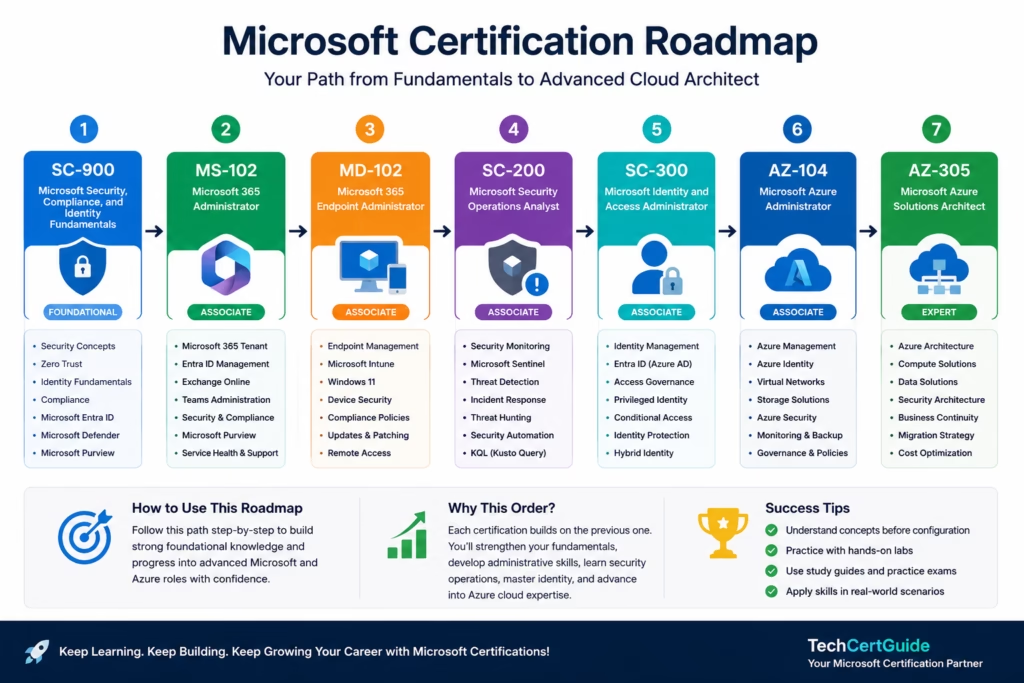
Each certification builds on the previous one, helping you progress from foundational knowledge to advanced administration, security, and cloud architecture.
SC-900 – Microsoft Security, Compliance, and Identity Fundamentals
Recommended for beginners
Build a strong foundation in Microsoft Security before moving into administrator roles.
You’ll learn
- Security fundamentals
- Zero Trust
- Microsoft Entra ID
- Authentication & MFA
- Conditional Access
- Microsoft Defender
- Microsoft Purview
- Compliance
- Governance
- Identity
Includes
- Structured learning path
- Beginner-friendly explanations
- Exam study plan
- Practice questions
- Hands-on labs
- Free study resources
- Cheat sheets
Recommended if you are:
- New to Microsoft Security
- Preparing for SC-900
- Starting an IT career
- Transitioning into Cybersecurity
Refer to the official SC-900 exam skills outline before scheduling your exam.
MS-102 – Microsoft 365 Administrator
Recommended after completing SC-900
Learn how to deploy, manage, secure, and operate Microsoft 365 environments through hands-on administration.
You’ll learn
- Microsoft 365 Administration
- Tenant Setup
- Microsoft Entra ID
- Hybrid Identity
- Microsoft Defender XDR
- Microsoft Purview
- Exchange Online
- Microsoft Teams Administration
- Security Operations
- Compliance
- Microsoft 365 Best Practices
Includes
- Step-by-step labs
- Real-world administrator scenarios
- Microsoft 365 trial setup
- Practical guides
- Security implementation
- Exam study plan
- Hands-on walkthroughs
Recommended if you are:
- System Administrator
- Microsoft 365 Administrator
- Infrastructure Engineer
- Preparing for MS-102
Refer to the official MS-102 exam skills outline before scheduling your exam.
Upcoming Learning Paths
These certification tracks are currently being developed.
- MD-102 – Endpoint Administrator
- SC-200 – Security Operations Analyst
- SC-300 – Identity and Access Administrator
- AZ-104 – Azure Administrator
- AZ-305 – Azure Solutions Architect
Each learning path will follow the same structured approach with:
- Learning roadmap
- Study guide
- Hands-on labs
- Practice questions
- Cheat sheets
- Exam strategy
- Real-world scenarios
How TechCertGuide Learning Paths Work
Our Microsoft Certification Learning Paths help with a consistent framework.
Step 1 – Learn the Fundamentals
Understand the concepts before touching the configuration.
Step 2 – Build Hands-on Skills
Practice using Microsoft 365, Entra ID, Defender, Purview, and Azure.
Step 3 – Prepare for the Exam
Use study plans, cheat sheets, and practice questions to reinforce your learning.
Step 4 – Apply Real-World Knowledge
Understand how administrators design, secure, and manage production environments.
Free Microsoft Certification Resources
Join thousands of learners and get access to free resources.
Free Downloads
- SC-900 Cheat Sheet
- MS-102 Study Guide
- Microsoft Certification Study Planner
- Lab Checklist
- Weekly Certification Newsletter
Why Learn with TechCertGuide?
Unlike traditional blogs, TechCertGuide is designed as a learning platform, not just a collection of articles.
Every lesson is connected.
Every topic has a purpose.
Every certification follows a logical progression.
Our goal is not only to help you pass Microsoft certification exams, but also to build the confidence and practical understanding needed to manage real-world Microsoft environments.
Which Certification Should You Choose?
| If You Want To… | Start Here |
|---|---|
| Learn Microsoft Security Fundamentals | SC-900 |
| Become a Microsoft 365 Administrator | MS-102 |
| Manage Microsoft Endpoints | MD-102 (Coming Soon) |
| Work in Security Operations | SC-200 (Coming Soon) |
| Specialize in Identity Management | SC-300 (Coming Soon) |
| Administer Azure Infrastructure | AZ-104 (Coming Soon) |
Start Learning Today
Choose your certification path and begin building skills that are valuable for both Microsoft certification exams and real-world IT careers.