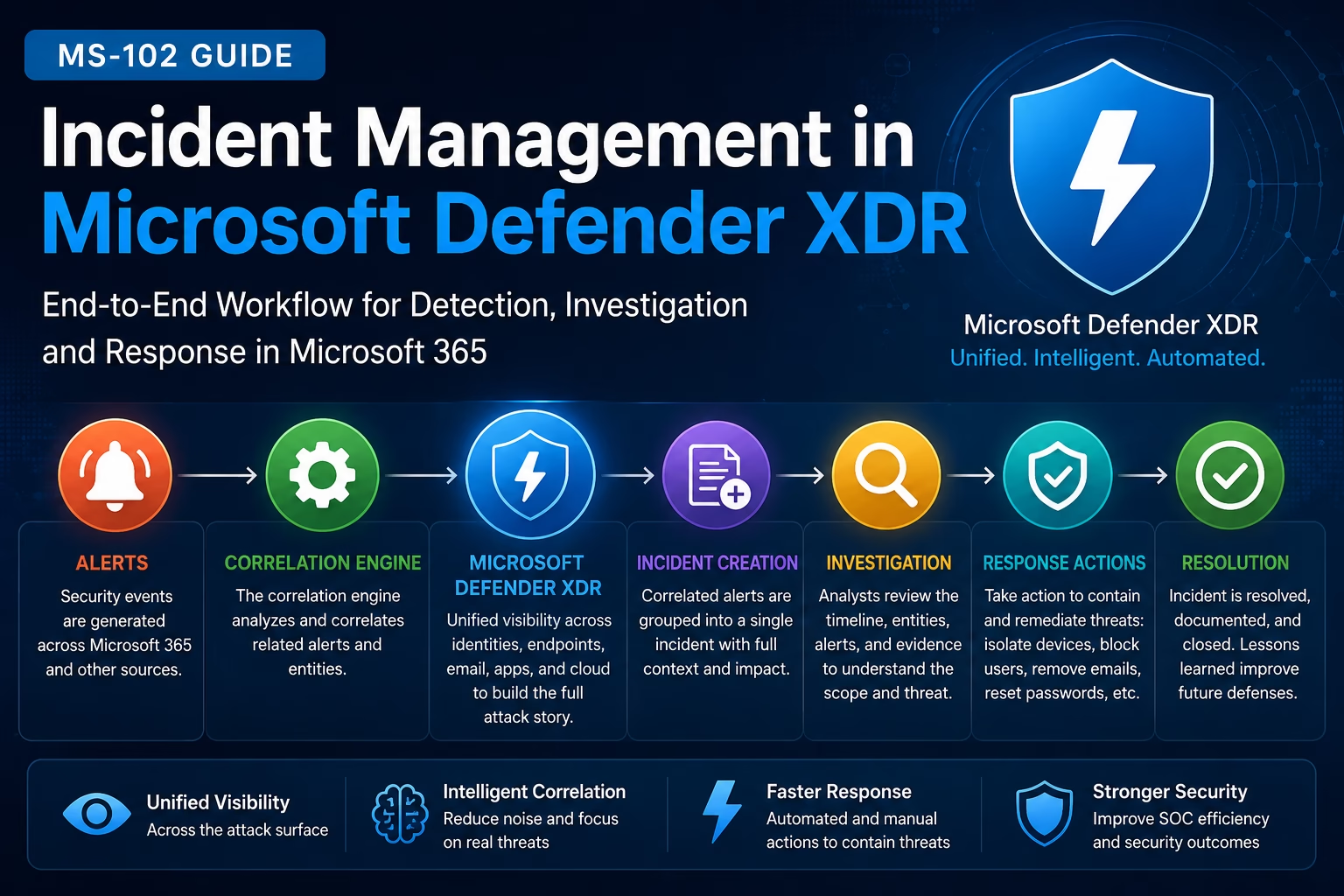
Incident Management in Microsoft Defender XDR helps organizations correlate alerts, investigate threats, and respond to security incidents from a centralized Microsoft 365 security platform.
Organizations today must:
- Detect attacks quickly
- Correlate suspicious activity
- Investigate incidents efficiently
- Respond before attackers spread further
This is where Microsoft Defender XDR becomes extremely powerful.
Microsoft Defender XDR helps security teams move beyond isolated alerts by automatically correlating related activities into:
Security IncidentsThis provides a complete attack story across:
- Endpoints
- Identities
- Cloud applications
- Microsoft 365 services
For anyone preparing for the MS-102: Microsoft 365 Administrator certification, understanding incident management in Microsoft Defender XDR is essential because modern Microsoft 365 security operations depend heavily on centralized investigation and response workflows.
In this guide, we’ll cover:
- What is incident management
- Alerts vs incidents explained
- How Defender XDR correlates alerts
- Incident lifecycle
- Investigation workflow
- Response actions
- Step-by-step incident management lab
- Best practices
- MS-102 exam tips
Learning Objectives
After completing this guide, you will be able to:
- Differentiate alerts from incidents in Microsoft Defender XDR.
- Explain why incident correlation matters.
- Identify incident severity levels, entities, and evidence.
- Manage an incident through its full lifecycle in Defender XDR.
What is Microsoft Defender XDR?
Microsoft Defender XDR is Microsoft’s centralized XDR platform that combines security telemetry from:
- Microsoft Defender for Endpoint
- Microsoft Defender for Office 365
- Microsoft Defender for Identity
- Microsoft Defender for Cloud Apps
This allows security teams to investigate threats from a single portal.
What is Incident Management in Microsoft Defender XDR?
Incident management is the process of:
- Detecting suspicious activity
- Correlating related alerts
- Investigating threats
- Containing attacks
- Resolving incidents
- Documenting actions
The goal is to minimize business impact and stop attackers quickly.
Alerts vs Incidents Explained
This is one of the most important Microsoft Defender XDR concepts.
What is an Alert?
An alert is:
A single detection eventExamples:
- Phishing email detected
- Malware execution detected
- Suspicious login activity
- Risky OAuth application
Alerts focus on individual activities.
What is an Incident?
An incident is:
A collection of related alerts connected into one attack storyDefender XDR automatically correlates alerts from multiple security products.
Example:
| Security Product | Alert |
|---|---|
| Defender for Office 365 | Phishing email |
| Defender for Endpoint | Malware execution |
| Defender for Identity | Suspicious login |
↓
One IncidentThis helps analysts understand the full attack lifecycle.
Why Incident Correlation Matters
Without correlation:
- Security teams investigate alerts individually
- Context gets lost
- Response becomes slower
With Defender XDR:
Related activities are automatically linked togetherThis improves:
- Investigation speed
- Threat visibility
- Incident response efficiency
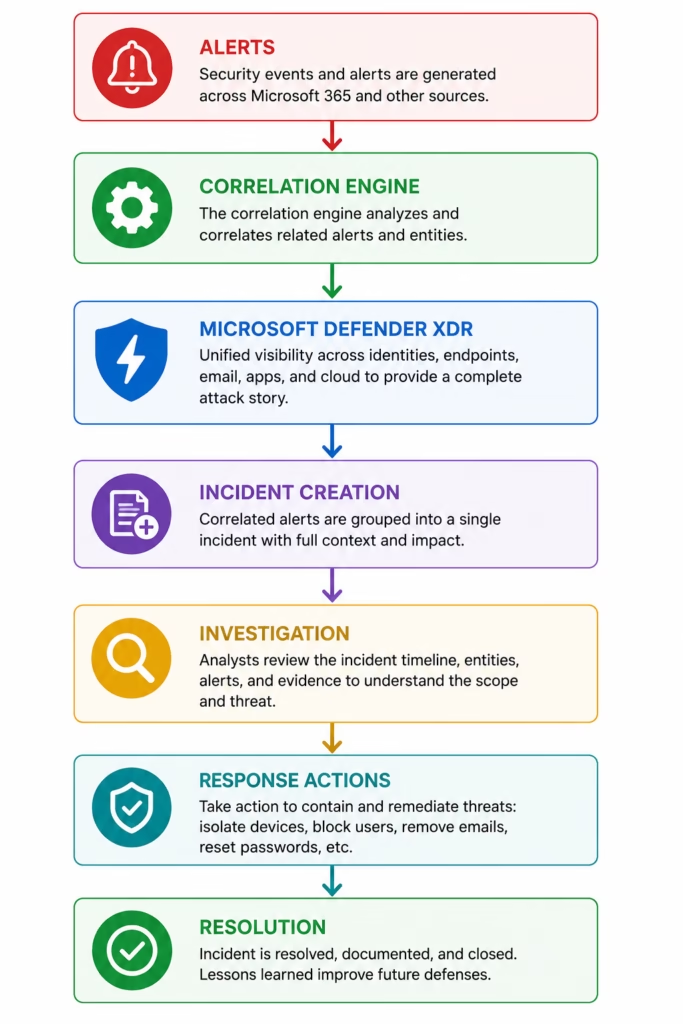
Microsoft Defender XDR Incident Workflow
One major advantage of Incident Management in Microsoft Defender XDR is automatic alert correlation across endpoints, identities, cloud apps, and email security.
Incident Severity Levels Explained
Microsoft Defender XDR categorizes incidents based on impact and risk.
| Severity | Meaning |
|---|---|
| Informational | Minimal impact |
| Low | Suspicious but limited |
| Medium | Potential malicious activity |
| High | Confirmed serious threat |
High-severity incidents require immediate attention.
What are Incident Entities?
Entities are objects connected to incidents.
Examples:
- User accounts
- Devices
- Mailboxes
- IP addresses
- URLs
- Files
- Applications
Entities help analysts understand:
Who and what is affectedWhat is Incident Evidence?
Evidence is the supporting telemetry linked to incidents.
Examples include:
- Malicious files
- Email telemetry
- Authentication logs
- Endpoint events
- Cloud activity
Evidence helps validate attack activity.
Incident Lifecycle Explained
Most incidents follow this lifecycle:
| Stage | Description |
|---|---|
| Detection | Threat activity identified |
| Correlation | Related alerts grouped |
| Investigation | Analysts review evidence |
| Containment | Response actions taken |
| Remediation | Threat removed |
| Resolution | Incident closed |
This is a foundational SOC concept.
🔄 End-to-End Incident Response Workflow
Step-by-Step Incident Management in Microsoft Defender XDR Lab
This is your practical MS-102 operations section.
Step 1: Open Microsoft Defender Portal
Go to:
Microsoft Defender PortalSign in using:
- Global Administrator
- Security Administrator
- Security Operator
Step 2: Open Incidents Queue
Navigate to:
Incidents & Alerts → Incidents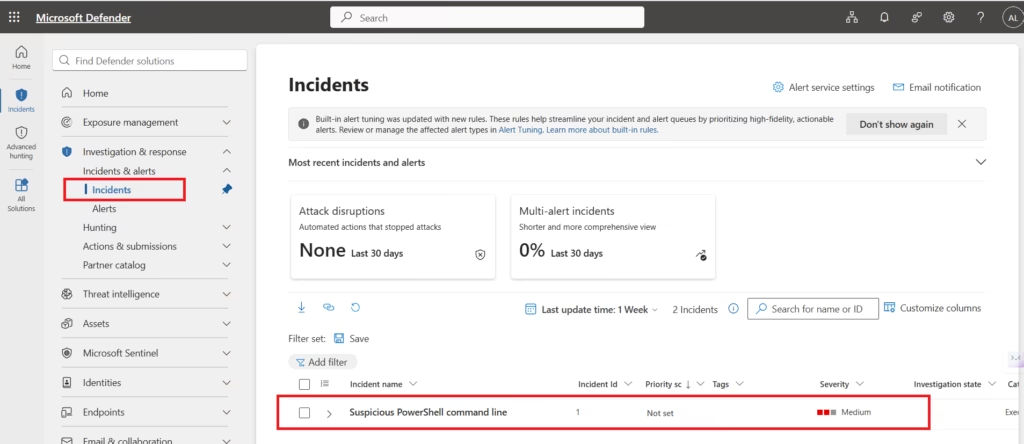
You will see:
- Active incidents
- Severity levels
- Assigned analysts
- Investigation status
- Impacted assets
This is the primary SOC dashboard.
Incident Management in Microsoft Defender XDR improves SOC efficiency by reducing alert fatigue and simplifying threat investigations.
Step 3: Review Incident Severity
Open an incident.
Review:
- Severity
- Incident summary
- Number of related alerts
- Affected entities
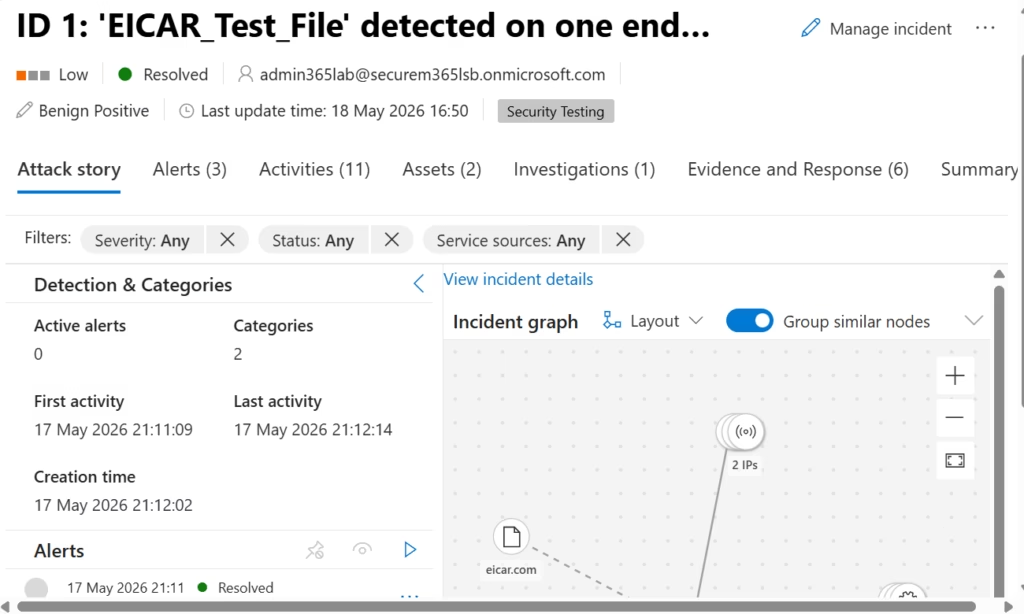
Severity determines investigation priority.
Step 4: Analyze Correlated Alerts
Inside the incident:
Review:
- Email alerts
- Endpoint alerts
- Identity alerts
- Cloud app alerts
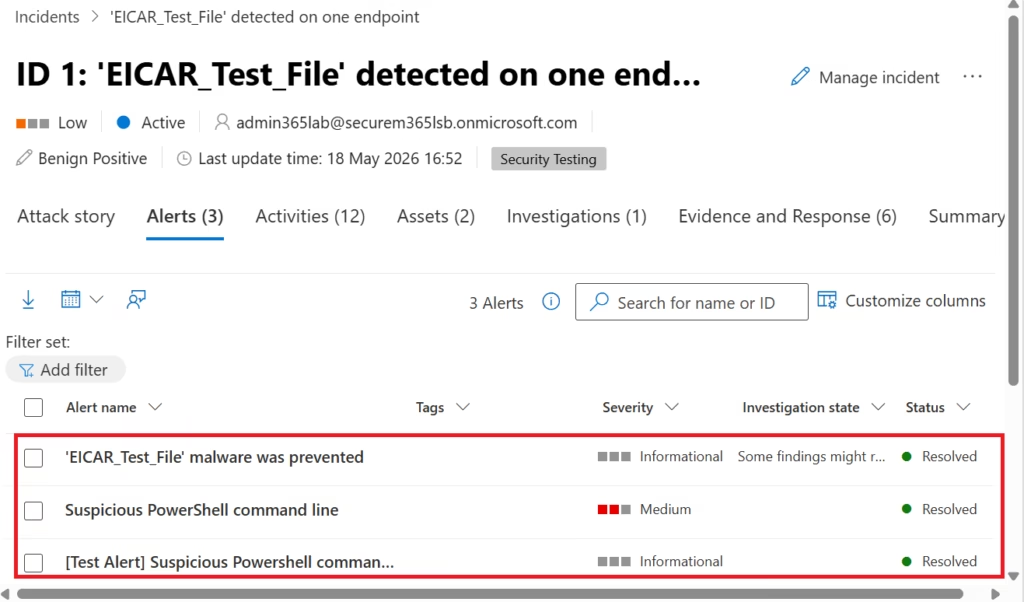
This shows the complete attack chain.
Step 5: Review Incident Timeline
Open:
ActivitiesReview:
- Attack sequence
- Authentication activity
- Device events
- Email delivery
- User actions
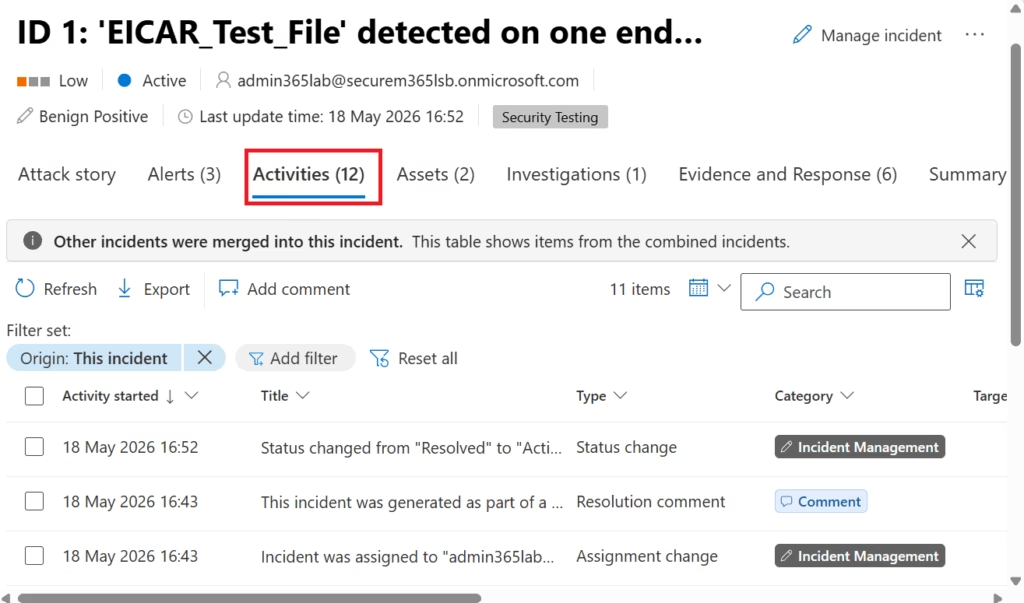
This helps reconstruct attacker behavior.
Step 6: Review Entities
Open:
AssetsAnalyze:
- Users
- Devices
- IP addresses
- Mailboxes
- Applications
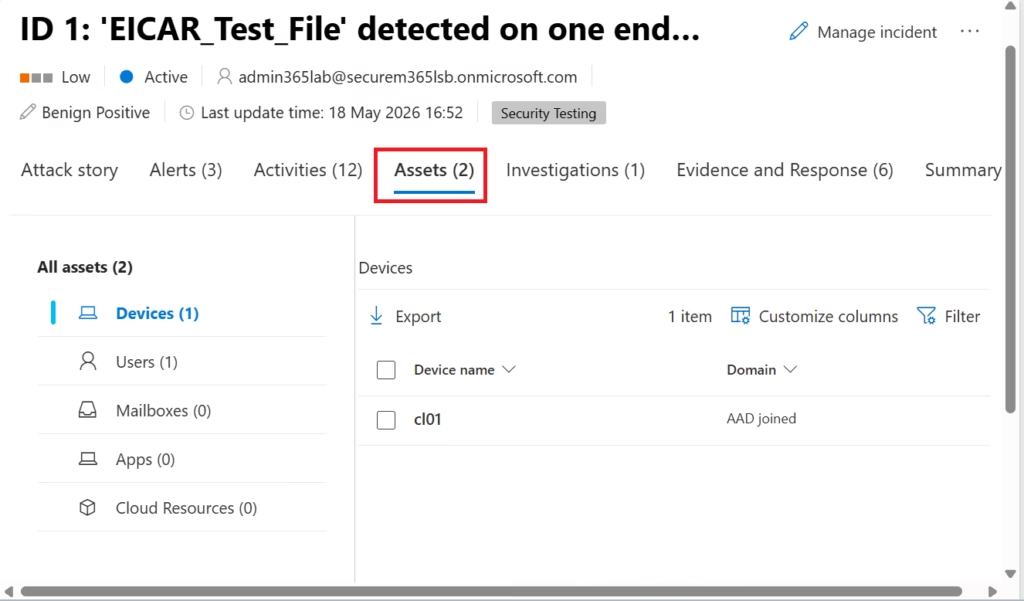
This helps identify affected assets.
Step 7: Review Evidence
Evidence and ResponseOpen:
Review:
- Malicious files
- URLs
- Suspicious emails
- Endpoint telemetry
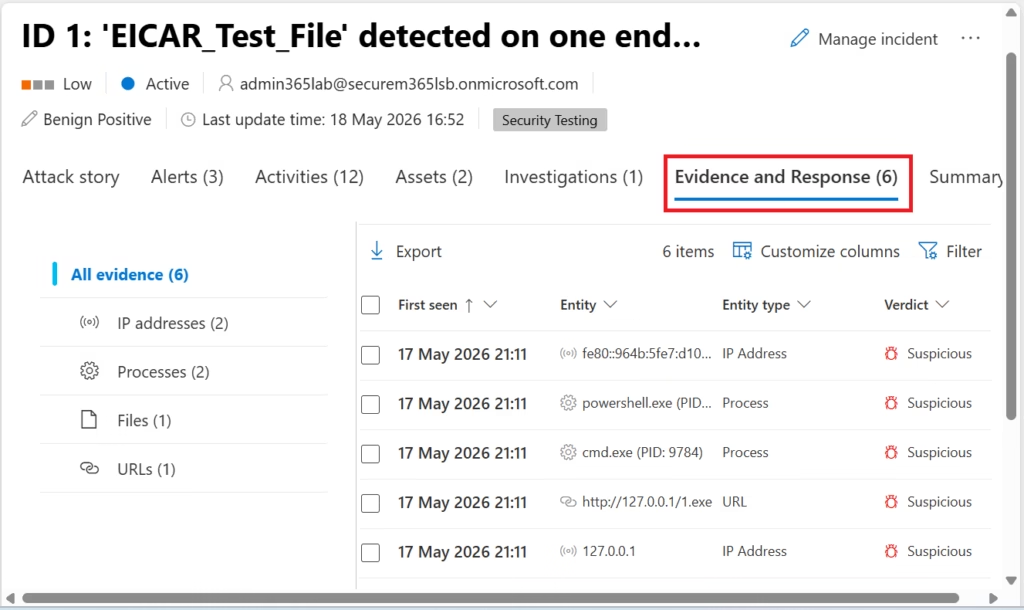
Evidence confirms whether the activity is malicious.
Step 8: Take Response Actions
Effective Incident Management in Microsoft Defender XDR allows security teams to contain attacks quickly using automated and manual response actions.
Possible actions include:
| Action | Purpose |
|---|---|
| Isolate device | Stop malware spread |
| Disable account | Prevent unauthorized access |
| Reset password | Remove compromised credentials |
| Block URL | Stop phishing access |
| Remove email | Protect users |
This helps contain threats quickly.
Step 9: Assign Incident Ownership
Assign incident to:
- Security analyst
- SOC team
- Incident responder
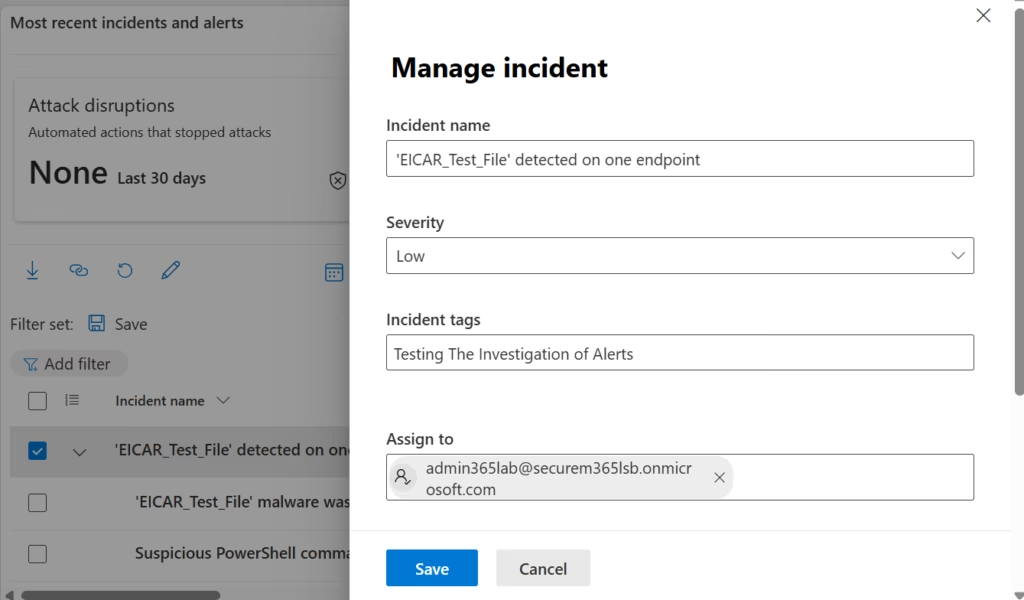
Proper ownership improves accountability.
Step 10: Update Incident Status
Update incident as:
- Active
- In Progress
- Resolved
Add investigation notes for auditing purposes.
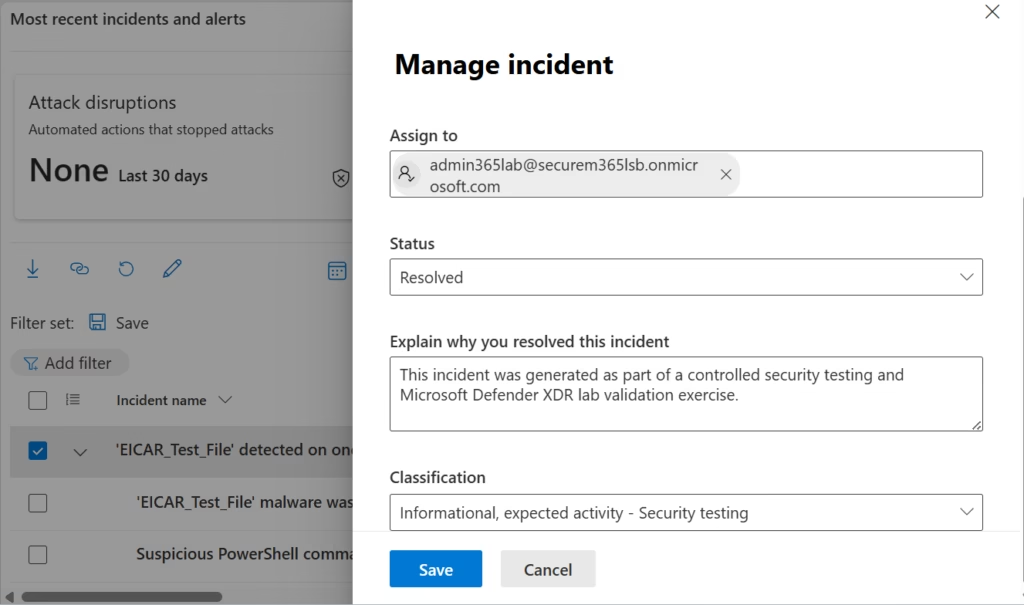
This incident was generated as part of a controlled Microsoft Defender XDR security testing and validation exercise. After reviewing the alert evidence, entities, and investigation timeline, the activity was classified as informational and expected within the lab environment.
Common Incident Types in Defender XDR
| Incident Type | Example |
|---|---|
| Phishing attack | Malicious email campaign |
| Malware infection | Endpoint compromise |
| Identity compromise | Suspicious authentication |
| Cloud abuse | Risky OAuth application |
| Data exfiltration | Sensitive file transfer |
These are common enterprise scenarios.
Best Practices for Incident Management in Microsoft Defender XDR
Organizations should establish clear workflows for Incident Management in Microsoft Defender XDR to improve security operations and response consistency.
As a senior infrastructure and security engineer, I strongly recommend:
- Prioritize High Severity Incidents First
- Focus on incidents with the highest business impact.
- Always Review Full Attack Timeline
- Attackers rarely perform only one action.
- Look for connected activities.
- Document Every Response Action
- Strong documentation supports:
- Auditing
- Compliance
- Future investigations
- Strong documentation supports:
- Avoid Premature Incident Closure
- False negatives are dangerous.
- Validate evidence carefully.
- Integrate Security Teams
- Identity, endpoint, cloud, and email teams should collaborate during investigations.
Microsoft Defender XDR vs Traditional SOC Investigation
| Traditional SOC | Defender XDR |
|---|---|
| Separate alerts | Unified incidents |
| Manual correlation | Automatic correlation |
| Slower investigations | Faster response |
| Limited visibility | Cross-domain visibility |
This is why XDR platforms are becoming critical.
MS-102 Exam Tip
Understanding Incident Management in Microsoft Defender XDR is important for MS-102 candidates preparing for Microsoft 365 security administration scenarios.
Scenario:
“A company wants to automatically group related security alerts from email, identity, endpoint, and cloud applications into one investigation workflow.”
Correct answer:
Microsoft Defender XDR IncidentsNot:
- Exchange Online Protection
- Intune
- Defender for Identity alone
- Microsoft Sentinel
Very common exam scenario.
Common Admin Mistakes
- Investigating Alerts Individually
- Always review related incidents.
- Ignoring Medium Severity Incidents
- Many attacks escalate gradually.
- Not Reviewing Entity Relationships
- Connected assets reveal attack spread.
- Poor Incident Documentation
- Incident tracking is critical for mature security operations.
Final Thoughts
Incident Management in Microsoft Defender XDR provides centralized visibility, faster investigations, and coordinated response actions across Microsoft security solutions.
Modern attacks are multi-stage and cross-platform.
A phishing email may lead to:
- Endpoint compromise
- Credential theft
- Cloud abuse
- Privilege escalation
This is why centralized incident management matters.
Microsoft Defender XDR helps organizations correlate threats, investigate incidents, and respond efficiently across Microsoft 365 security workloads.
For MS-102 candidates, understanding incident workflows is essential.
For security teams, it is operationally critical.
Because modern cybersecurity is no longer just about detecting threats.
It is about understanding the complete attack story from detection to resolution.Next in the MS-102 Security Series
Automated Investigation & Response (AIR) in Microsoft Defender XDR Explained (MS-102 Guide)
Because detecting and investigating threats is important, but automating response actions is where modern SOC operations become truly scalable.
https://techcertguide.blog/microsoft-defender-xdr-air
Previous Topic
If you haven’t read it yet: Ultimate Guide to Investigating Alerts in Microsoft Defender XDR
https://techcertguide.blog/investigating-alerts-in-microsoft-defender-xdr
Start from the Beginning
MS-102 Microsoft 365 Administrator Overview
https://techcertguide.blog/ms-102-microsoft-365-administration
Official Microsoft Reference
https://learn.microsoft.com/en-us/certifications/exams/ms-102CategoriesMS-102
2 thoughts on “Complete Incident Management in Microsoft Defender XDR: End-to-End Workflow (MS-102 Guide)”