Learning Objectives
After completing this guide, you will be able to:
- Explain the Zero Trust security model.
- Identify the three core principles of Zero Trust.
- Describe the six pillars where Zero Trust is applied.
- Compare Zero Trust to traditional perimeter-based security.
Zero Trust Model
For many years, security was built on a simple assumption:
If you are inside the network, you can be trusted.
That assumption no longer works.
Cloud services, remote work, mobile devices, and identity-based attacks have changed everything. Today, most security breaches do not break firewalls — they log in using stolen identities.
This is why Zero Trust is a core concept in SC-900 (Microsoft Security, Compliance, and Identity Fundamentals).
SC-900 introduces Zero Trust as a security mindset, not a product or tool. To understand it properly, Microsoft explains Zero Trust using two levels:
- 3 Core Principles – how Zero Trust thinks
- 6 Pillars – where Zero Trust is applied
This article explains both clearly and simply, exactly at the SC-900 level.
What Is Zero Trust in SC-900?
Zero Trust is a security model that assumes no implicit trust.
Every access request must be:
- Verified
- Limited
- Continuously evaluated
The core idea is simple:
Never trust implicitly. Always verify.
SC-900 does not expect you to configure Zero Trust.
It expects you to understand why this model exists and how it reduces risk.
Why Microsoft Moved to Zero Trust
Traditional security relied heavily on:
- Network location
- Perimeter firewalls
- One-time authentication
Modern environments break these assumptions:
- Users work from anywhere
- Devices may be unmanaged
- Applications are cloud-based
- Identities are frequently targeted
Because of this, Microsoft now treats identity as the new security perimeter.
Zero Trust is the model that supports this shift.
The 3 Core Principles of Zero Trust (SC-900 Focus)
The three core principles explain how access decisions are made.
These are exam-critical for SC-900.
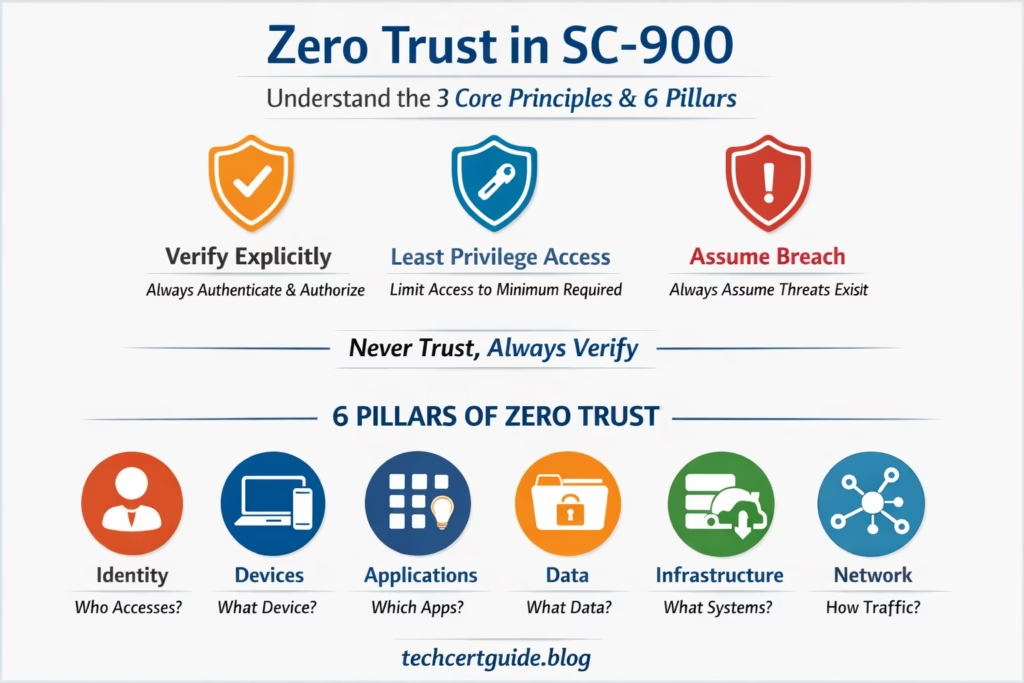
- Verify Explicitly – authenticate and authorize based on all available signals
- Use Least Privilege Access – limit access with just-in-time and just-enough permissions
- Assume Breach – minimize blast radius and verify end-to-end encryption
Verify Explicitly
Never assume a user or device is trusted.
Every access request is evaluated using multiple signals, such as:
- User identity
- Authentication strength (for example, MFA)
- Device state
- Location or risk level
In simple terms:
Always check before allowing access.
This explains why users may be prompted for MFA or blocked even with correct passwords.
Use Least Privilege Access
Users should have:
- Only the access they need
- Only for the time they need it
- Only to the resources required for their role
This limits how much damage can be done if an account is compromised.
In simple terms:
Less access means less risk.
Assume Breach
Zero Trust assumes that:
- Credentials can be stolen
- Devices can be compromised
- Attacks may already be inside the environment
Security is designed to limit impact, not rely on perfect prevention.
In simple terms:
Design security as if a breach can happen.
The 6 Pillars of Zero Trust (Where It Is Applied)
While the principles explain how Zero Trust works, the six pillars explain where it is applied across an organisation.
SC-900 introduces these pillars at a high level, without technical depth.
Identity
Who is requesting access?
This includes:
- Users
- Administrators
- Service and workload identities
Identity is the primary control plane in modern Microsoft security.
Devices
What device is being used?
Access decisions may depend on:
- Whether the device is managed
- Whether it meets security requirements
A valid identity alone is not always enough.
Applications
What application is being accessed?
Controls ensure:
- Only approved applications are used
- Users can only access authorised apps
This reduces exposure to risky or unknown applications.
Data
What data is being accessed?
Data protection includes:
- Classification
- Encryption
- Data Loss Prevention (DLP)
Even after access is granted, data remains protected.
Infrastructure
What systems are involved?
This includes:
- Servers
- Cloud resources
- Virtual machines
Infrastructure must be monitored and protected continuously.
Network
How traffic moves inside the environment?
Network controls:
- Limit unnecessary communication
- Reduce lateral movement
- Help contain attacks
The network is no longer trusted by default.
How the Principles and Pillars Work Together
A simple way to remember:
- 3 Core Principles = How decisions are made
- 6 Pillars = Where those decisions apply
For example:
- Verify explicitly (principle)
- Applied to identity and devices (pillars)
This is exactly how Microsoft designs Zero Trust.
Zero Trust vs Traditional Security
| Traditional Model | Zero Trust Model |
|---|---|
| Trust inside the network | No implicit trust |
| One-time verification | Continuous verification |
| Broad access | Least privilege |
| Perimeter-focused | Identity-centric |
SC-900 tests whether you understand why the old model no longer works.
Why Zero Trust Matters for SC-900 and Real IT Roles
Zero Trust is no longer optional.
Organisations expect IT professionals to understand:
- Identity-first security
- Risk-based access decisions
- Continuous verification models
SC-900 introduces Zero Trust early to build the right security mindset.
Common Misconceptions About Zero Trust
SC-900 helps clear these myths:
- “Zero Trust means zero access.”
It means controlled and verified access. - “Zero Trust is a product.”
It is a security strategy, not a tool. - “Zero Trust slows users down.”
When designed correctly, it balances security and usability.
Best Practices for Adopting Zero Trust
- Start with Identity First
- Prioritize strong authentication (MFA) and Conditional Access before expanding Zero Trust controls elsewhere.
- Apply Least Privilege Access Gradually
- Introduce just-in-time and just-enough-access policies in phases to avoid disrupting existing workflows.
- Segment Before You Restrict
- Use network and application segmentation to limit blast radius before applying strict access rules.
- Monitor Continuously
- Use signals from identity, device, and threat protection tools to continuously validate trust rather than relying on one-time checks.
- Communicate the Mindset Shift
- Ensure IT teams and end users understand Zero Trust as an ongoing practice, not a one-time project.
FAQ
Q: Is Zero Trust a product you can buy?
A: No. Zero Trust is a security strategy and mindset, not a single product. Microsoft implements it through a combination of services such as Microsoft Entra ID, Conditional Access, and Microsoft Defender.
Q: What is the difference between the 3 principles and the 6 pillars of Zero Trust?
A: The 3 principles (Verify Explicitly, Least Privilege Access, Assume Breach) describe how access decisions are made, while the 6 pillars (Identity, Devices, Applications, Data, Infrastructure, Network) describe where those principles are applied.
Q: Does Zero Trust mean no one is ever trusted?
A: No. It means trust is never assumed by default. Access is granted only after verification, and only to the extent necessary, rather than trusting users or devices simply because they are inside the network.
Q: Is Zero Trust covered in the SC-900 exam?
A: Yes. Zero Trust is a core conceptual topic in SC-900, and candidates are expected to understand its principles and pillars at a foundational level rather than configure it hands-on.
Final Thoughts: Zero Trust Is a Mindset, Not a Feature
Zero Trust changes how we think about security.
Instead of trusting by default, modern security:
- Verifies continuously
- Limits access intentionally
- Assumes threats exist
SC-900 ensures learners understand this shift before moving into advanced Microsoft security roles.
Quick Summary: Zero Trust means “never trust, always verify.” It rests on 3 principles (Verify Explicitly, Least Privilege Access, Assume Breach) applied across 6 pillars (Identity, Devices, Applications, Data, Infrastructure, Network).
Also, view our detailed guide on what is SC-900 to understand Microsoft Security, Compliance, and Identity fundamentals.
For official and up-to-date exam objectives, learning paths, and reference material, refer to Microsoft Learn’s SC-900 documentation.
What’s Next in the SC-900 Series
In the next post, we’ll cover:
Least Privilege Access in SC-900: Why Minimal Access Reduces Risk
1 thought on “Zero Trust Model in SC-900 – Never Trust, Always Verify”