Defense in Depth in SC-900
Security failures rarely happen because a single control was missing.
They happen because multiple safeguards were absent or poorly layered.
That is why Defense in Depth is a core concept in SC-900 (Microsoft Security, Compliance, and Identity Fundamentals). Microsoft does not rely on one tool or one security boundary. Instead, it designs security as a series of protective layers, each reducing risk if another layer fails.
This article explains Defense in Depth exactly as Microsoft defines it, following the layered model used in Microsoft documentation, while keeping the explanation strictly at SC-900 conceptual level.
What Is Defense in Depth in SC-900?
Defense in Depth is a security strategy where multiple layers of protection are applied across an environment to reduce the impact of security failures.
Instead of assuming that one control will always work, Microsoft designs security assuming:
- Controls can fail
- Accounts can be compromised
- Systems can be misconfigured
Each layer exists to slow attackers, limit access, and protect data even when another layer is breached.
SC-900 focuses on understanding these layers, not configuring them.
Defense in Depth Layers (Outer to Inner)
Microsoft represents Defense in Depth as concentric security layers, starting from the physical environment and moving inward toward data.
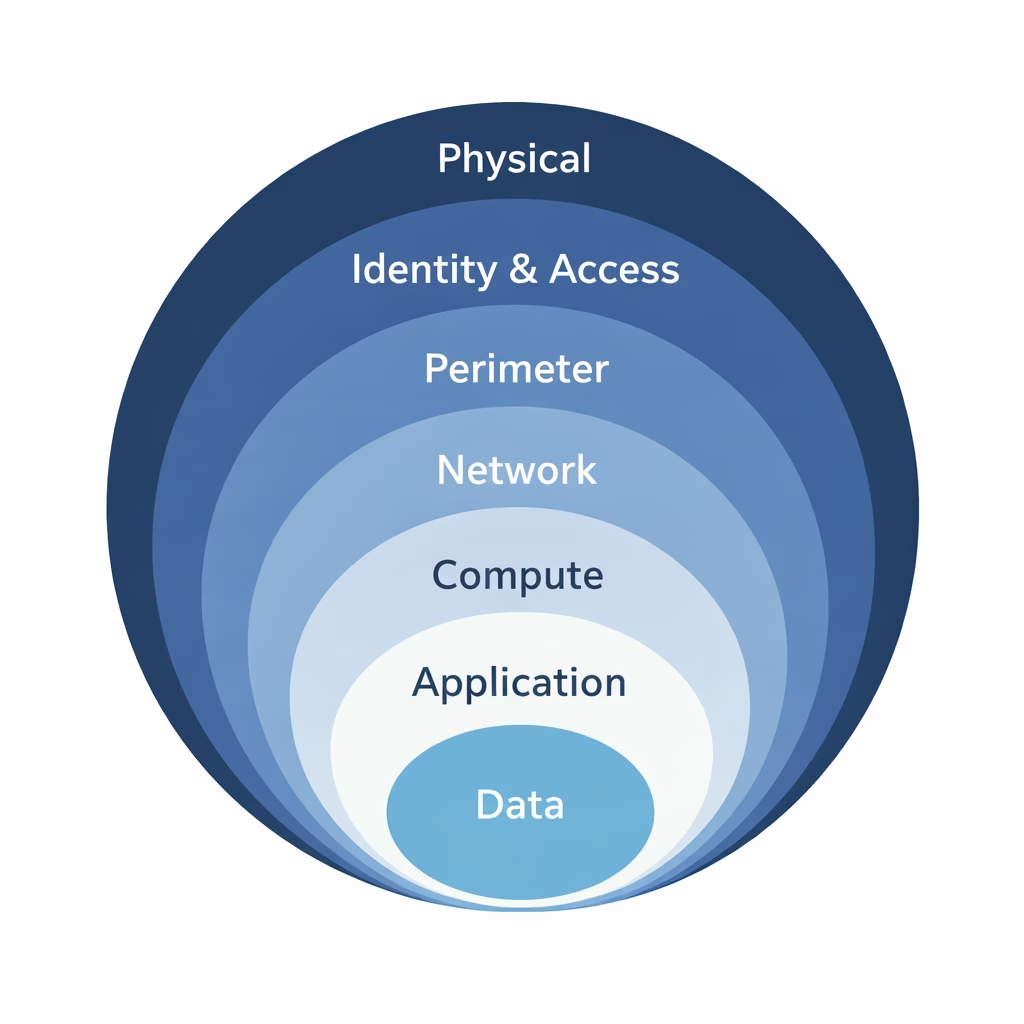
1. Physical Security (Outermost Layer)
This is the foundation of all security.
Physical security includes:
- Datacenters
- Hardware protection
- Environmental safeguards
In cloud environments, Microsoft is responsible for this layer. Customers do not manage datacenter security, but they rely on it to ensure the platform itself is trustworthy.
SC-900 expects you to understand that physical security exists but is provider-managed.
2. Identity & Access Layer
Microsoft places identity very close to the outer layers, because identity is now the primary attack surface.
This layer includes:
- Authentication
- Multi-Factor Authentication (MFA)
- Conditional Access
- Identity Protection
If identity controls are weak, attackers can bypass many other layers without touching the network at all.
This is why Microsoft often says:
Identity is the new security perimeter
SC-900 strongly reinforces this idea.
3. Perimeter Layer
The perimeter layer protects the edge of the environment.
This layer focuses on:
- Blocking malicious traffic
- Detecting abnormal access patterns
- Reducing exposure to external threats
While traditional security relied heavily on perimeter defenses, Microsoft treats this layer as important but not sufficient on its own.
SC-900 teaches that perimeter security is just one layer, not the entire strategy.
4. Network Layer
The network layer controls how systems communicate internally.
It focuses on:
- Limiting lateral movement
- Restricting unnecessary connections
- Reducing the attack surface
Even if an attacker gets inside the environment, network controls help ensure they cannot freely move across systems.
This layer supports the idea of containment, not just prevention.
5. Compute Layer
The compute layer includes:
- Servers
- Virtual machines
- Endpoints and operating systems
Security at this layer ensures that systems are:
- Hardened
- Protected from malware
- Monitored for suspicious behavior
SC-900 does not test how to secure operating systems, but it expects you to understand that compute resources must be protected as part of layered security.
6. Application Layer
Applications are where users interact with systems and data.
This layer focuses on:
- Application access controls
- Secure application design
- Limiting application permissions
Defense in Depth ensures that even authenticated users:
- Can only access approved applications
- Cannot perform actions beyond their role
This directly supports least privilege access, a recurring SC-900 theme.
7. Data Layer (Innermost and Most Critical)
Data is the ultimate target.
The data layer focuses on:
- Data classification
- Encryption
- Data Loss Prevention (DLP)
- Retention and governance
Even if attackers reach the data layer, protection mechanisms can:
- Prevent data exfiltration
- Limit exposure
- Trigger alerts and audits
Microsoft places data at the center because all other layers exist to protect it.
Why Defense in Depth Works
Defense in Depth works because it assumes failure.
Instead of asking:
“How do we stop every attack?”
It asks:
“How do we reduce damage when something goes wrong?”
This mindset:
- Reduces blast radius
- Improves detection
- Enables faster response
- Prevents single-point failures
SC-900 introduces this early because it reflects real-world security design, not theoretical perfection.
Defense in Depth and Zero Trust
Defense in Depth supports Zero Trust, but they are not the same thing.
- Zero Trust defines how trust is evaluated
- Defense in Depth defines how protection is layered
Together, they ensure:
- No implicit trust
- Continuous verification
- Multiple safeguards across identity, devices, applications, and data
Without layered security, Zero Trust cannot be enforced effectively.
Common Misunderstandings SC-900 Clears Up
SC-900 helps learners avoid these mistakes:
- “One strong control is enough”
- “Security ends after login”
- “Cloud providers handle all security”
Defense in Depth shows that security is shared, layered, and continuous.
Final Thoughts: Layered Security Is Resilient Security
Defense in Depth is not about complexity.
It is about resilience.
Microsoft designs security assuming:
- Identities will be targeted
- Controls may fail
- Attacks will evolve
SC-900 ensures learners understand this layered approach before moving into deeper security roles.
This understanding is essential for anyone working with Microsoft cloud, identity, or security platforms.
Also, view our detailed guide on what is SC-900 to understand Microsoft Security, Compliance, and Identity fundamentals.
For official and up-to-date exam objectives, learning paths, and reference material, refer to Microsoft Learn’s SC-900 documentation.







