Why Groups Matter Before You Configure Anything
After exploring users in the Microsoft 365 Admin Center, the next foundational area to understand is Explore Groups in Microsoft 365.
Groups are not just containers for users. In Microsoft 365, group control:
- Access to resources
- Collaboration permissions
- License assignment
- Security scope
- Email distribution
Before creating or modifying groups, it is important to understand what types exist, where they appear, and why they are different.
In this chapter, we will explore Microsoft 365 groups from an awareness perspective—no configuration yet.
Where to Find Groups in Microsoft 365
To explore groups:
- Sign in to the Microsoft 365 Admin Center
https://admin.microsoft.com - Select Teams & groups
- Click Active teams & groups
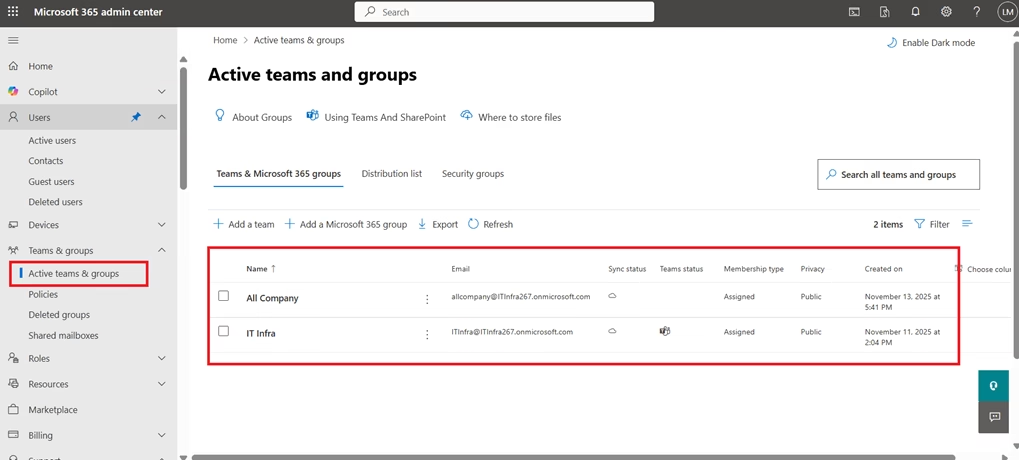
You will see different group categories available in your tenant.
Types of Groups You Will See
Microsoft 365 supports multiple group types. Understanding their purpose is critical for MS-102.
1. Microsoft 365 Groups
Microsoft 365 Groups are collaboration-focused groups.
When you create one, Microsoft automatically provisions:
- Shared mailbox
- Shared calendar
- SharePoint site
- Planner workspace
- Teams integration (optional)
These groups are commonly used for project teams and departments.
Key point:
They are designed for collaboration across Microsoft 365 workloads.
2. Security Groups
Security groups are primarily used for:
- Assigning permissions to resources
- Controlling access to applications
- Applying Conditional Access policies
- Group-based licensing
They do not automatically create collaboration tools like mailboxes or SharePoint sites.
Key point:
Security groups are access-control focused.
3. Distribution Lists (Distribution Groups)
Distribution groups are used to:
- Send an email to multiple users at once
They are email-focused and do not provide modern collaboration features.
Key point:
They are legacy-style email distribution mechanisms.
4. Mail-Enabled Security Groups
These combine features of:
- Security groups
- Distribution groups
They allow both:
- Access control
- Email distribution
These are often used in hybrid or transitional environments.
What You Can Observe in the Groups Section
Without creating anything, you can:
- View group names
- Identify group type
- See group owners
- View member count
- Check email address (if applicable)
This high-level view helps you understand how Microsoft 365 structures collaboration and access.
Why Groups Matter in Real Administration
Groups are central to Microsoft 365 because they allow administrators to manage users at scale.
Instead of assigning permissions individually, you can:
- Add users to a group
- Assign permissions to the group
- Apply licenses to the group
- Enforce security policies through group membership
This simplifies management and reduces administrative overhead.
Why Groups Matter for MS-102
The MS-102 Microsoft 365 Administrator exam frequently tests:
- Differences between group types
- When to use security groups vs Microsoft 365 groups
- Group-based licensing
- Access control scenarios
Understanding the purpose of each group type helps you avoid confusion in scenario-based questions.
Common Beginner Confusion
New administrators often confuse:
- Microsoft 365 Groups vs Security Groups
- Distribution Lists vs Microsoft 365 Groups
The simplest way to remember:
- Microsoft 365 Groups = Collaboration
- Security Groups = Access Control
- Distribution Lists = Email Only
This mental model helps during both real administration and exam preparation.

What Not to Change Yet
At this stage:
- Do not create test groups yet
- Do not assign licenses via groups
- Do not modify group settings
We will handle configuration in structured labs later.
Right now, the goal is clarity and familiarity.
Summary
In this chapter, you explored groups in Microsoft 365 and:
- Located the Groups section in the Admin Center
- Identified the main group types
- Understood the difference between collaboration and security groups
- Recognised why groups are essential for scalable administration
This prepares you for more advanced identity and licensing topics ahead.
Final Thoughts
Understanding groups in Microsoft 365 is essential for moving beyond individual user management and toward scalable administration. Groups are the foundation for collaboration, access control, and license management across the tenant.
By exploring Microsoft 365 groups, security groups, and distribution lists, you’ve taken an important step toward understanding how permissions and communication are structured in real-world environments.
In the MS-102 Microsoft 365 Administrator journey, group awareness prepares you for more advanced topics such as group-based licensing, Conditional Access targeting, and workload-specific permissions.
If you’re new to this learning series, start with the main MS-102 Microsoft 365 Administrator overview, where we explain how all chapters connect and what skills you’ll build across the journey.
For the most accurate and up-to-date exam objectives and reference material, Microsoft maintains the official MS-102 documentation on Microsoft Learn. This series complements those resources by focusing on real-world administrative understanding.
What’s Next
Now that you understand how users and groups appear in Microsoft 365, the next step is to explore Billing and Subscriptions.
In the next chapter, we’ll examine your Microsoft 365 E3 trial subscription, included services, license counts, and why licensing structure matters for MS-102.







