Microsoft 365: Infrastructure and Security Guide for the Modern Workplace
Microsoft 365 infrastructure and security are often misunderstood as just productivity tools, but from an enterprise perspective, they form a full-scale cloud control plane. It is a full-scale enterprise cloud platform that unifies identity, security, compliance, collaboration, and endpoint management into a single operational control plane.
After working extensively with on-premises infrastructure, Active Directory, Windows Server, hybrid identity, firewalls, and enterprise security controls, I have seen Microsoft 365 fundamentally change how organizations design, secure, and operate IT environments.
This guide explains Microsoft 365 from a real infrastructure and security perspective—not marketing hype making it practical for system administrators, infrastructure engineers, and security professionals.
If you are new to Microsoft certifications, start with our guide on how to choose the right IT certification based on your career.
What Is Microsoft 365 (From an Infrastructure Perspective)?
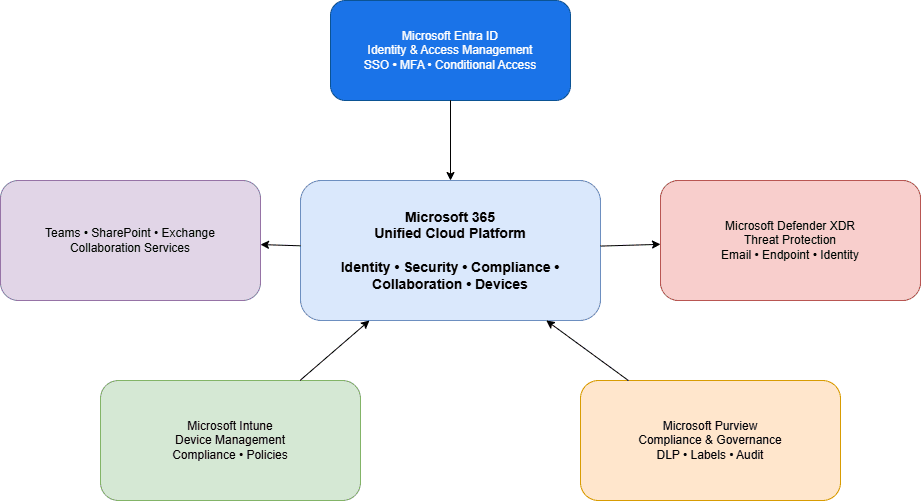
From an architectural standpoint, Microsoft 365 infrastructure and security operate as a unified identity-driven platform rather than isolated SaaS services.
It integrates:
- Identity and access management
- Email and collaboration platforms
- Endpoint and application management
- Threat detection and response
- Compliance and data governance
Unlike traditional IT tools that operate in silos, Microsoft 365 services share identity and security signals. A user’s risk level, device compliance state, and behaviour can directly influence access decisions across applications.
Key insight:
Microsoft 365 is core infrastructure, not just SaaS software.
Microsoft provides official architecture and security documentation through Microsoft Learn for Microsoft 365 administrators.
Microsoft Entra ID: The Foundation of Microsoft 365
Every Microsoft 365 deployment is built on Microsoft Entra ID (formerly Azure Active Directory).
This is the single most critical component in the entire ecosystem.
What Entra ID Provides
- Centralized identity for users, devices, and applications
- Single Sign-On (SSO)
- Multi-Factor Authentication (MFA)
- Conditional Access enforcement
- Integration with on-prem Active Directory
In hybrid environments, Azure AD Connect enables:
- Password Hash Synchronization or Pass-Through Authentication
- Hybrid Azure AD Join
- A gradual transition from on-prem identity to cloud-first identity
Real-world lesson:
In multiple incident investigations, the root cause of Microsoft 365 breaches was poor identity design, not missing security tools.
Weak MFA enforcement, legacy authentication, and over-privileged admin roles remain the most common failure points.
Exchange Online: Email Is a Security Boundary
Email continues to be the number one attack vector in enterprise environments.
Exchange Online is not just a mail server—it is a security perimeter.
Built-in Security Capabilities
- Exchange Online Protection (EOP) for spam and malware
- Microsoft Defender for Office 365 for phishing and zero-day threats
- Message trace and threat investigation tools
Infrastructure Best Practices
- Disable legacy authentication
- Enforce MFA for all users (including admins)
- Configure SPF, DKIM, and DMARC correctly
- Use mail flow rules for data protection and alerting
Field insight:
In one environment, legacy SMTP authentication broke after MFA enforcement—impacting alerting systems. The fix required service account exclusions and modern authentication planning, highlighting why email security must be designed, not assumed.
Treat email as a security surface, not just a communication tool.
Microsoft Teams & SharePoint: Collaboration With Control
Microsoft Teams is deeply integrated with SharePoint Online and Microsoft 365 Groups.
Every Team automatically creates:
- A SharePoint site
- An Exchange mailbox
- A Microsoft 365 Group
- Identity-based access permissions
Common Problems Without Governance
- Uncontrolled Teams sprawl
- Oversharing of sensitive data
- External guest access risks
- No ownership or lifecycle management
Recommended Governance Controls
- Restrict who can create Teams
- Apply sensitivity labels
- Define naming conventions
- Control external sharing
- Automate lifecycle management
Practical takeaway:
Collaboration must scale securely, not freely. Without governance, Teams quickly becomes a data exposure risk.
Microsoft Intune: Modern Endpoint Management
Traditional Group Policy and VPN-centric management models no longer support hybrid or remote work.
Microsoft Intune fills this gap by enabling cloud-native endpoint management.
What Intune Enables
- Cloud-based device enrollment
- Compliance and configuration policies
- Application deployment
- Endpoint security baselines
- Integration with Conditional Access
Why Infrastructure Teams Prefer Intune
- No dependency on on-prem VPNs
- Global device management
- Support for Windows, macOS, iOS, and Android
- Enables Zero Trust device validation
Real-world scenario:
In hybrid rollouts, devices that were not properly Azure AD-joined failed compliance checks, leading to access blocks. This reinforced the importance of correct join states and staged Conditional Access deployment.
A compliant device becomes a security requirement, not just an IT asset.
Conditional Access: The Core of Zero Trust
Conditional Access is the real security engine of Microsoft 365.
It evaluates:
- User identity
- Device compliance
- Location
- Sign-in and user risk
- Application sensitivity
And enforces:
- MFA
- Device compliance
- Session restrictions
- Access blocking
Operational insight:
Organizations that design Conditional Access correctly reduce account compromise risk before deploying advanced security tools. Poorly designed policies, however, can cause outages just as easily as they prevent attacks.
Conditional Access must be planned, staged, and monitored.
Microsoft Defender XDR & Sentinel: Unified Security Operations
Microsoft Defender has evolved into a full XDR platform, covering:

- Defender for Endpoint
- Defender for Identity
- Defender for Office 365
- Defender for Cloud Apps
When integrated with Microsoft Sentinel (SIEM):
- Alerts are correlated
- Incidents are prioritized
- Automated response becomes possible
Operational benefit:
SOC teams experience reduced alert fatigue once signals are correlated in Sentinel instead of being handled across isolated portals.
This consolidation improves detection speed and response accuracy.
Compliance & Governance With Microsoft Purview
Microsoft Purview provides native tools for:
- Data Loss Prevention (DLP)
- Sensitivity labels
- Retention policies
- Audit logs
- eDiscovery and legal hold
For organizations pursuing ISO 27001, regulatory compliance, or audit readiness, Microsoft 365 offers:
- Built-in compliance controls
- Continuous audit evidence
- Policy-driven enforcement
Compliance becomes continuous, not reactive.
Common Microsoft 365 Mistakes I See in the Field
- Treating Microsoft 365 as “just email and Teams.”
- Weak or missing Conditional Access
- Over-permissioned admin roles
- No central security monitoring
- No governance or lifecycle strategy
- Ignoring identity-based risks
Microsoft 365 exposes architectural weaknesses quickly.
Final Thoughts: Microsoft 365 Is Core Infrastructure
From a senior infrastructure engineer’s perspective, Microsoft 365 is:
- An identity platform
- A Zero Trust security layer
- A compliance framework
- An endpoint management solution
- A collaboration backbone
Organizations that succeed treat Microsoft 365 as critical infrastructure, not a subscription add-on.
Those who fail usually underestimate its architectural impact.
Treating Microsoft 365 infrastructure and security as core enterprise architecture is the difference between a resilient environment and a fragile one.
Author Note
This article reflects hands-on infrastructure and security experience across hybrid and enterprise Microsoft 365 environments.







