Why Understanding the Tenant Comes First
Before you create users, assign licenses, configure security policies, or troubleshoot service issues, there is one concept you must clearly understand: the Microsoft 365 tenant.
Every configuration you make in Microsoft 365 identity, security, compliance, or collaboration starts at the tenant level. If you do not understand what the tenant is and how it works, it becomes difficult to reason about access control, policy scope, or even exam questions in MS-102.
Think of the tenant as the foundation. Once that foundation is clear, everything else in Microsoft 365 administration starts to make sense.
What Is a Microsoft 365 Tenant?
A Microsoft 365 tenant is your organisation’s dedicated and isolated environment inside Microsoft’s cloud.
When an organisation signs up for Microsoft 365, Microsoft automatically creates a tenant for that organisation. This tenant becomes a private space where all of your cloud resources live, including:
- Users and groups
- Licenses and subscriptions
- Configuration settings
- Microsoft 365 services such as Exchange, SharePoint, Teams, and Intune
- Security and compliance policies
No two organisations share the same tenant. Each tenant is isolated by design, which means one organisation’s data, users, and policies are completely separated from another’s. This isolation is fundamental to both security and compliance in Microsoft 365.
When people ask “what is a Microsoft 365 tenant?”, the simplest answer is this: it is the secure cloud boundary that defines and contains your organisation in Microsoft 365.
A Tenant Is a Dedicated Cloud Environment
A useful way to understand a tenant is to think of it as a private apartment in a high-rise building.
- The building represents Microsoft’s global cloud infrastructure.
- Your apartment represents your Microsoft 365 tenant.
Inside your apartment, only you decide what happens. Other tenants may exist in the same building, but they cannot see or affect your space.
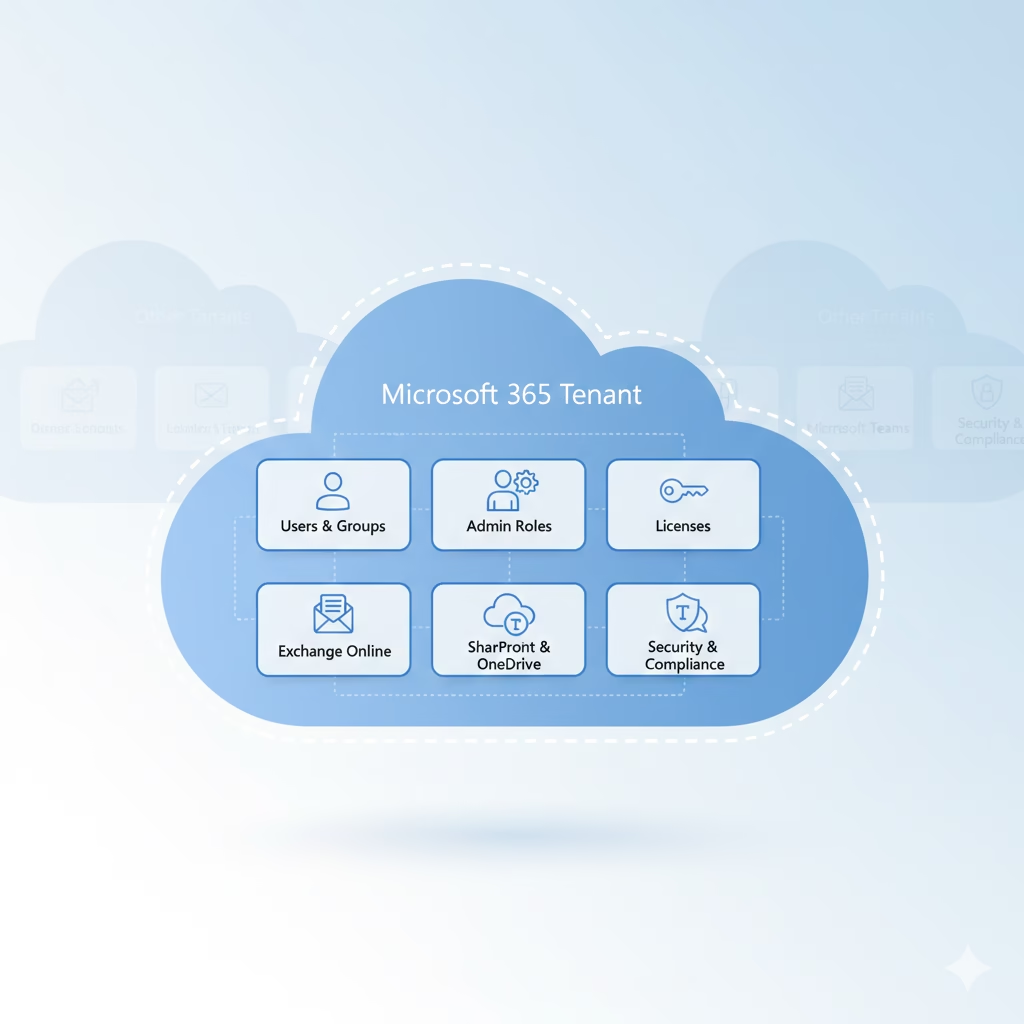
Within your tenant, administrators control:
- Users and groups – who exists in the organisation
- Administrative roles – who has permission to manage what
- Licenses – which services users can access
- Microsoft 365 services – Exchange, SharePoint, Teams, Intune, Defender, and more
- Security and compliance policies – MFA, Conditional Access, DLP, retention, and auditing
This mental model is important for the MS-102 Microsoft 365 Administrator exam because many questions assume you understand that changes apply at the tenant level unless explicitly scoped otherwise.
Each Tenant Has a Unique Tenant Identity
Every Microsoft 365 tenant is identified by a Tenant ID, also known as a GUID.
This Tenant ID is:
- A globally unique identifier
- Fixed and permanent
- Assigned when the tenant is created
An example of a Tenant ID looks like this:
a1b2c3d4-5678-90ab-cdef-1234567890ab
You may not see this ID often as a beginner, but it plays a critical role behind the scenes. Microsoft uses the Tenant ID to:
- Authenticate users and services
- Associate workloads like Exchange and SharePoint with your environment
- Track subscriptions and licensing
- Integrate Microsoft 365 with Azure, the Power Platform, and third-party applications
From Microsoft’s perspective, the Tenant ID is the true identity of your organisation in the cloud. Names and domains can change, but the Tenant ID does not.
Default Tenant Domain
When a tenant is first created, Microsoft assigns it a default domain in the following format:
yourtenantname.onmicrosoft.com
This domain becomes part of the tenant’s identity. Even after you add a custom domain such as yourcompany.com, the default onmicrosoft.com domain always remains attached to the tenant.
This matters because:
- Some internal services rely on the default domain
- It is often used during initial setup and troubleshooting
- It can help identify the tenant in hybrid or multi-tenant scenarios
For MS-102, it is important to remember that a tenant can have multiple domains, but only one tenant identity.
The Global Administrator Role
The first account created in a new tenant is assigned the Global Administrator role. This role is also commonly referred to as:
- Tenant administrator
- Company administrator
- Global admin
The Global Administrator has unrestricted access across the entire tenant, including:
- Entra ID
- Exchange
- SharePoint
- Teams
- Intune
- Security and compliance portals
A Global Administrator can:
- Create and manage other admin accounts
- Add and verify custom domains
- Assign licenses
- Configure tenant-wide security and compliance policies
- Enable MFA and Conditional Access
- Manage every service in Microsoft 365
Because of this level of power, Microsoft recommends limiting the number of Global Administrators, typically to two to four accounts, and protecting them with strong security controls. This principle is frequently tested indirectly in the MS-102 exam through security and access-related scenarios.
Tenant vs Subscription
This distinction is critical and often misunderstood.
- Tenant = the environment
- Subscription = the product or license you purchase
A tenant exists independently of subscriptions. For example:

- You can attach multiple subscriptions (such as Microsoft 365 E3 and Business Premium) to a single tenant
- If a subscription expires or is cancelled, the tenant still exists
- Users, groups, and settings remain in the tenant even if licenses change
Understanding this difference helps explain many real-world behaviours in Microsoft 365, such as why user accounts still exist after licenses are removed.
For MS-102 Microsoft 365 Administrator candidates, questions often assume you understand this separation between environment and licensing.
Why Tenants Are Important for MS-102
Tenant knowledge is foundational because:
- All identity and access decisions originate in the tenant
- All workload services depend on tenant-level configuration
- Security posture is controlled through tenant-wide policies
- Many exam questions test tenant concepts before diving into features
If you misunderstand the tenant, it becomes difficult to reason about Conditional Access, role-based access, or service boundaries.
Summary
A Microsoft 365 tenant is:
- A private and isolated cloud environment for an organisation
- Identified by a permanent and globally unique Tenant ID
- Managed by Global Administrators
- The home for all Microsoft 365 users, services, settings, and security policies
Understanding the tenant is not optional. It is the foundation for identity, services, and security in Microsoft 365, and a core concept for success in the MS-102 exam.
Final Thoughts
Understanding the Microsoft 365 tenant is the first step toward thinking like a real administrator, not just a feature-level operator. Every identity decision, security policy, and workload configuration in Microsoft 365 starts at the tenant level.
If you’re new to this learning series, start with the main MS-102 Microsoft 365 Administrator overview, where we explain how all chapters connect and what skills you’ll build across the journey.
For the most accurate and up-to-date exam objectives and reference material, Microsoft maintains the official MS-102 documentation on Microsoft Learn. This series complements those resources by focusing on real-world administrative understanding.
What’s Next
Now that you understand what a Microsoft 365 tenant is and why it matters, the next step is to see one in action.
In the next chapter, we’ll set up a Microsoft 365 tenant for hands-on practice and use it as our lab environment throughout the rest of the MS-102 learning series.







