Microsoft 365 tenant health monitoring is how administrators move from reactive troubleshooting to proactive management. A tenant is not something you configure once and forget. It requires continuous monitoring.
For the MS-102 Microsoft 365 Administrator exam, you must understand how to:
- Monitor service health
- Interpret Message Center notifications
- Use usage reports
- Troubleshoot tenant-level issues
- Review audit logs
- Manage support requests
In real environments, this is what separates a junior admin from a responsible platform owner.
Why Tenant Health Monitoring Matters
Every Microsoft 365 tenant depends on cloud services such as:
- Exchange Online
- SharePoint Online
- Teams
- Entra ID
- Defender
If any service experiences degradation, administrators must detect and respond quickly.
Tenant health monitoring ensures:
- Service continuity
- Security visibility
- Performance tracking
- Informed decision-making
Service Health Dashboard
The first tool every administrator must know:
Microsoft 365 Admin Center → Health → Service Health
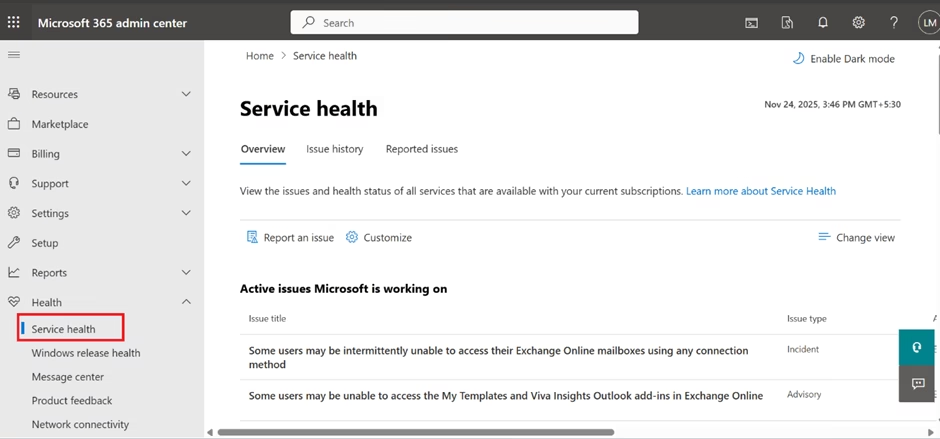
Here you can see:
- Active incidents
- Advisory notifications
- Service degradation
- Historical incidents
Each issue includes:
- Impacted services
- Affected regions
- Estimated resolution time
- Technical details
For MS-102, expect scenario-based questions involving service outages.
Example scenario:
Users cannot send an email. You check Service Health and find an Exchange Online advisory.
Correct action:
Review the advisory before troubleshooting locally.
Message Center
Located in:
Microsoft 365 Admin Center → Health → Message Center
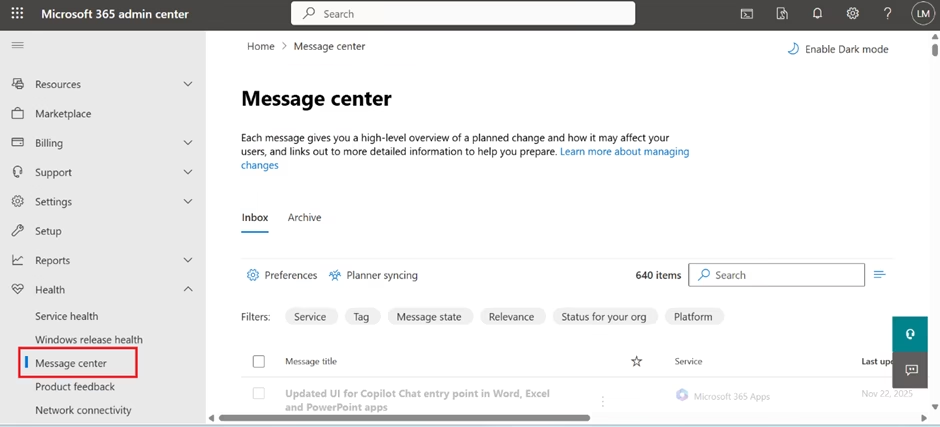
The Message Center provides:
- Upcoming feature changes
- Security updates
- Policy changes
- Planned maintenance
Important features:
- Filter by service
- Assign messages to admins
- Track read/unread status
In the real world, ignoring the Message Center leads to unexpected service changes.
MS-102 may test your understanding of administrative communication responsibility.
Usage Reports
Located in:
Reports → Usage
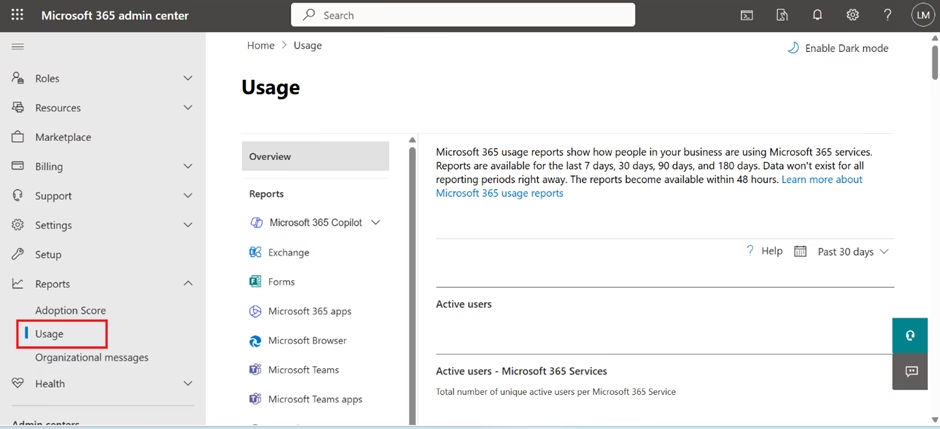
These reports show:
- Email activity
- Teams activity
- OneDrive usage
- SharePoint site activity
- License utilization
Usage reports help administrators:
- Identify inactive users
- Detect adoption gaps
- Plan license adjustments
- Optimize cost
Example:
If 40% of E5 users never use advanced features, licensing optimization may be required.
Service Performance Reports
These reports help identify:
- Latency issues
- Client connectivity problems
- Regional performance variations
Though not deeply technical, administrators must understand:
Performance issues are not always internal.
Cloud performance data helps isolate root causes.
Audit Logs and Activity Monitoring
Audit logs are essential for security and compliance.
Access via:
Microsoft Purview → Audit
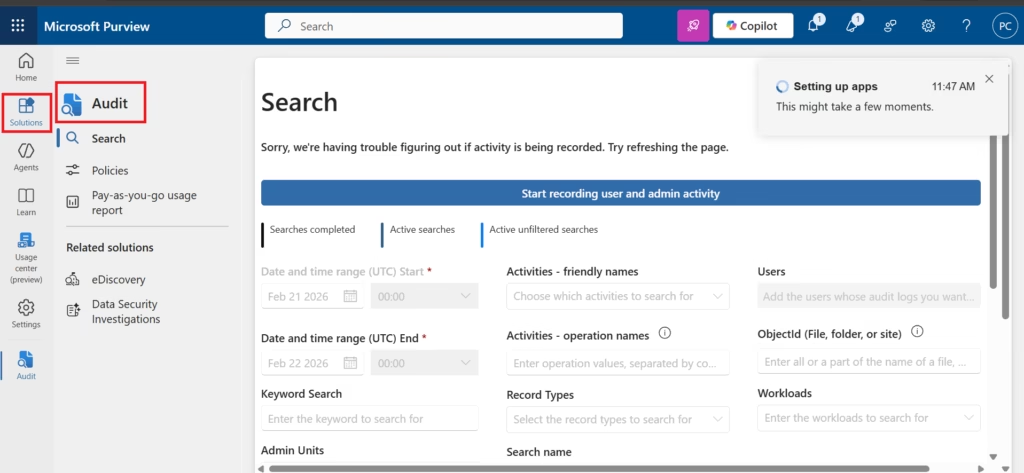
Audit logs allow you to track:
- User logins
- File access
- Mailbox access
- Admin role changes
- Policy modifications
In MS-102, you may be asked:
Which tool helps determine who deleted a file?
Correct answer:
Audit logs.
Root Cause Analysis Workflow
When troubleshooting tenant-level issues, follow this approach:
1️⃣ Check Service Health
2️⃣ Review Message Center
3️⃣ Verify user licensing
4️⃣ Review audit logs
5️⃣ Perform message trace (if mail-related)
6️⃣ Check Conditional Access policies
This structured method demonstrates exam-level maturity.
Managing Support Requests
If Microsoft service issues persist:
Admin Center → Support → Microsoft Service Support
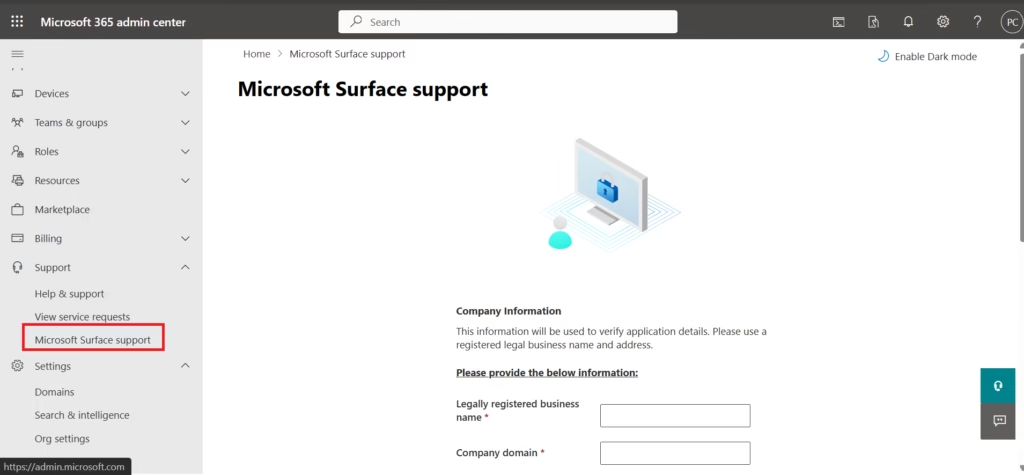
Provide:
- Detailed description
- Screenshots
- Affected users
- Error messages
Understanding how and when to escalate is part of responsible administration.
Best Practices for Tenant Health Monitoring
Apply these principles:

1️⃣ Review Service Health Daily
Make it routine.
2️⃣ Assign Message Center Responsibility
Someone must track upcoming changes.
3️⃣ Enable Audit Logging Early
Audit logs must be enabled before data can be reviewed.
4️⃣ Monitor License Utilization Monthly
Avoid over-provisioning.
5️⃣ Document Incidents
Maintain internal records for repeated issues.
Why Tenant Health Monitoring Matters for MS-102
MS-102 expects administrators to:
- Interpret cloud service issues
- Avoid unnecessary troubleshooting
- Identify configuration errors
- Perform structured problem resolution
Monitoring is not optional.
It is part of tenant governance.
Final Insights
Microsoft 365 tenant health monitoring represents a shift from configuration to operational maturity.
Anyone can create users and assign licenses.
A real administrator monitors service health, anticipates disruptions, and investigates anomalies.
When you understand tenant health:
- You reduce downtime
- You improve security visibility
- You make informed decisions
- You build administrative credibility
This concludes the core of Domain 1: Deploy and Manage a Microsoft 365 Tenant.
If you’re new to this learning series, start with the main MS-102 Microsoft 365 Administrator overview, where we explain how all chapters connect and what skills you’ll build across the journey.
For the most accurate and up-to-date exam objectives and reference material, Microsoft maintains the official MS-102 documentation on Microsoft Learn. This series complements those resources by focusing on real-world administrative understanding.
Next, we transition into: Introduction to Identity & Access Management in Microsoft Entra ID
That is where Microsoft 365 administration becomes security-driven.







