Introduction
Identity is the foundation of Microsoft 365 security and access management.
Organizations today rarely operate fully on-premises or fully in the cloud. Instead, most follow a Microsoft Entra Hybrid identity models, where identities are managed both locally and in the cloud.
To enable this, Microsoft provides Microsoft Entra Connect, which connects on-premises Active Directory with Microsoft Entra ID.
But here’s the key question for MS-102
How do users authenticate in a hybrid setup?
That’s where Hybrid Identity Models come in.
What is Hybrid Identity?
Hybrid identity means:
- Users are created in on-prem Active Directory
- Synced to Microsoft Entra ID
- Same identity is used across:
- Windows login
- Microsoft 365
- Cloud apps
Why Hybrid Identity is Used
- Seamless user experience (SSO)
- Centralized identity management
- Supports legacy + modern systems
- Required for many enterprise environments
Types of Microsoft Ente Hybrid Identity Models (VERY IMPORTANT for MS-102)
Microsoft defines three main authentication models:
- Password Hash Synchronization (PHS)
- Pass-through Authentication (PTA)
- Federation (ADFS)
1. Password Hash Synchronization (PHS)
What is PHS?
In this model:
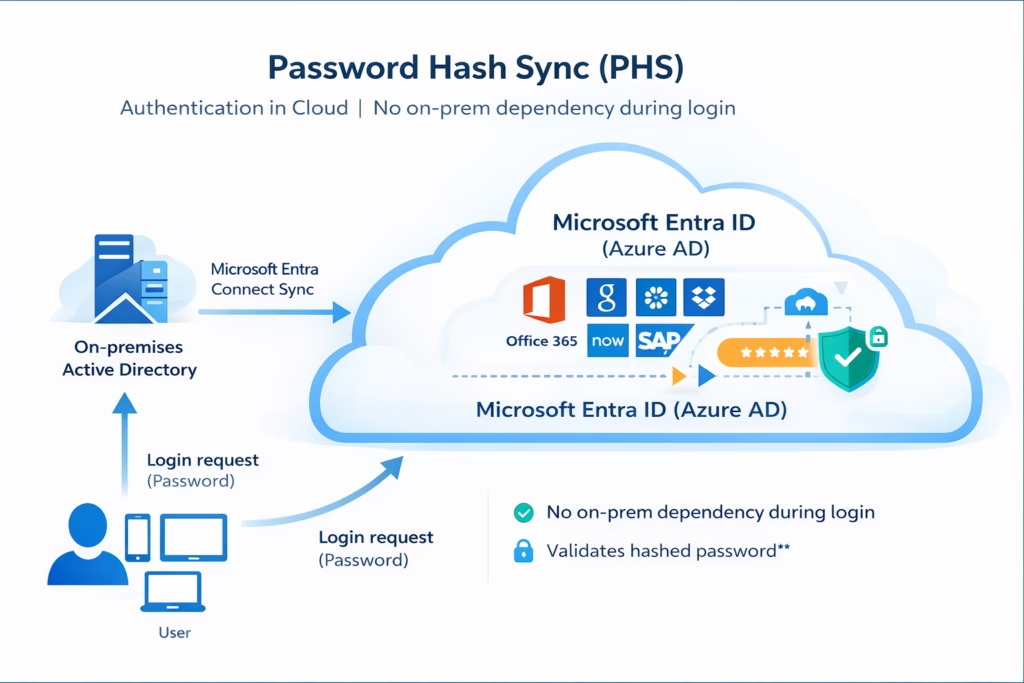
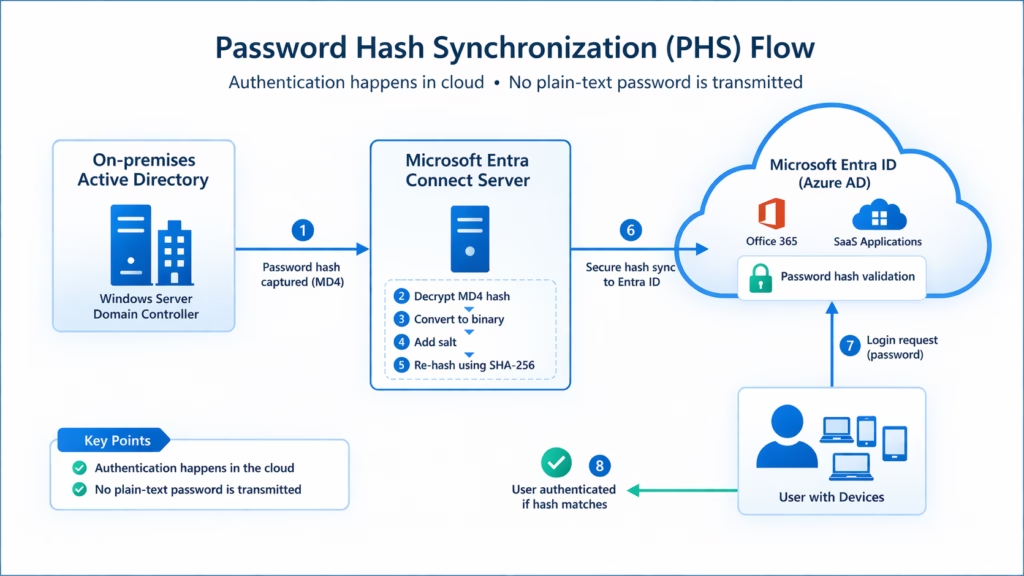
- User password hash is synced from on-prem AD to Entra ID
- Authentication happens in the cloud
Important:
It’s a hash of a hash (not the actual password)
How It Works
- User logs into Microsoft 365
- Entra ID validates the password using the synced hash
- Access granted
Advantages
- Simple to configure
- No on-prem dependency during login
- High availability
- Works even if on-prem AD is down
Limitations
- Password exists (hashed) in the cloud
- May not meet strict compliance requirements
Best Use Case
- Most organizations
- Default recommendation by Microsoft
2. Pass-through Authentication (PTA)
What is PTA?

In PTA:
- Password is NOT stored in the cloud
- Authentication happens on-premises
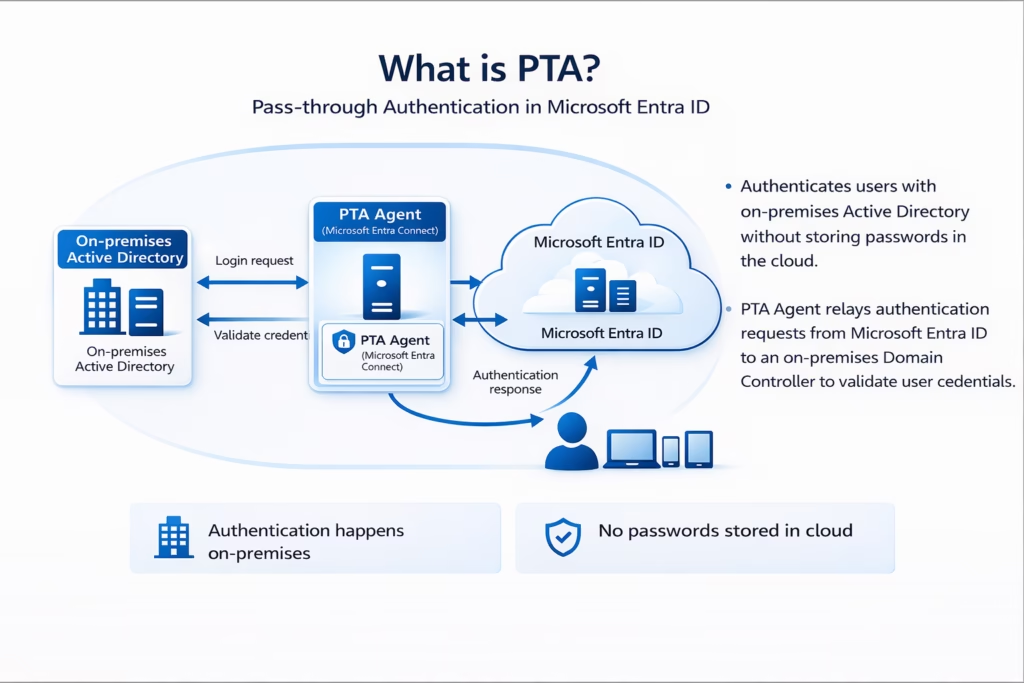
How It Works
- User enters credentials
- Entra ID sends a request to the PTA Agent
- Agent validates against on-prem AD
- Access granted
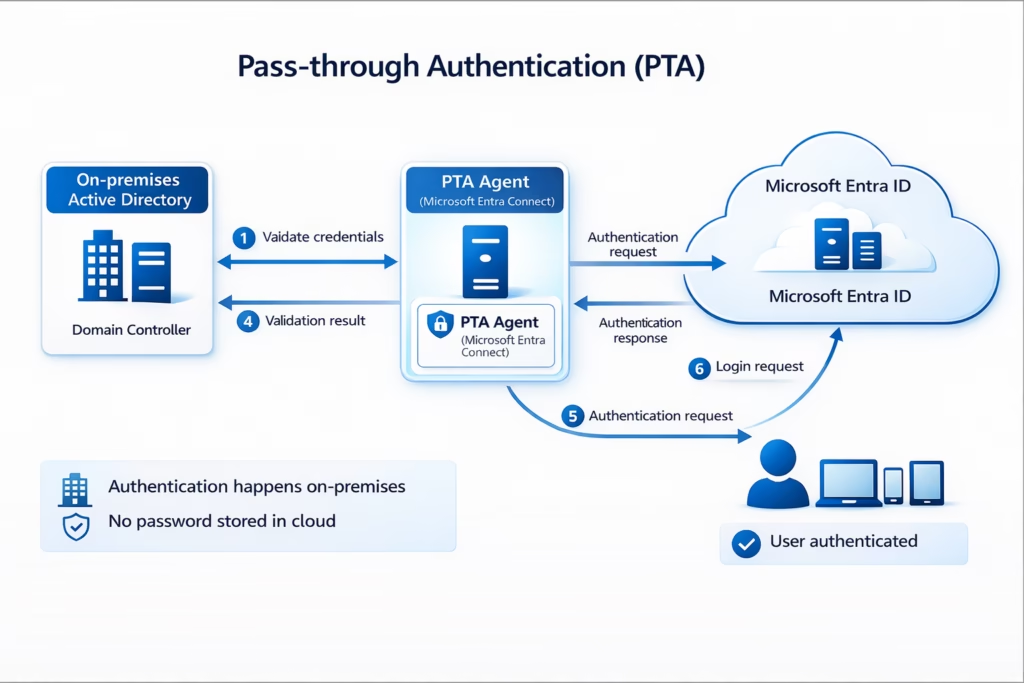
Advantages
- No password stored in the cloud
- Meets stricter security requirements
- Easy to deploy
Limitations
- Requires on-prem agent availability
- Dependency on network connectivity
Best Use Case
- Organizations with security concerns
- Want cloud + on-prem validation
3. Federation (ADFS)
What is Federation?
In Federation:
- Authentication is handled by an external identity provider
- Typically uses Active Directory Federation Services (ADFS)
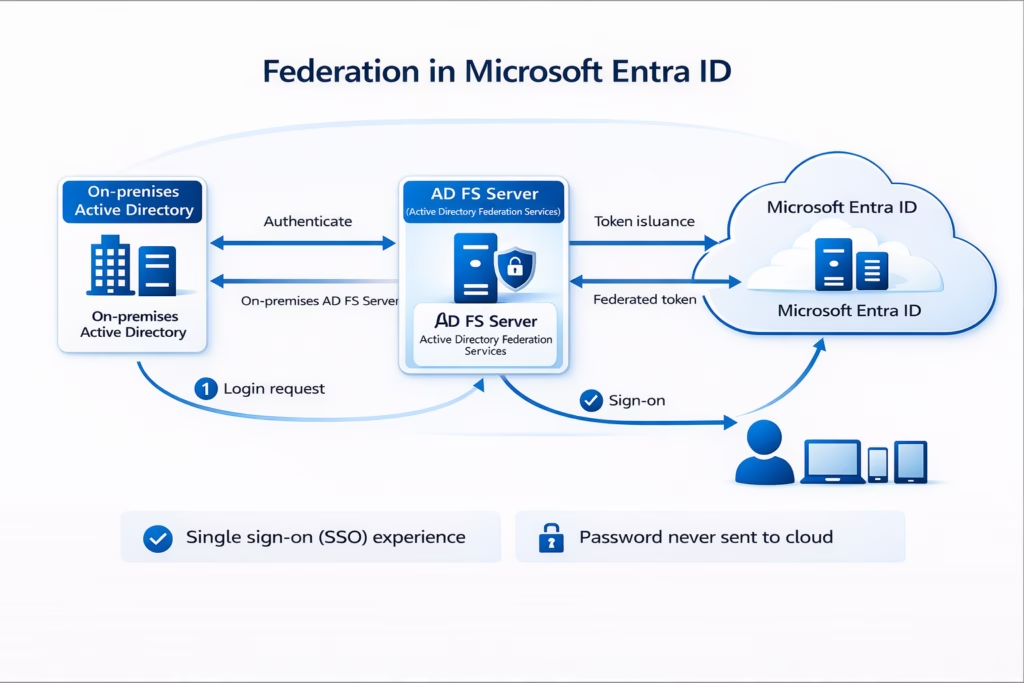
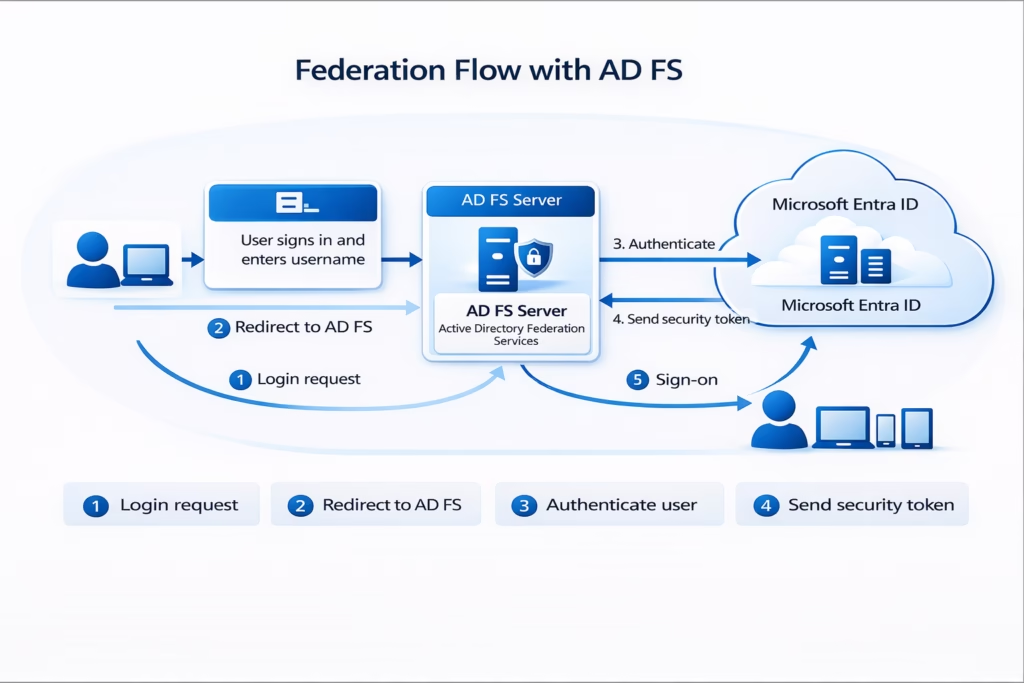
How It Works
- User tries to log in
- Redirected to the ADFS server
- ADFS authenticates the user
- Token sent to Entra ID
- Access granted
Advantages
- Full control over authentication
- Supports advanced policies
- Smart card / MFA integration
Limitations
- Complex setup
- Requires additional servers
- High maintenance
Best Use Case
- Large enterprises
- Organizations needing advanced auth policies
Comparison Table (Must Know for MS-102)
| Feature | PHS | PTA | Federation |
|---|---|---|---|
| Password stored in cloud | Yes (hashed) | No | No |
| Authentication location | Cloud | On-prem | On-prem |
| Complexity | Low | Medium | High |
| Dependency on on-prem | No | Yes | Yes |
| Recommended | Yes | Yes | Limited |
Key Decision Guidance
Choose Password Hash Synchronization (PHS) in Microsoft Entra Hybrid identity model if:
- You want a simple, cloud-first solution with minimal setup
- You need high availability (authentication works even if on-prem AD is unavailable)
- You prefer reduced infrastructure dependency (no reliance on on-prem servers during login)
- You want faster deployment and easier management
- Your organization is moving towards a modern, zero-trust architecture
Best for: Most organizations, startups, and cloud-first environments
Microsoft’s recommended default approach
Choose Pass-through Authentication (PTA) in the Microsoft Entra Hybrid identity model if:
- You require real-time authentication against on-prem Active Directory
- You do not want password hashes stored in the cloud (compliance/security reasons)
- You still want a simpler alternative to Federation (AD FS)
- You can maintain high availability of PTA agents (multiple agents recommended)
- Your organization needs a balance between security and simplicity
Best for: Organizations with stricter security policies or regulatory requirements
Choose Federation (AD FS) in the Microsoft Entra Hybrid identity model if:
- You need advanced authentication controls (e.g., smart cards, third-party MFA, custom policies)
- You already have an existing AD FS infrastructure in place
- You require full control over the authentication flow and policies
- You must integrate with legacy or third-party identity systems
- Your organization can manage complex infrastructure and maintenance
Best for: Large enterprises with specialized authentication requirements
Seamless Single Sign-On (SSO)
in Microsoft Entra Hybrid identity model also supports Seamless SSO:
- Users logged into domain machines
- Automatically signed into Microsoft 365
- No repeated password prompts
Works with:
- PHS
- PTA
Common Mistakes
- Thinking PHS stores the actual password
- Overcomplicating with Federation
- Not planning high availability for PTA
- Ignoring business requirements
MS-102 Exam Tips
Focus on:
- Differences between PHS, PTA, and Federation
- Authentication flow (who validates the password?)
- When to use each Microsoft Entra Hybrid identity model
- Benefits of Seamless SSO
Conclusion
Microsoft Entra Hybrid identity models are the foundation of secure and seamless access in modern Microsoft 365 environments. As organizations continue to adopt cloud services while maintaining on-premises infrastructure, choosing the right authentication model becomes a critical architectural decision.
Each model serves a different purpose:
- Password Hash Synchronization (PHS) offers a simple, highly available, and cloud-first approach, making it the default choice for most organizations.
- Pass-through Authentication (PTA) provides real-time validation against on-premises Active Directory, ensuring that credentials are never stored in the cloud.
- Federation (AD FS) delivers advanced control and flexibility, but comes with increased complexity, infrastructure overhead, and maintenance requirements.
The key is not just understanding how each model works, but knowing when to use which model based on business needs, security requirements, and infrastructure capabilities.
With Microsoft Entra Connect, organizations can seamlessly integrate on-premises and cloud identities, enabling:
- Consistent user experience across environments
- Enhanced security with modern authentication methods
- Centralized identity management
In most real-world scenarios, PHS or PTA is recommended, while Federation is typically reserved for specific enterprise requirements.
Next Step
Continue your learning with:
Clean Up Active Directory Using IdFix Tool (Coming Next)
Previous Topic
If you haven’t explored it yet:
Active Directory & Domain Controller Setup for Hybrid Identity
https://techcertguide.blog/active-directory-domain-controller-setup/
Start from the Beginning
MS-102 Microsoft 365 Administrator Overview
https://techcertguide.blog/ms-102-microsoft-365-administration/
Official Microsoft Reference
https://learn.microsoft.com/en-us/certifications/exams/ms-102







