Introduction
Role Assignment in Microsoft Entra ID is a powerful capability, but if done incorrectly, it can introduce serious security risks.
Many organizations make the mistake of:
- Assigning Global Admin unnecessarily
- Not reviewing role assignments regularly
- Granting permanent access instead of temporary access
This leads to over-privileged accounts, increasing the risk of compromise.
In this guide, you’ll learn best practices for Role Assignment in Microsoft Entra ID, along with step-by-step configuration using real admin portal screenshots.
What is Role Assignment in Entra ID?
Role assignment is the process of granting permissions to users so they can perform administrative tasks.
Microsoft Entra ID provides:
- Built-in roles (Global Admin, User Admin, Security Admin)
- Custom roles
- Scoped roles using Administrative Units
🔗 Connection with Previous Topic
After defining administrative boundaries using Administrative Units,
the next step is to assign roles securely within those boundaries.
Step-by-Step: Assign Roles in Microsoft Entra ID
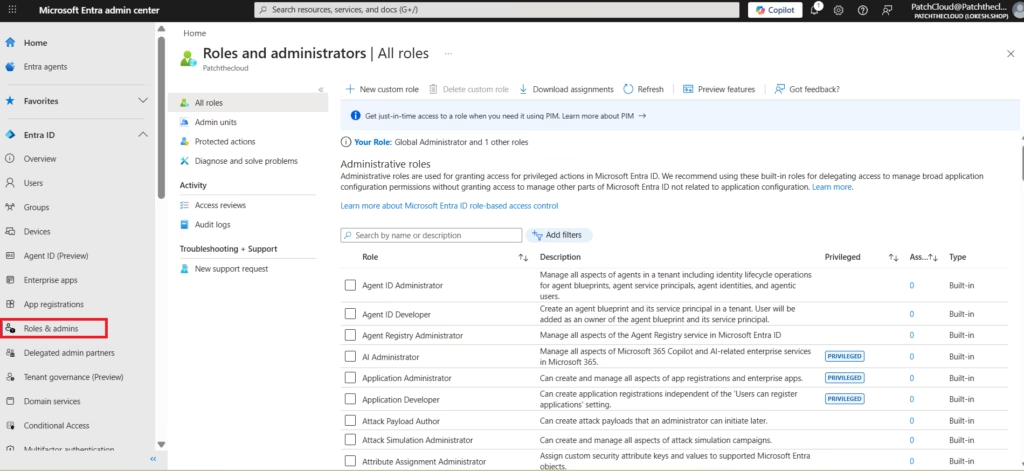
Step 1: Navigate to Roles
Go to:
Microsoft Entra Admin Center
Entra ID → Roles & administrators
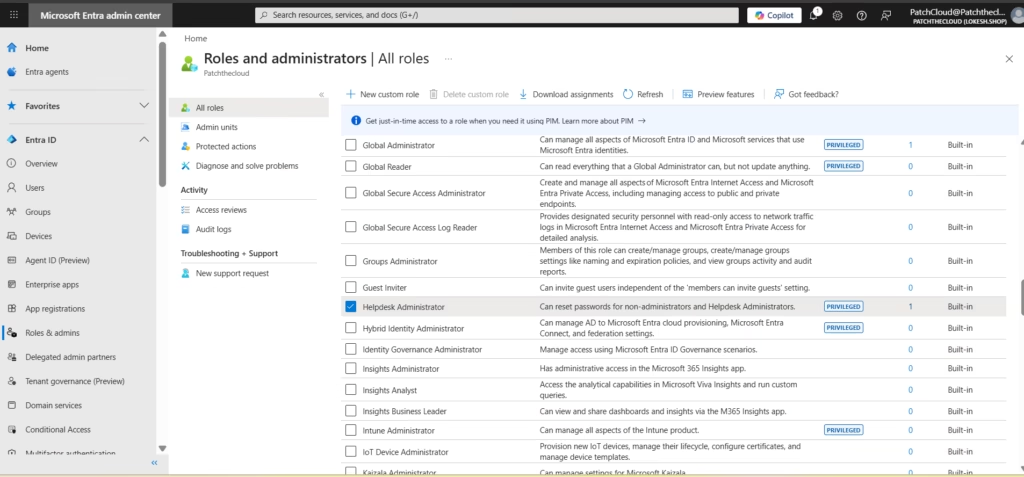
Step 2: Select a Role
Choose a role such as:
- User Administrator
- Security Administrator
- Global Reader
Click on the role to view details.
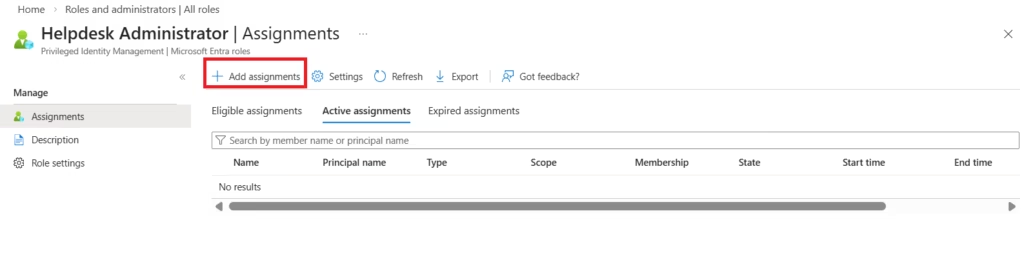
Step 3: Assign the Role
Click:
+ Add assignments
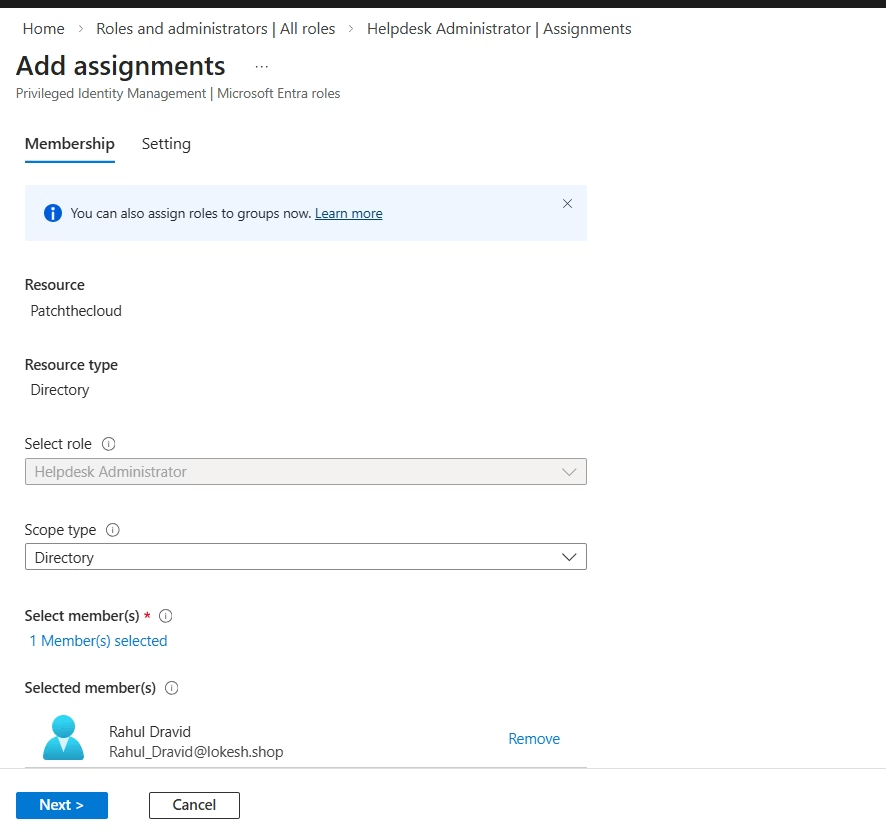
Then:
- Select user or group
- Click Assign
Step 4: Verify Assignment
Check:
- Assigned users
- Scope (tenant / AU)
🔍 Real-World Scenario: Role Assignment in Action
Consider an organization with multiple departments such as HR, Finance, and IT. Instead of assigning Global Administrator access to all IT staff, the organization can implement a more secure and structured approach using role-based access.
For example:
- HR team members can be assigned the User Administrator role, limited to HR users
- The finance team can be assigned the Billing Administrator role
- IT support staff can be given the Helpdesk Administrator role
Additionally, by combining this with Administrative Units, each department’s admin access can be scoped only to their respective users and groups.
To further enhance security:
- Use Privileged Identity Management (PIM) for temporary role activation
- Conduct Access Reviews regularly to validate role assignments
This approach ensures that:
- Access is limited and controlled
- Administrative tasks are delegated efficiently
- Security risks are minimized
👉 This is how real-world organizations implement secure and scalable role assignment in Microsoft Entra ID.
Best Practices for Role Assignment
1. Follow the Least Privilege Principle
- Assign only required roles
- Avoid Global Admin unless necessary
2. Use Role-Based Access Control (RBAC)
- Assign roles based on job function
- Avoid individual-based assignments
3. Use Administrative Units for Scope Control
- Limit admin access to specific departments
- Avoid tenant-wide permissions
4. Implement Just-In-Time (JIT) Access
Use PIM to:
- Provide temporary access
- Reduce standing privileges
5. Perform Regular Access Reviews
- Validate role assignments periodically
- Remove unused access
6. Assign Roles to Groups Instead of Users
- Simplifies management
- Improves scalability
7. Avoid Overlapping Roles
- Prevent privilege escalation
- Reduce confusion
8. Monitor Role Assignments
- Use logs and audit reports
- Track admin activity
9. Use Naming Conventions
- Clearly define admin roles
- Maintain consistency
10. Limit Global Administrator Usage
- Keep a minimum number of global admins
- Use break-glass accounts
Common Mistakes to Avoid
- Assigning Global Admin to all IT staff
- Not using PIM
- Ignoring Access Reviews
- No documentation of role assignments
Conclusion
Role assignment in Microsoft Entra ID is a critical part of identity and access management.
By following best practices, organizations can:
- Strengthen security
- Reduce risk
- Improve governance
- Align with Zero Trust
When combined with:

- Administrative Units
- Access Reviews
- PIM
👉 Role assignment becomes a powerful control mechanism for enterprise security.
🔗 Continue Learning
Role assignment is a critical part of identity and access management in Microsoft Entra ID. By applying best practices such as least privilege, scoped administration, and regular reviews, organizations can significantly reduce security risks and improve governance.
When combined with Administrative Units, Access Reviews, and Privileged Identity Management (PIM), role assignment becomes a powerful mechanism to control and secure administrative access across the environment.
👉 Next Step
Continue your learning with:
➡️ Identity Models in Microsoft Entra ID (Cloud vs Hybrid) (Coming Next)
⬅️ Previous Topic
If you haven’t explored it yet:
➡️ Administrative Units in Microsoft Entra ID
https://techcertguide.blog/administrative-units-in-microsoft-entra-id
🔗 Related Topics
Deepen your understanding with:
➡️ Access Reviews in Microsoft Entra ID
https://techcertguide.blog/pim-access-reviews-microsoft-entra-id/
➡️ Privileged Identity Management (PIM)
https://techcertguide.blog/entra-privileged-identity-management-pim/
📖 Start from the Beginning
➡️ MS-102 Microsoft 365 Administrator Overview
https://techcertguide.blog/ms-102-microsoft-365-administration/
📚 Official Microsoft Reference
➡️ https://learn.microsoft.com/en-us/certifications/exams/ms-102/








1 thought on “10 Essential Best Practices for Role Assignment in Microsoft Entra ID (Step-by-Step Guide)”