A successful SC-900 to MS-102 Transition: Data Architecture requires a shift from ‘protecting the cloud’ to managing specific workloads:
“Microsoft 365 data is just… in the cloud.”
That vague idea works for awareness-level security discussions.
It fails completely when you become responsible for administration.
In SC-900, data is discussed as something to protect.
In MS-102, data becomes something you must locate, manage, retain, delete, and recover.
That requires precision — not assumptions.
Why the SC-900 to MS-102 Transition: Data Architecture is Often Misunderstood
Security guidance often says:
- Protect sensitive data
- Monitor access to data
- Apply labels to data
- Retain data securely
But as an admin, the first question you must ask is simpler:
Which data — and where exactly is it stored?
Because in Microsoft 365:
- Data location determines permissions
- Data location determines retention
- Data location determines deletion behavior
- Data location determines recovery options
If you don’t know where data lives, every policy you apply is guesswork.
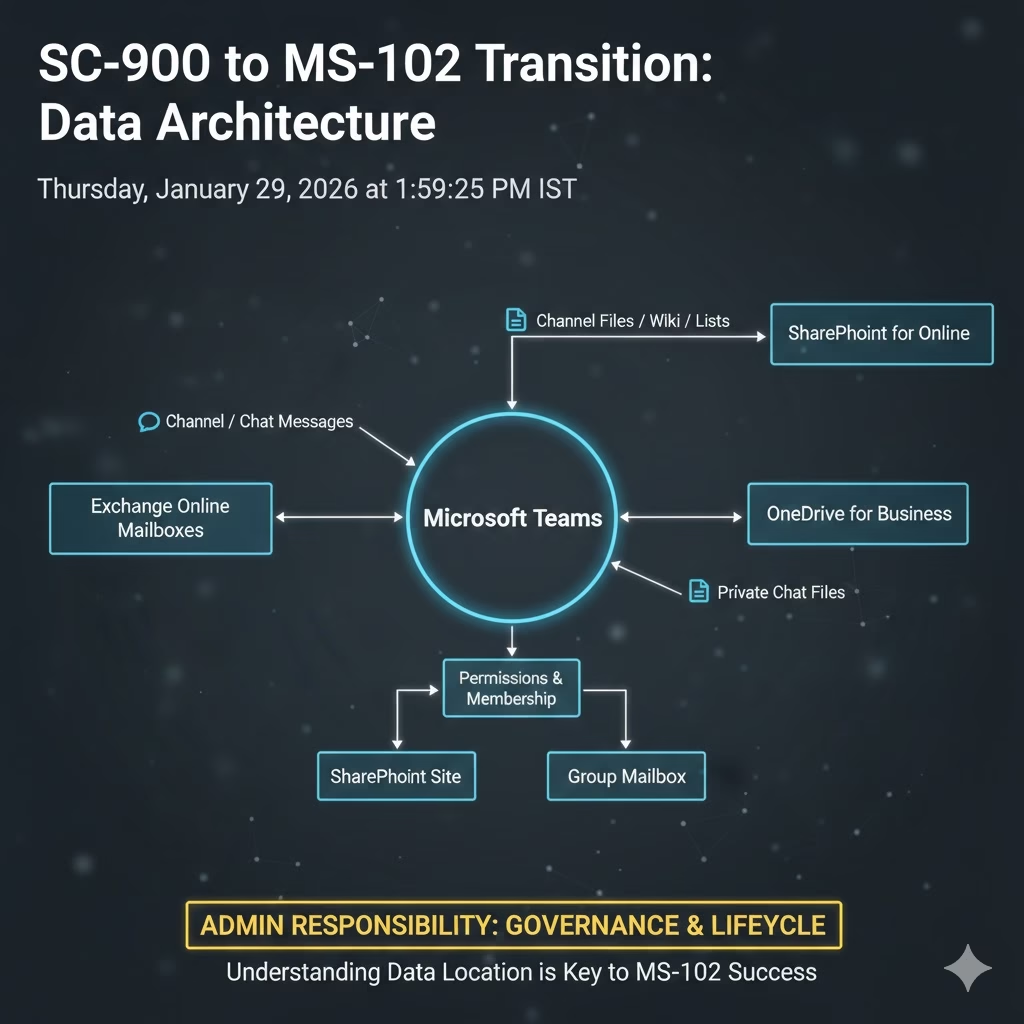
Microsoft 365 Is Not One Data Store
Senior administrators learn this quickly:
Microsoft 365 is a collection of workloads,
each with its own data model and behavior.
At a high level:
- Exchange Online
- Mailboxes
- Calendars
- Contacts
- Compliance copies of Teams chats
- SharePoint Online
- Team files
- Channel documents
- OneDrive for Business
- Shared content
- Microsoft Teams
- Chat messages
- Channel conversations
- Meetings metadata
(but not file storage itself)
Teams feels like a single product —
but it is really a front-end for multiple back-end services.
The Teams Illusion (Every Admin Learns This Late)
One of the most common admin realizations is this:
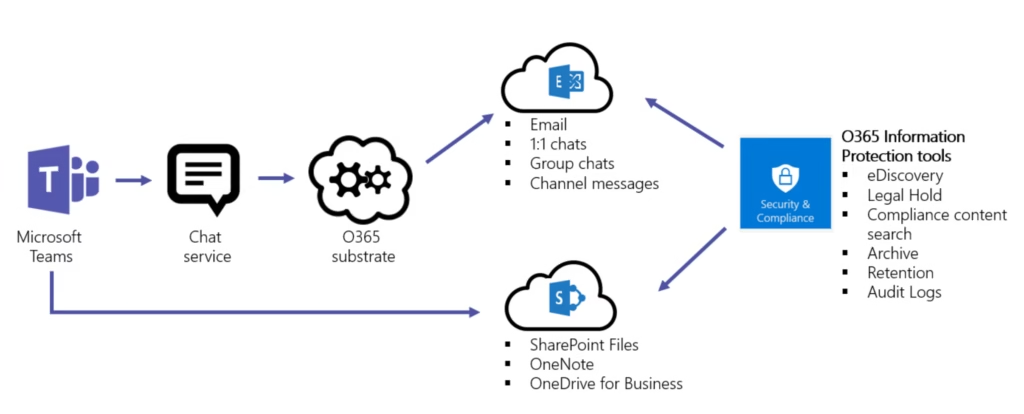
Teams doesn’t store files. SharePoint does.
When a Team is created:
- A Microsoft 365 Group is created
- A SharePoint site is created
- An Exchange mailbox is created
- Permissions are linked automatically
This means:
- A Teams issue might be a SharePoint issue
- A sharing issue might be an identity issue
- A retention issue might be a mailbox issue
Understanding data location is what separates tool operators from platform administrators.
Why Data Location Matters for Admin Decisions
Here’s where senior admins think differently.
If data lives in:
- Exchange → retention behaves one way
- SharePoint → retention behaves differently
- Teams chat → deletion rules change again
This impacts:
- Legal holds
- Retention policies
- eDiscovery searches
- User deletion outcomes
- Backup and restore expectations
Many “security incidents” turn out to be:
Admins misunderstanding where the data was stored.
Data Location Drives Governance (Not the Other Way Around)
A common beginner mistake:
“Let’s design retention first.”
A senior admin approach:
“Let’s map where data lives, then apply governance.”
Why?
- You can’t retain what you can’t locate
- You can’t delete what you don’t understand
- You can’t explain data behavior during audits without clarity
Governance only works when data architecture is understood first.
Mini-Lab: Trace Data the Admin Way (10 Minutes)
Understanding the theory is the first step, but the SC-900 to MS-102 Transition: Data Architecture only truly clicks when you see the backend storage in action. In the SC-900 mindset, you might simply see a file in a chat; however, to think like an MS-102 administrator, you must be able to trace that file to its actual physical “home.”
Perform this 10-minute trace to verify your understanding of how workloads connect
Step 1
Create a new Microsoft Team.
Step 2
Upload a file in:

- A standard channel
- A private or shared channel (if available)
Step 3
Now trace:
- Where the file appears in SharePoint
- Which site collection does it belong to
- Which permissions were applied automatically
Step 4
Ask yourself:
- Which admin center would I troubleshoot from?
- Which retention policy would apply here?
- What happens if the user is deleted?
If you can answer confidently, you’re thinking like an MS-102 admin.
Why This Post Exists Before MS-102 Core Topics
Before we go deep into:
- Exchange administration
- SharePoint governance
- Teams policies
- Compliance and retention
One rule must be clear:
Microsoft 365 administration is workload-aware, not feature-based.
Data location is the map.
Everything else is navigation.
What’s Next in the Transition Series
In the final transition post, we shift mindset again:
Why admins think in lifecycle, not features.
Because once data and identity are clear,
ownership becomes the real challenge.
Final Thought
Mastering the SC-900 to MS-102 Transition: Data Architecture is the final step in moving from security theory to admin reality
SC-900 teaches you that data matters. MS-102 teaches you where data lives and why guessing is dangerous.
Once you understand data locations, Microsoft 365 stops feeling complex; it starts feeling predictable.
If you’re looking for the official and most up-to-date SC-900 exam objectives, learning paths, and reference material, Microsoft maintains them on Microsoft Learn’s SC-900 documentation.
If you’re new to the series or want a clearer foundation before moving forward, you can also read our detailed guide on what SC-900 is, where we explain Microsoft Security, Compliance, and Identity fundamentals in plain language.







