Security vs Compliance in SC-900 explains a distinction that is often misunderstood in real environments: security reduces risk, while compliance proves responsibility.
Many organisations invest heavily in security tools but still fail audits. Others meet compliance requirements yet remain vulnerable to attacks. SC-900 includes this topic to ensure learners understand why security and compliance are related—but not the same.
This article explains the difference clearly, without tools or configurations, exactly as expected for SC-900 (Microsoft Security, Compliance, and Identity Fundamentals).
Why SC-900 Separates Security and Compliance
In practice, teams often assume:
- “If we are secure, we are compliant.”
- “If we are compliant, we are secure.”
Both assumptions are incorrect.
SC-900 separates these concepts to help learners:
- Avoid architectural mistakes
- Understand organisational responsibilities
- Communicate clearly across security, IT, and compliance teams
What Is Security? (SC-900 View)
At SC-900 level, security focuses on:
Preventing, detecting, and responding to threats that could compromise systems, identities, or data.
Security aims to:
- Reduce attack surface
- Detect malicious activity
- Respond to incidents
Security answers the question:
“How do we protect systems and data from threats?”
What Is Compliance? (SC-900 View)
At SC-900 level, compliance focuses on:
Ensuring data and systems are handled according to policies, laws, and regulations—and proving it.
Compliance aims to:
- Enforce data handling rules
- Maintain audit trails
- Support investigations and reporting
Compliance answers the question:
“How do we prove we follow rules and regulations?”
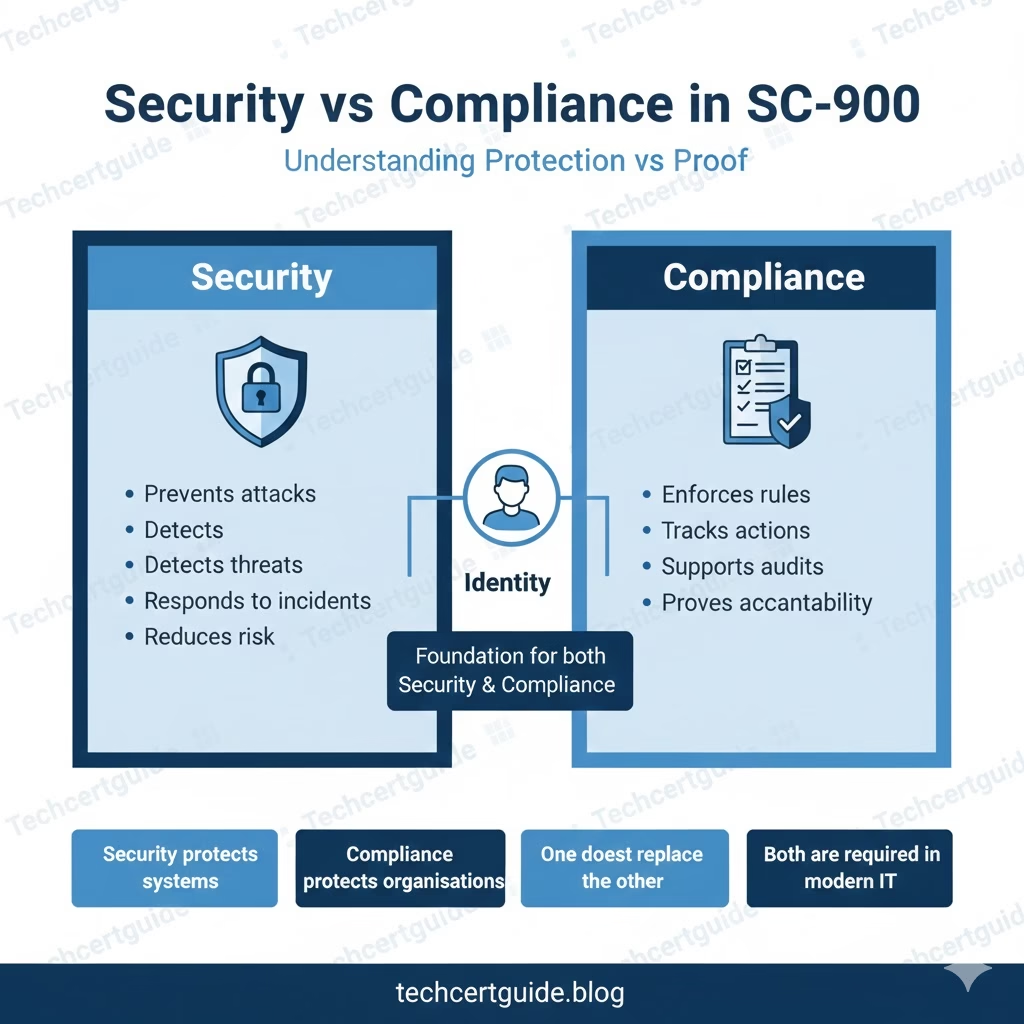
Security vs Compliance: Key Differences
SC-900 expects you to understand the clear distinction:
| Security | Compliance |
|---|---|
| Prevents attacks | Enforces rules |
| Detects threats | Tracks actions |
| Responds to incidents | Supports audits |
| Technical focus | Governance focus |
| Risk reduction | Accountability |
Both are necessary—but they solve different problems.
Why Being Secure Does NOT Guarantee Compliance
An organisation may:
- Block malware
- Detect phishing
- Enforce MFA
Yet still fail compliance because:
- Data retention rules are missing
- Audit logs are incomplete
- Data is shared improperly
SC-900 highlights that compliance requires evidence, not just protection.
Why Being Compliant Does NOT Guarantee Security
An organisation may:
- Pass audits
- Follow documented policies
- Retain logs correctly
Yet still be insecure if:
- MFA is not enforced
- Identity protection is weak
- Threats are not detected in time
SC-900 reinforces that compliance alone does not stop attacks.
How Security and Compliance Work Together
In well-designed environments:
- Security reduces the likelihood of incidents
- Compliance ensures incidents can be investigated and explained
Together, they provide:
- Protection
- Visibility
- Accountability
- Trust
SC-900 tests whether you understand this balance, not tool details.
Where Microsoft Places Security and Compliance
At a high level:
- Security tools focus on protection and detection
- Compliance tools focus on data governance and accountability
SC-900 introduces both perspectives to ensure learners understand how modern platforms embed compliance into security design.
Security, Compliance, and Identity
Identity sits at the center of both:
- Security controls access
- Compliance tracks actions
This reinforces the SC-900 theme:
Identity is the foundation of both security and compliance.
Security vs Compliance and Zero Trust
Zero Trust assumes:
- Breaches can happen
- Access must be verified
- Actions must be monitored
Security enforces access decisions.
Compliance records and governs what happens next.
This conceptual link is exam-relevant.
What SC-900 Does NOT Expect You to Know
SC-900 does not require:
- Regulatory framework details
- Audit execution steps
- Compliance reporting workflows
- Tool configuration knowledge
The exam tests understanding of intent and responsibility, not operations.
Common Misconceptions SC-900 Corrects
- “Compliance is just paperwork.”
It enforces real controls on data. - “Security teams handle compliance.”
Compliance spans IT, legal, HR, and business. - “Passing audits means we’re safe.”
Security posture still matters.
SC-900 Exam Tip
For SC-900:
- Clearly distinguish security vs compliance
- Know what each is responsible for
- Understand why both are required
- Avoid assuming one replaces the other
If you can explain why protection and proof are both needed, you’re exam-ready.
Final Thoughts: Protection and Proof Go Hand in Hand
Security protects organisations from threats.
Compliance protects organisations from risk, liability, and loss of trust.
SC-900 includes this topic to ensure learners understand:
- Why both are essential
- Why neither is sufficient alone
- How modern organisations balance the two
Understanding this distinction is critical for any modern IT or security role.
Also, view our detailed guide on what is SC-900 to understand Microsoft Security, Compliance, and Identity fundamentals.
For official and up-to-date exam objectives, learning paths, and reference material, refer to Microsoft Learn’s SC-900 documentation.
What’s Next in the SC-900 Series
Next, we’ll move into study and exam strategy content with:
SC-900 Study Plan for Working Professionals: 30 Minutes a Day







