Introduction
“Struggling to remember the difference between SSPR and MFA registration for the MS-102? You aren’t alone. SSPR is a top-3 exam topic because it’s the bridge between cloud security and on-premise Active Directory.”
SSPR in Microsoft Entra ID allows users to reset or unlock their passwords without administrator assistance. In modern organizations, password issues are one of the most common helpdesk requests. SSPR reduces operational workload while improving security and user productivity.
For the MS-102 Microsoft 365 Administrator exam, understanding SSPR is important because it connects identity management, authentication methods, and hybrid identity scenarios.
SSPR also integrates with Identity Protection, enabling automated remediation when accounts are suspected to be compromised.
What Is SSPR in Microsoft Entra ID?
SSPR in Microsoft Entra ID is a feature in Microsoft Entra ID that allows users to:
- Reset forgotten passwords
- Unlock their accounts
- Recover access securely
Users verify their identity using configured authentication methods before resetting the password.
This removes the need for manual administrator intervention.
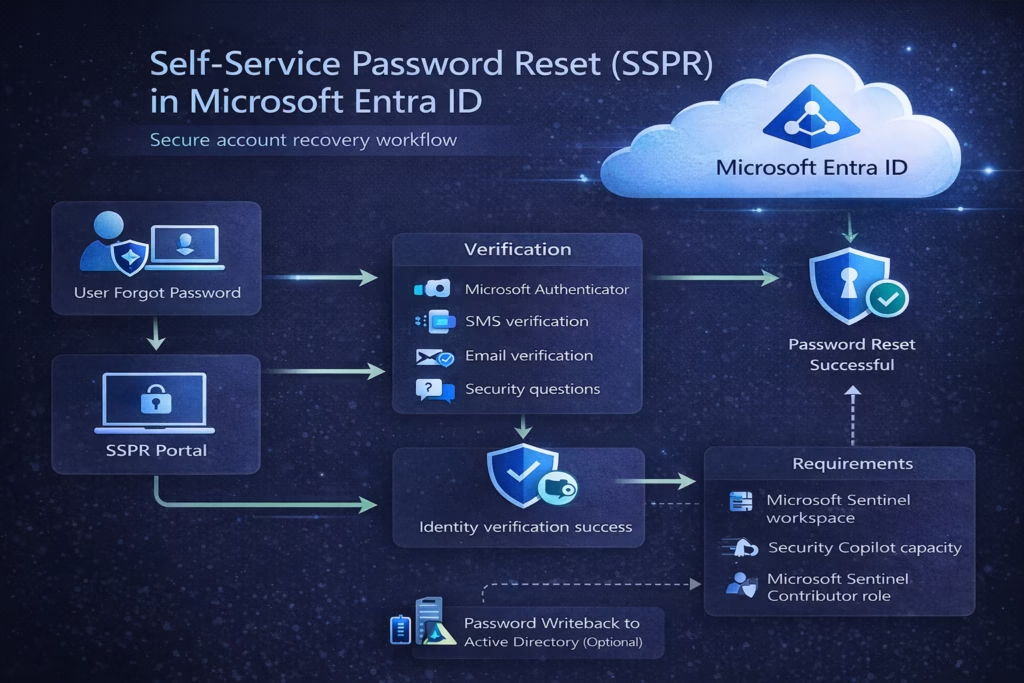
Benefits of SSPR in Microsoft Entra ID
Organizations implement SSPR to achieve several benefits:
Reduced Helpdesk Workload
Password reset requests represent a large portion of IT support tickets. SSPR significantly reduces these requests.
Faster Account Recovery
Users can restore access immediately without waiting for support.
Improved Security
Identity verification ensures that password resets follow secure authentication processes.
Integration with Identity Protection
Risk-based policies may require users to reset passwords when accounts are considered compromised.
How SSPR Works
The SSPR process typically follows these steps:
- User navigates to the password reset portal.
- User enters their username or email address.
- Microsoft Entra ID verifies identity using authentication methods.
- User sets a new password.
- Access is restored.
Verification methods ensure only the legitimate user can perform the reset.
Authentication Methods for SSPR
Users must register authentication methods before using SSPR.
Common methods include:
- Microsoft Authenticator app
- SMS verification
- Email verification
- Security questions
Administrators can configure which methods are allowed.
Organizations often require two authentication methods for higher security.
How to Enable SSPR in Microsoft Entra ID (Step-by-Step)
To enable SSPR:
- Go to Azure Portal
- Navigate to Microsoft Entra ID → Password Reset
- Choose Selected users or All users
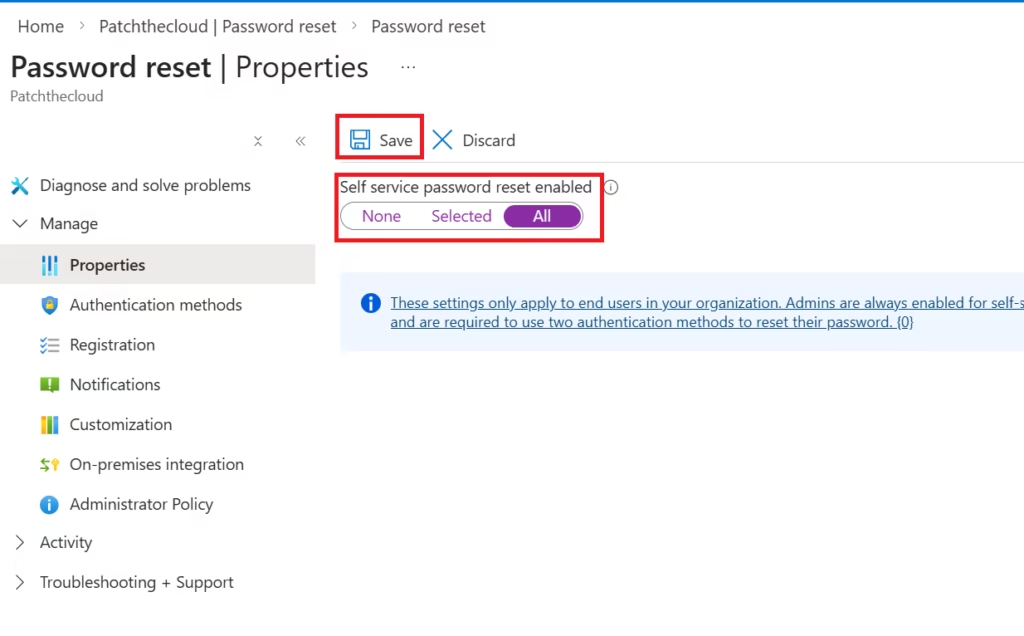
- Save configuration
Most organizations start with a pilot group before enabling it tenant-wide.
Password Writeback in Hybrid Environments
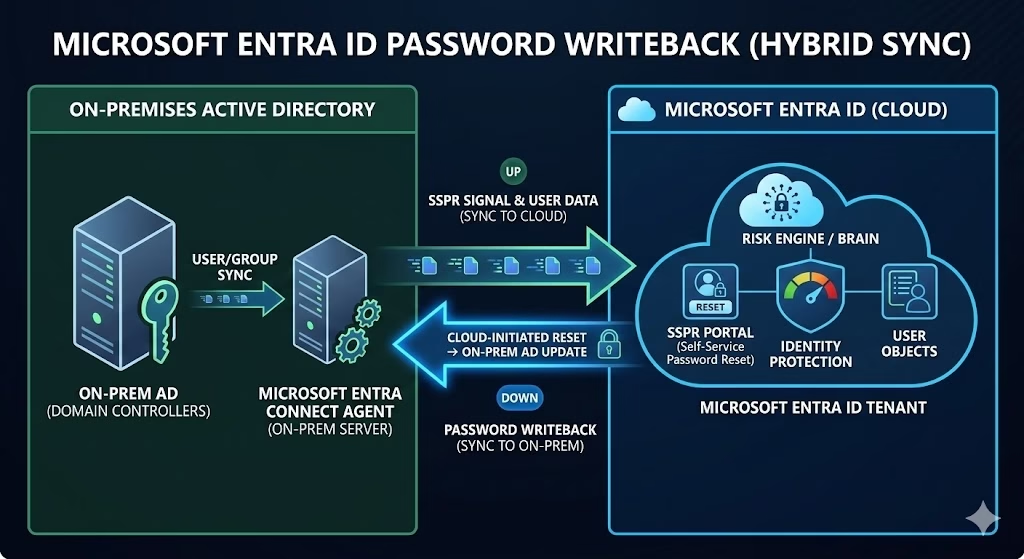
In hybrid identity environments, password changes must synchronize with on-premises Active Directory.
This is done using Password Writeback.
Password Writeback allows:
- Password resets in the cloud
- Synchronization back to on-prem AD
This ensures users maintain a single consistent password across environments.
Password Writeback requires Azure AD Connect configuration.
💡 MS-102 Exam Alert: The “Writeback” Gotcha
On the MS-102 exam, they often ask where Password Writeback is configured.
- The Answer: It is enabled in Microsoft Entra Connect (on-premise agent), but the SSPR policy is managed in the Entra Portal (cloud). You need both for it to work.
SSPR Registration Process
Users must register authentication methods before using SSPR.
Administrators can enforce registration by configuring:
Registration Campaigns
This prompts users to register security information during sign-in.
Registered authentication methods are also used for:
- MFA verification
- Account recovery
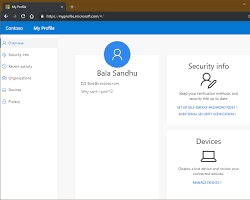
The 2026 Registration Experience: Combined Security Info
Gone are the days when users had to register for MFA and SSPR separately. Microsoft has now fully migrated to the Combined Registration Experience.
- Where users go: mysignins.microsoft.com/security-info
- Why it matters: Users provide their phone, email, or Authenticator app details once, and those methods are automatically used for both Multi-Factor Authentication and Self-Service Password Reset.
- Admin Tip: As an MS-102 administrator, ensure you have migrated to the unified Authentication Methods policy in the Entra portal, as legacy separate policies are being deprecated.
SSPR and Conditional Access
SSPR works alongside Conditional Access and Identity Protection.
For example:
If a user account is detected as high risk:
The Conditional Access policy may require a password reset before access is restored.

This automated remediation strengthens identity security.
SSPR Licensing: Cloud-only vs. Hybrid
One of the most common questions for the MS-102 exam is: “Do I need a license for SSPR?” The answer depends on your environment:
- Cloud-Only Users: SSPR is free for users who exist only in Entra ID (Azure AD). They can reset their cloud passwords without a paid license.
- Hybrid Users (Password Writeback): If you want cloud password resets to sync back to your on-premises Active Directory, you must have a Microsoft Entra ID P1 or P2 (or Microsoft 365 E5/E3) license.
Best Practices for SSPR Deployment
Enable SSPR for All Users
Start with pilot groups, but eventually enable tenant-wide coverage.
Require Multiple Authentication Methods
Requiring at least two verification methods improves security.
Use Registration Campaigns
Ensure users register authentication methods early.
Enable Password Writeback for Hybrid Environments
Hybrid organizations should configure writeback to maintain password consistency.
Monitor Sign-In Logs
Administrators should review logs to track reset activity.
MS-102 Exam Alignment
For the MS-102 exam, focus on:
- What SSPR does
- How authentication methods are used
- Password Writeback in hybrid environments
- SSPR integration with Identity Protection
- Administrative configuration steps
Expect scenario-based questions about user account recovery.
Final Insights
Self-Service Password Reset is more than a convenience feature. It is an essential component of modern identity management in Microsoft 365.
By enabling secure account recovery, organizations can reduce support costs while strengthening identity security.
Combined with MFA, Conditional Access, and Identity Protection, SSPR helps create a resilient identity protection strategy.
For Microsoft 365 administrators preparing for the MS-102 exam, mastering SSPR is an important step toward understanding the complete identity lifecycle.
If you’re new to this learning series, start with the main MS-102 Microsoft 365 Administrator overview, where we explain how all chapters connect and what skills you’ll build across the journey.
For the most accurate and up-to-date exam objectives and reference material, Microsoft maintains the official MS-102 documentation on Microsoft Learn. This series complements those resources by focusing on real-world administrative understanding.
In the next chapter, we will move into: Authentication Methods in Microsoft Entra ID
These concepts connect directly with modern identity security architecture.







