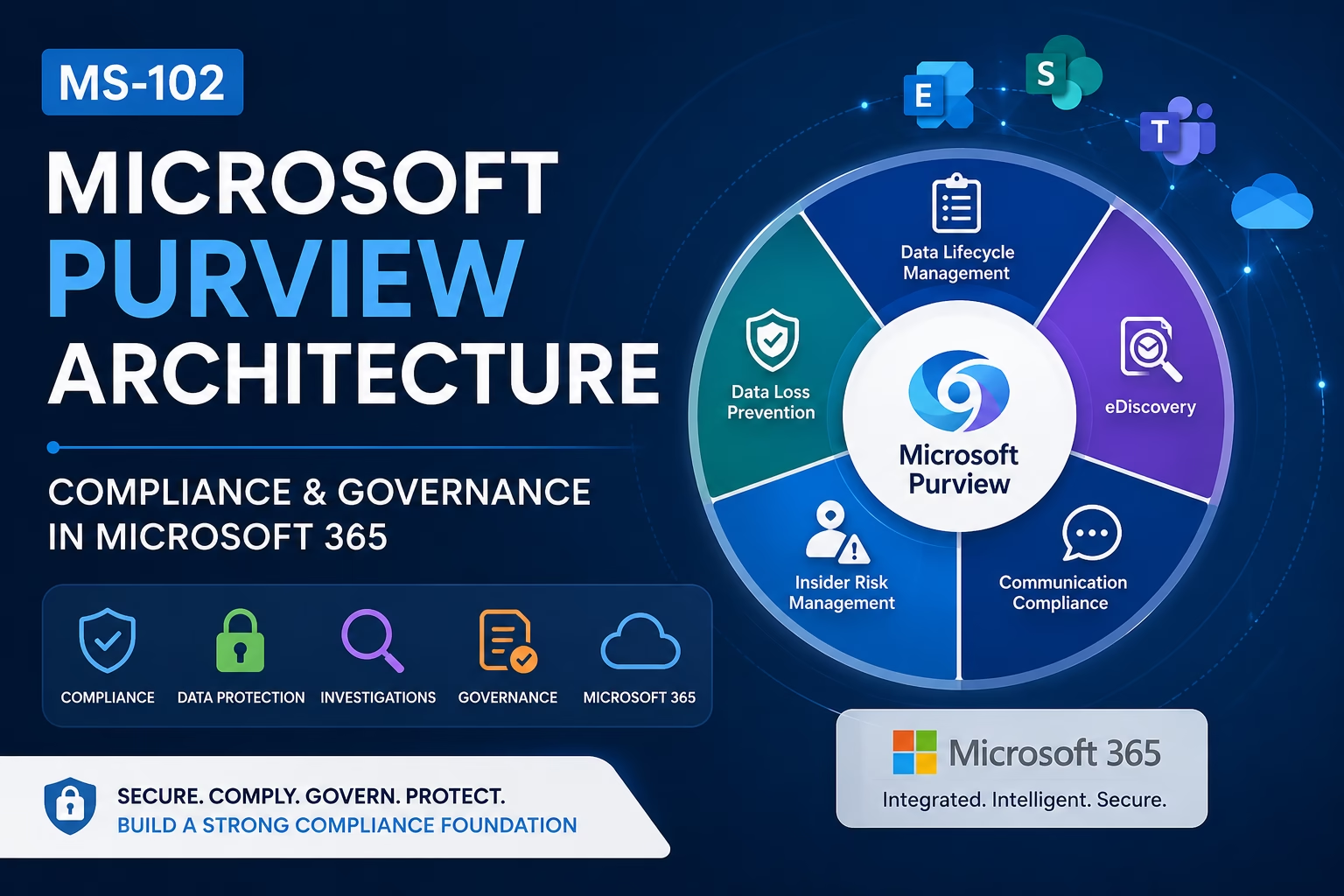
Microsoft Purview Architecture helps organizations centrally manage compliance, governance, data protection, and regulatory requirements across Microsoft 365 environments.
Modern organizations must govern sensitive data across:
- Exchange Online
- SharePoint Online
- OneDrive
- Microsoft Teams
- Endpoint devices
Microsoft Purview provides centralized compliance management capabilities for Microsoft 365 administrators preparing for the MS-102 certification.
Microsoft Purview helps organizations:
- Protect sensitive information
- Manage data lifecycle
- Prevent data loss
- Detect insider risks
- Investigate compliance incidents
- Meet regulatory requirements
For anyone preparing for the MS-102: Microsoft 365 Administrator certification, understanding Microsoft Purview architecture and compliance responsibilities is critical because compliance management is a major Microsoft 365 administrative responsibility.
In this guide, we’ll cover:
- What Microsoft Purview is
- Compliance vs security explained
- Microsoft Purview architecture
- Core Purview solutions
- Admin responsibilities
- Compliance workloads
- Purview portal walkthrough
- Step-by-step lab
- Best practices
- MS-102 exam tips
Learning Objectives
After completing this guide, you will be able to:
- Explain what Microsoft Purview is and why it matters.
- Differentiate compliance from security.
- Describe the Microsoft Purview architecture and workflow.
- Identify core Purview solutions and admin responsibilities.
What is Microsoft Purview?
Microsoft Purview is Microsoft’s unified compliance, governance, and data protection platform for Microsoft 365 and hybrid environments.
Microsoft Purview helps organizations:
- Discover sensitive data
- Classify information
- Protect business data
- Manage records
- Monitor risks
- Investigate compliance events
Purview combines multiple compliance and governance solutions into a centralized platform.
Why Microsoft Purview Matters
Modern organizations face growing challenges:
- Regulatory compliance
- Data leakage
- Insider threats
- Information sprawl
- Legal investigations
- Data retention requirements
Without centralized governance:
- Sensitive data becomes difficult to control
- Compliance risks increase
- Investigations become slower
- Regulatory violations become more likely
Microsoft Purview helps organizations centralize compliance operations across Microsoft 365 workloads.
Compliance vs Security Explained
This is one of the most important MS-102 concepts.
| Security | Compliance |
|---|---|
| Protects systems from attacks | Governs and protects organizational data |
| Focuses on threats | Focuses on regulations and governance |
| Uses Defender, Conditional Access, MFA | Uses Purview, DLP, eDiscovery |
| Prevents unauthorized access | Controls data handling and retention |
Security and compliance work together but serve different purposes.
Microsoft Defender protects systems.
Microsoft Purview protects and governs information.
Microsoft Purview Architecture Explained
Microsoft Purview integrates across Microsoft 365 services to provide centralized compliance and governance capabilities.
Core workloads include:
- Exchange Online
- SharePoint Online
- OneDrive
- Microsoft Teams
- Endpoint devices
- Microsoft Defender
- Entra ID
Purview analyzes and protects data across these connected services.
Microsoft Purview Architecture Workflow
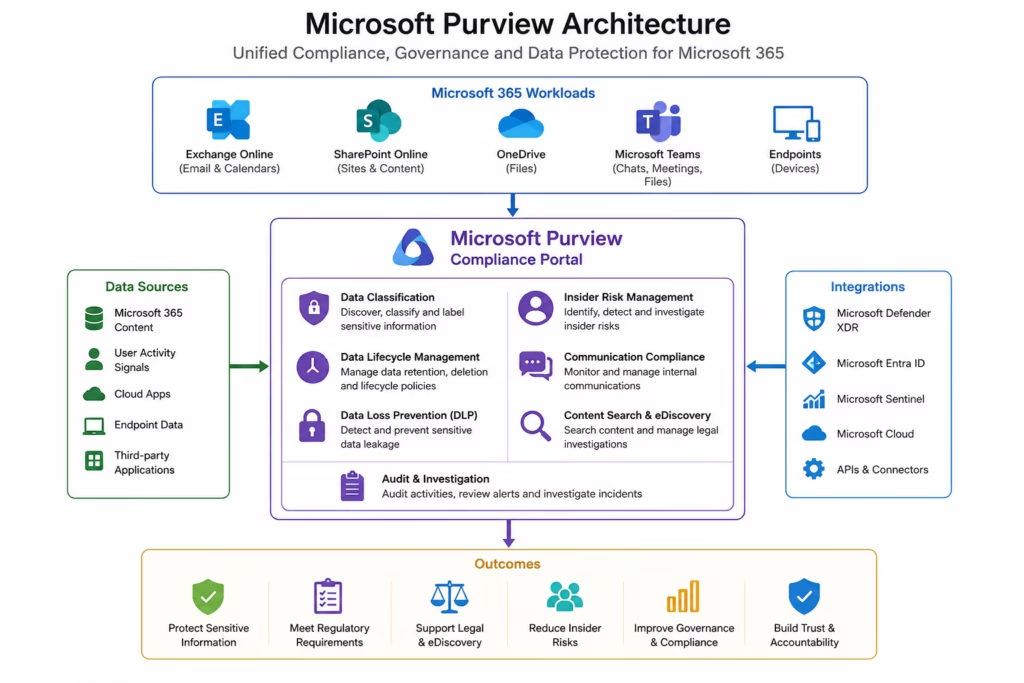
Microsoft Purview architecture illustrating centralized compliance management, data governance, and information protection across Microsoft 365 workloads.
🗺️ Microsoft Purview Architecture Diagram
Core Microsoft Purview Solutions
Microsoft Purview contains multiple compliance and governance solutions.
| Solution | Purpose |
|---|---|
| Data Loss Prevention (DLP) | Prevent sensitive data leakage |
| Sensitivity Labels | Classify and protect information |
| Retention Policies | Manage data lifecycle |
| Insider Risk Management | Detect risky user activity |
| Communication Compliance | Monitor communications |
| Content Search | Search Microsoft 365 data |
| eDiscovery | Legal investigation workflows |
| Audit | Activity tracking and investigations |
These solutions work together inside the Microsoft Purview portal.
Microsoft Purview Admin Responsibilities
Microsoft 365 administrators play a major role in compliance management.
Common responsibilities include:
- Creating compliance policies
- Managing retention settings
- Protecting sensitive data
- Monitoring compliance alerts
- Supporting legal investigations
- Managing access permissions
- Reviewing audit logs
- Enforcing governance standards
Compliance management is now a core operational responsibility for Microsoft 365 administrators.
Microsoft Purview Roles Explained
Microsoft Purview uses role-based access control (RBAC).
Common roles include:
| Role | Responsibility |
|---|---|
| Compliance Administrator | Full compliance management |
| Compliance Data Administrator | Manage compliance data |
| eDiscovery Manager | Handle investigations |
| Records Management | Manage retention and records |
| Insider Risk Management | Investigate insider threats |
Organizations should follow the principle of least privilege.
Microsoft Purview Portal Overview
The main compliance portal is:
Microsoft Purview Compliance PortalAdministrators can access:
- Data lifecycle management
- DLP policies
- Insider risk
- Audit logs
- eDiscovery cases
- Communication compliance
- Content search
- Information protection
This becomes the central compliance management platform for Microsoft 365 environments.
Microsoft Purview Architecture Workloads Explained
Microsoft Purview protects multiple Microsoft 365 services.
| Workload | Example |
|---|---|
| Exchange Online | Email compliance |
| SharePoint Online | Document governance |
| OneDrive | Personal file protection |
| Microsoft Teams | Chat and meeting compliance |
| Endpoints | Device data protection |
This enables cross-platform governance and compliance visibility.
Step-by-Step Microsoft Purview Lab
This is your practical MS-102 administration section.
Step 1: Open Microsoft Purview Portal
Go to:
compliance.microsoft.comSign in using:
- Global Administrator
- Compliance Administrator
- Security Administrator
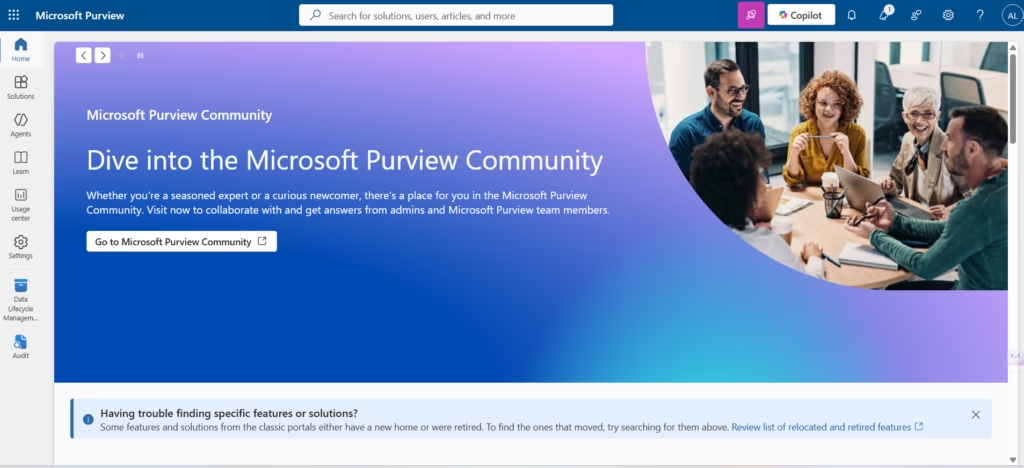
Step 2: Explore Solution Areas
Inside the portal, review:
- Data lifecycle management
- Data loss prevention
- Insider risk management
- eDiscovery
- Audit
- Communication compliance
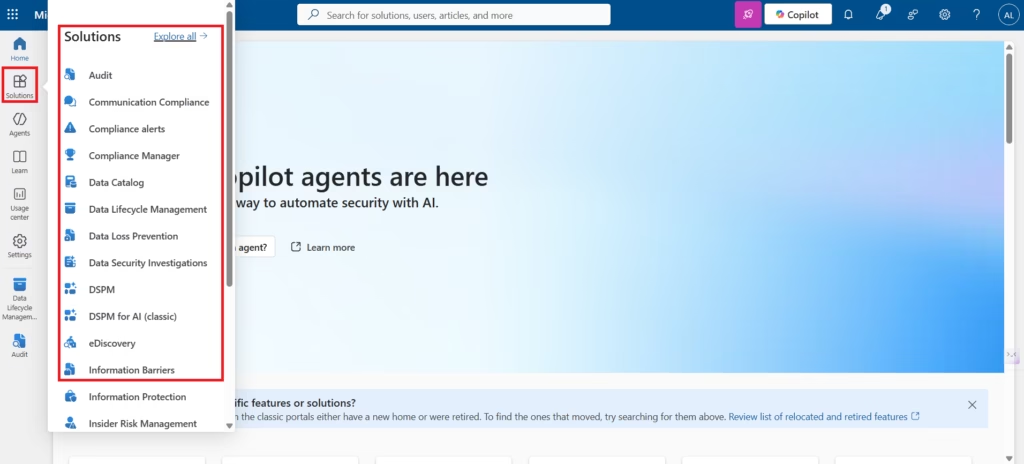
This helps administrators understand Purview capabilities.
Step 3: Review Microsoft 365 Workloads
Identify integrated workloads such as:
- Exchange Online
- SharePoint Online
- OneDrive
- Teams
Microsoft Purview centrally manages compliance policies across these workloads.
Step 4: Review Compliance Solutions
Open several Purview solutions and review:
- Policy configuration
- Alerts
- Investigation tools
- Compliance dashboards
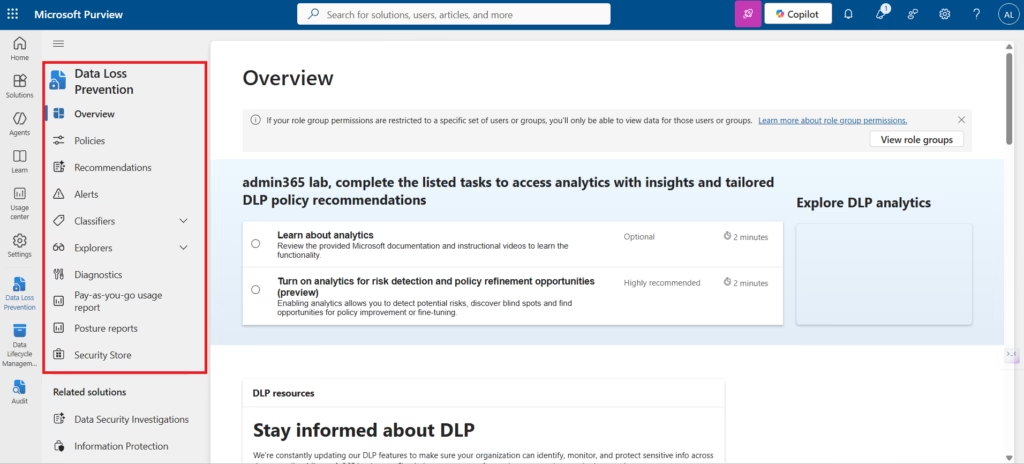
This helps administrators understand compliance workflows.
Step 5: Review Role-Based Access
Navigate to:
PermissionsReview:
- Compliance Administrator
- eDiscovery Manager
- Insider Risk Management roles
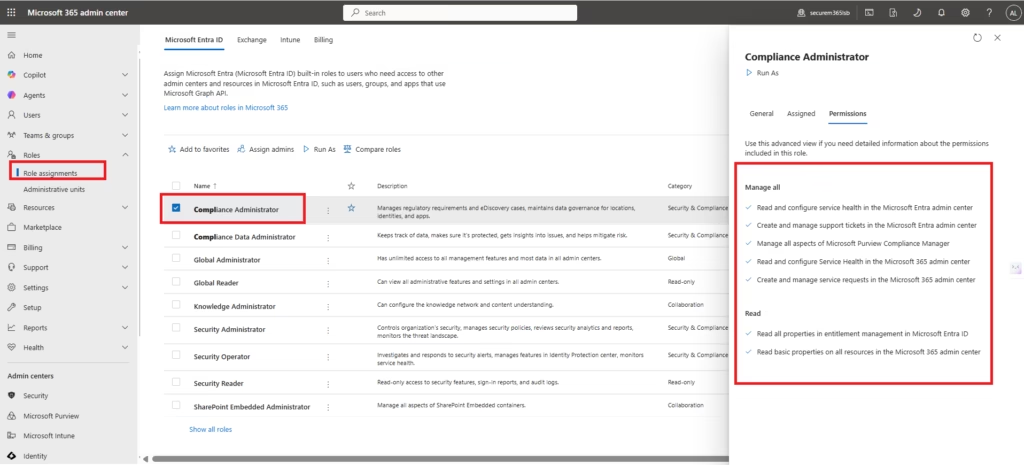
This demonstrates how Microsoft Purview uses delegated administration.
Step 6: Review Audit Capabilities
Open:
AuditReview available audit events and activity tracking capabilities.
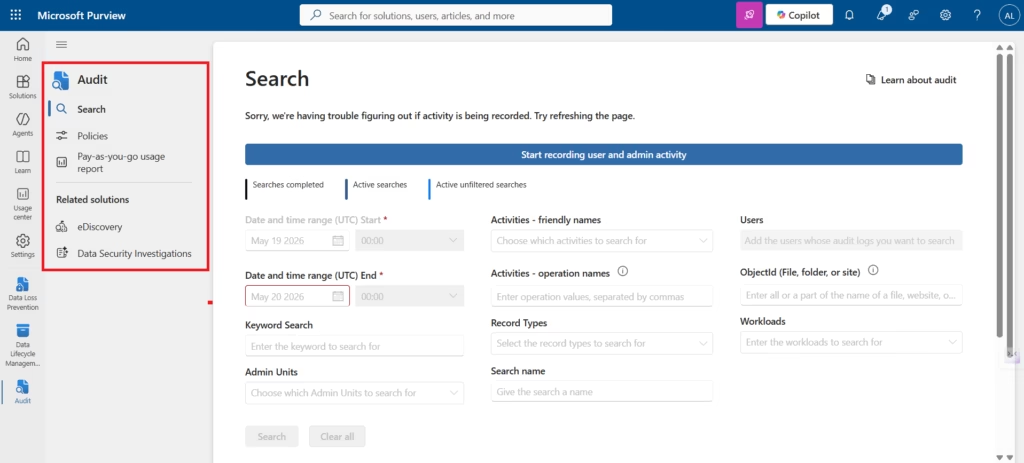
Audit logs help organizations investigate:
- User activity
- File access
- Policy changes
- Administrative actions
Why Microsoft Purview Architecture is Important for Organizations
Microsoft Purview helps organizations:
- Meet regulatory requirements
- Reduce compliance risk
- Protect sensitive information
- Improve governance visibility
- Simplify investigations
- Standardize data protection
As cloud adoption increases, compliance management becomes increasingly important.
Best Practices for Microsoft Purview Architecture
As a senior infrastructure and security engineer, I strongly recommend:
- Use Least Privilege Access
- Only assign required compliance roles.
- Start with Audit Mode
- Test compliance policies before enforcement.
- Classify Sensitive Data Properly
- Strong classification improves DLP and governance effectiveness.
- Review Retention Requirements Carefully
- Retention mistakes can create legal and compliance issues.
- Integrate Security and Compliance, Teams
- Security and compliance should work together for better governance outcomes.
Microsoft Purview vs Microsoft Defender
| Microsoft Defender | Microsoft Purview |
|---|---|
| Threat protection | Data governance |
| Attack detection | Compliance management |
| Endpoint security | Data lifecycle management |
| Incident response | Legal & regulatory workflows |
Both platforms complement each other inside Microsoft 365 environments.
MS-102 Exam Tip
Scenario:
“A company wants centralized tools to manage data retention, insider risks, content searches, and compliance investigations across Microsoft 365 workloads.”
Correct answer:
Microsoft PurviewNot:
- Microsoft Defender XDR
- Exchange Online Protection
- Intune
- Microsoft Sentinel
Very common MS-102 exam scenario.
Common Admin Mistakes
- Treating Compliance as Only a Legal Function
- Compliance is also an operational IT responsibility.
- Over-Permissioning Compliance Roles
- Too many privileged users increase risk.
- Ignoring Data Lifecycle Requirements
- Poor retention configuration can create compliance issues.
- Not Reviewing Audit Logs
- Audit visibility is critical for investigations.
Final Thoughts
Microsoft Purview Architecture helps organizations build a powerful compliance, governance, and data protection framework across Microsoft 365 environments while simplifying regulatory management and information security operations.
Modern organizations must protect more than endpoints and identities.
They must also govern:
- Sensitive business data
- Communications
- Records
- Legal information
- Organizational knowledge
Microsoft Purview helps organizations classify data, manage retention, prevent data leakage, investigate compliance incidents, and enforce governance policies across Microsoft 365 workloads.
For MS-102 candidates, understanding Microsoft Purview architecture and compliance responsibilities is essential.
For administrators, it is operationally critical.
Because modern Microsoft 365 administration is no longer only about managing users and devices.
It is also about governing and protecting organizational information.
Next in the Microsoft Purview Series
Microsoft 365 Compliance Roles & Permissions Explained (MS-102 Guide)
Because effective compliance management starts with proper administrative delegation, role-based access control, and least privilege access design.
Previous Topic
If you haven’t read it yet: Complete Microsoft Defender XDR AIR Guide (MS-102)
Start from the Beginning
MS-102 Microsoft 365 Administrator Overview
https://techcertguide.blog/ms-102-microsoft-365-administration
Official Microsoft Reference
https://learn.microsoft.com/en-us/purview/microsoft-purview-compliance-portal
3 thoughts on “Ultimate Microsoft Purview Architecture Guide: Powerful Compliance & Governance for Microsoft 365 (MS-102)”