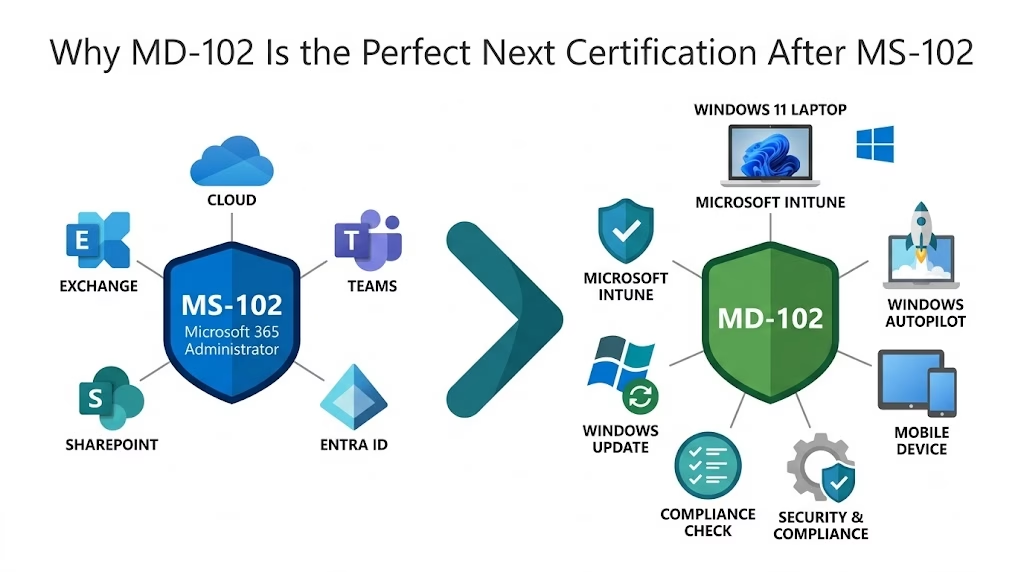
Introduction
In today’s digital-first workplace, managing and securing endpoints efficiently is crucial for organizational success and IT resilience. As companies increasingly adopt cloud services and remote working models, the need for skilled professionals in modern endpoint management continues to grow. The MD-102 certification stands out as a vital credential for IT administrators seeking to demonstrate their expertise in managing devices and policies using Microsoft Endpoint Manager. Achieving this certification not only validates your skills but also opens doors to career advancement, enhances organizational security, and streamlines device management across diverse environments.
What is the MD-102 Certification?
Overview of Microsoft Endpoint Administrator Associate Role
The MD-102 exam certifies professionals as Microsoft Endpoint Administrator Associates, equipping them to implement, manage, and monitor endpoint devices and policies using Microsoft Endpoint Manager and related tools. This role focuses on delivering secure and compliant device management across Windows, macOS, iOS, and Android platforms within Microsoft 365 ecosystems.
Key Skills and Competencies Validated by MD-102
- Configuring and managing device enrollment and policies
- Deploying and managing applications across devices
- Enforcing device compliance with organizational security standards
- Implementing endpoint protection and conditional access
- Monitoring device health and generating reports
Who Should Pursue This Certification?
The MD-102 certification is ideal for:
- IT administrators responsible for endpoint device management
- Technical professionals focused on Microsoft 365 security and device compliance
- Technical managers overseeing endpoint teams
- Organizations aiming to upskill their workforce in modern desktop and endpoint management
Why Choose the MD-102 Certification?
Industry Relevance and Demand for Microsoft Endpoint Administrators
With the rapid expansion of cloud computing and remote work environments, organizations need certified experts to manage heterogeneous device landscapes securely and efficiently. Microsoft Endpoint Manager has become a cornerstone for modern device management, driving high demand for MD-102 certified administrators.
Benefits for Career Advancement and Professional Growth
Earning the MD-102 credential enhances your professional credibility and distinguishes you in a competitive job market. It empowers you to take on advanced roles in IT infrastructure, security, and endpoint management while opening opportunities for higher salaries and leadership positions.
Microsoft Endpoint Manager Ecosystem and Integration with Other Microsoft 365 Services
MD-102 certified professionals gain a deep understanding of how Microsoft Endpoint Manager integrates with Azure AD, Microsoft Defender for Endpoint, Intune, and Microsoft 365 security tools — enabling seamless policy enforcement and holistic device management.
Understanding the MD-102 Exam Details
Exam Objectives and Skills Measured
The MD-102 exam evaluates your ability to perform key tasks within Microsoft Endpoint Manager and related technologies. Core areas include:
- Endpoint Management: Device enrollment, configuration profiles, and lifecycle management
- Policy Configuration: Creating and assigning compliance policies and configuration settings
- Application Management: Deploying and managing Win32, Store, and web applications across endpoints
- Device Compliance and Security: Enforcing security baselines, conditional access, and endpoint protection
- Monitoring and Reporting: Utilizing dashboards and logs for operational insights and troubleshooting
Exam Format, Duration, and Passing Score
The exam typically consists of multiple-choice, scenario-based, and drag-and-drop questions designed to simulate real-world administrative challenges. Candidates have approximately 120 minutes to complete the exam, with a passing score usually set around 700 out of 1000 points, though this may vary slightly depending on the exam version.
Prerequisites and Recommended Experience
While there are no formal prerequisites, effective candidates usually have experience with Windows 10/11 administration, familiarity with Azure Active Directory, and hands-on knowledge of Microsoft Endpoint Manager. Prior completion of MD-101 (Managing Modern Desktops) is helpful but not mandatory.
Comprehensive MD-102 Learning Path
Official Microsoft Training Resources and Instructor-Led Courses
Microsoft offers official learning paths and instructor-led courses to prepare for the MD-102 exam. These include modules covering device enrollment, application deployment, security configurations, and monitoring. Enrolling in Microsoft Learn’s free self-paced tutorials or instructor-led classroom sessions helps reinforce essential concepts.
Recommended Books, Online Tutorials, and Labs
Consider supplementing your study with reputable books focused on Microsoft Endpoint Manager and modern device management. Online tutorials and video courses from platforms like LinkedIn Learning or Pluralsight can provide detailed walkthroughs and practical demonstrations. Hands-on labs enable you to practice common administrative tasks in a controlled environment.
Hands-On Practice Using Microsoft Endpoint Manager
Gaining hands-on experience is critical. Setting up a test environment to simulate device enrollments, policy configurations, and application deployments using Microsoft Endpoint Manager ensures you understand real-world workflows and potential troubleshooting scenarios.
Community Forums and Study Groups for Peer Support
Joining communities such as Microsoft Tech Community, Reddit’s r/Intune, and various LinkedIn groups connects you with fellow candidates and professionals. These forums provide valuable study tips, exam updates, and insights from experienced Endpoint Administrators.
Practical Administrator-Focused Preparation Tips
Setting Up a Test Lab Environment with Microsoft Endpoint Manager
Create a sandbox environment using trial Microsoft 365 subscriptions to practice enrolling devices, configuring policies, and managing apps. This hands-on lab helps translate theoretical knowledge into practical skills.
Configuring Device Enrollment and Compliance Policies
Practice configuring enrollment methods such as automatic enrollment via Azure AD, bulk device import, and co-management with Configuration Manager. Experiment with compliance policies that enforce encryption, password requirements, and threat protection.
Deploying Applications and Updates Efficiently
Work on deploying different types of applications—Win32, MS Store, and Line-of-Business apps. Learn strategies for scheduling updates and managing patch compliance to ensure devices stay current without disrupting end users.
Managing Endpoint Security Using Conditional Access and Endpoint Protection
Familiarize yourself with integrating endpoint compliance data into Azure AD Conditional Access policies. Implement Microsoft Defender for Endpoint configurations and security baselines to safeguard endpoints against threats effectively.
Troubleshooting Common Endpoint Management Issues
Develop skills to identify and resolve typical problems such as enrollment failures, app deployment errors, policy conflicts, and device configuration issues. Using Intune logs and monitoring tools is key to efficient troubleshooting.
Exam Day Best Practices for MD-102 Certification
How to Schedule and Prepare for the Exam Logistics
Register the exam through the official Microsoft certification portal. Choose a convenient date and time, ensuring a quiet testing environment if taking it online. Verify your identification documents and system requirements if testing remotely.
Time Management Strategies During the Exam
Read all questions carefully and allocate time based on question complexity. Flag difficult questions to revisit after answering the easier ones. Keep track of time and avoid spending too long on any single question.
Approaching Different Types of Questions
For scenario-based questions, focus on the problem context and required outcome before reading the answer choices. Use a process of elimination for multiple-choice questions by discarding clearly incorrect answers. Be mindful of questions that allow multiple correct responses.
Post-Certification: Leveraging Your MD-102 Credential
Applying Your Skills in Real-World Administration Jobs
Use your MD-102 knowledge to streamline device management, improve endpoint security posture, and enhance compliance across your organization. Showcase your credential in resumes and professional profiles to attract recruiters and employers.
Continuing Education and Microsoft Certification Renewal
Stay current with ongoing Microsoft Endpoint Manager updates and advances in Microsoft 365 security. Microsoft periodically requires recertification or online renewal to maintain your associate status, ensuring your skills stay relevant.
Advanced Microsoft Certifications as Next Steps
After MD-102, consider advancing to certifications like MS-101: Microsoft 365 Mobility and Security or AZ-104: Microsoft Azure Administrator to expand your expertise in cloud infrastructure and security.
Conclusion
The MD-102 certification represents a significant milestone for IT professionals committed to mastering modern endpoint administration with Microsoft Endpoint Manager. It validates critical skills needed to secure, configure, and manage devices effectively in today’s dynamic environments. By following a structured preparation plan—combining official training, hands-on practice, and community engagement—you can confidently achieve this credential and unlock new career opportunities. Embrace the journey toward becoming a Microsoft Endpoint Administrator Associate and contribute to building resilient, secure digital workplaces.
FAQ Section
| Question | Answer |
|---|---|
| What is the difference between MD-102 and MD-101 exams? | The MD-101 exam covers managing modern desktops with a broader focus on user experience and device management, while MD-102 concentrates specifically on managing endpoints using Microsoft Endpoint Manager and related administrative tasks. |
| How difficult is the MD-102 certification exam? | The exam is moderately challenging, requiring both conceptual understanding and practical experience, especially in endpoint management scenarios. Proper preparation and hands-on practice greatly increase success rates. |
| Can beginners take the MD-102 exam or should they have prior experience? | While there are no strict prerequisites, it is recommended that candidates have some prior experience with Windows device administration and Microsoft 365 services to succeed. |
| How often is the MD-102 exam updated? | Microsoft updates its certification exams periodically to reflect platform changes and new features, typically every 12 to 18 months. Check the official exam page for the latest updates. |
| What resources does Microsoft offer for exam preparation? | Microsoft Learn provides free learning paths, official instructor-led courses, hands-on labs, and exam guides tailored for the MD-102 exam. |
| Is the MD-102 certification valid globally? | Yes, the MD-102 certification is recognized worldwide as a standard for Microsoft Endpoint Administrator expertise. |
| How long does it take to prepare for the MD-102 exam on average? | Preparation time varies based on experience, but most candidates spend 6 to 12 weeks studying and practicing to be exam-ready. |
| What is the renewal policy for the MD-102 certification? | MD-102 certifications require renewal every year through an online free renewal assessment to maintain certification status and ensure skills stay current. |
2 thoughts on “Why MD-102 Is the Perfect Next Certification After MS-102”