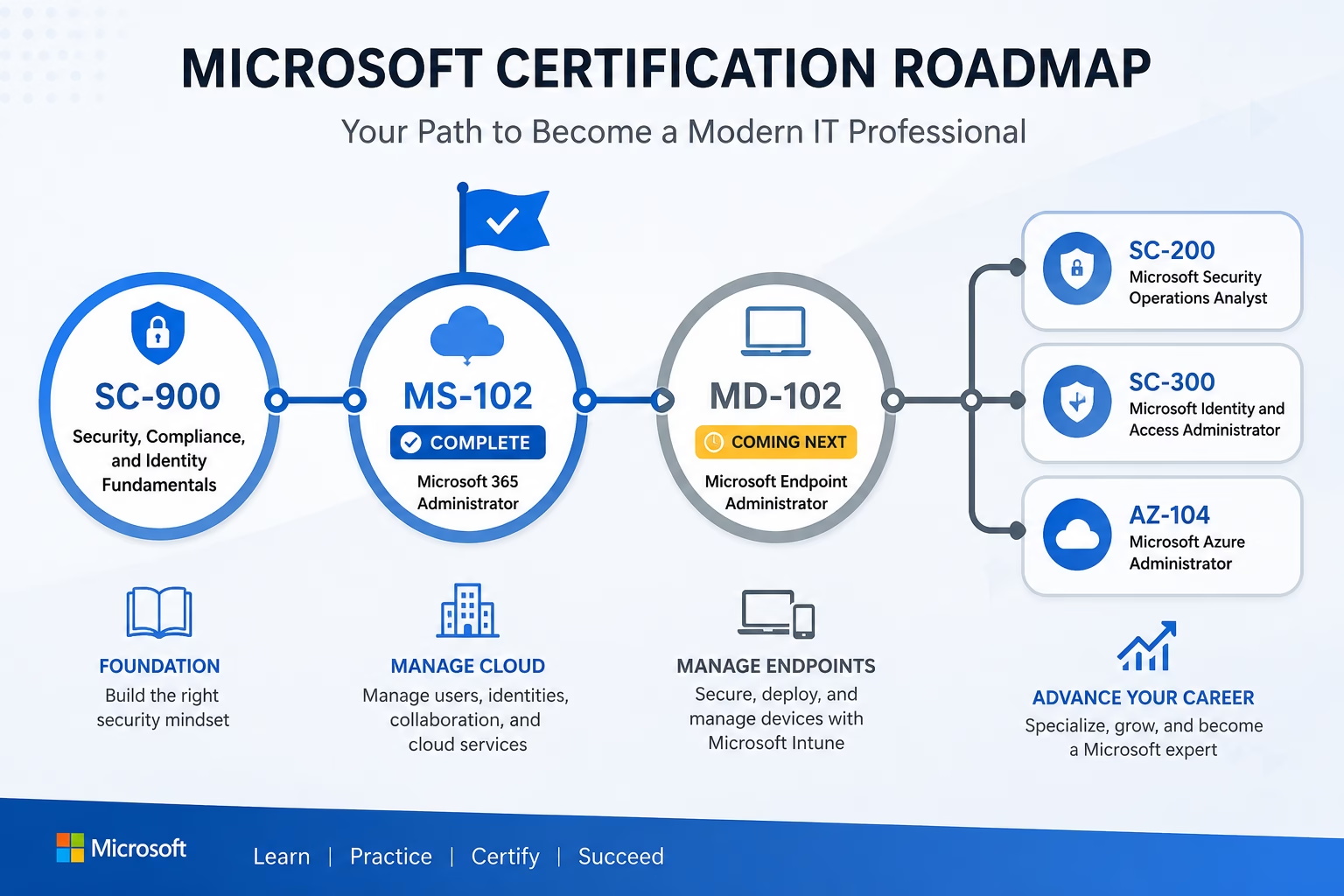
MS-102 Certification is more than just an exam—it’s an important milestone for Microsoft 365 administrators. Over the past several months, TechCertGuide has published a complete MS-102 Certification study series covering Microsoft Entra ID, Exchange Online, Microsoft Teams, SharePoint Online, Microsoft Defender, and Microsoft Purview. Today, I’m excited to announce that the MS-102 Certification series is complete and to introduce the next step in our Microsoft learning journey: MD-102 Microsoft Endpoint Administrator.
MS-102 Certification was a big series to write, and I suspect it was a big series to read. It covers a lot of ground because Microsoft 365 administration covers a lot of ground. Identity, security, compliance, licensing, tenant management, it’s a wide net, and that’s exactly why the certification exists in the first place. Organizations don’t hire administrators who understand one corner of Microsoft 365. They hire administrators who can operate across the whole platform.
But here’s the thing about Microsoft 365 administration: it doesn’t stop at identities and cloud services. Every policy you configure, every security baseline you set, every compliance rule you write eventually has to reach a real device in a real user’s hands. That’s where this series is heading next, and I’ll get to that shortly.
First, let’s talk about what we actually covered.
What We Covered in the MS-102 Series
Throughout the MS-102 Certification, we explored the essential skills required to administer and secure a Microsoft 365 environment. The table below summarizes the core topics covered and explains why each one is important when managing a production Microsoft 365 tenant rather than a lab environment.
| Topic Area | What It Covered | Why It Matters in Production |
|---|---|---|
| Microsoft 365 Administration | Tenant setup, admin roles, admin centers | The operational foundation for every other task in the series |
| Microsoft Entra ID | Identity management, Conditional Access, and authentication | Identity is the new perimeter — most breaches start here |
| Exchange Online | Mail flow, mailbox management, mail security | Email remains the top attack vector in most organizations |
| SharePoint Online | Site management, sharing controls, governance | Uncontrolled sharing is one of the most common compliance gaps |
| Microsoft Teams | Administration, policies, governance | Teams has become a primary collaboration and data-sharing surface |
| Security | Threat protection, secure configurations | Baseline security controls that prevent the majority of common attacks |
| Compliance | Retention, eDiscovery, information governance | Legal and regulatory requirements don’t wait for convenient timing |
| Microsoft Defender | Threat detection and response across workloads | Detection matters as much as prevention |
| Microsoft Purview | DLP, sensitivity labels, insider risk | Data doesn’t just need to be secured — it needs to be tracked |
| Identity Management | Provisioning, access reviews, and lifecycle | Access that isn’t reviewed becomes access that isn’t controlled |
| Licensing | Plans, assignments, optimization | Licensing mistakes are expensive and easy to make at scale |
| Microsoft 365 Apps | Deployment and management | Apps are the daily interface between users and the platform |
| Administration Best Practices | Real-world operational patterns | The difference between passing the exam and running a tenant well |
Exam Tip: MS-102 Certification leans heavily on scenario-based questions. Microsoft isn’t just testing whether you know what a feature does — it’s testing whether you know when to use it. If you only memorized definitions, go back through the series sections on Conditional Access and Purview DLP before sitting the exam.
Skills You Have Gained
If you’ve worked through this series properly, and not just read it, you should now be able to walk into a Microsoft 365 tenant and actually operate it. That includes:
- Managing Microsoft 365 tenants from initial setup through ongoing administration
- Handling user and group administration, including bulk operations
- Configuring identity management and Conditional Access policies in Entra ID
- Administering Exchange Online mail flow and mailbox settings
- Managing the team’s policies and governance at an organizational level
- Administering SharePoint Online sites and sharing controls
- Implementing baseline and advanced security configurations
- Configuring compliance features, including retention and DLP
- Troubleshooting common Microsoft 365 issues across workloads
Best Practice: Don’t treat this as exam knowledge you can set aside once you pass. Every skill on this list is something you’ll use in a real support ticket, a real security incident, or a real audit request. Production-ready knowledge is the actual goal here — the certification is just proof of it.
Real-World Scenario: A user reports they can’t access a shared SharePoint site from a new laptop. Is it a licensing issue, a Conditional Access block, a sharing permission problem, or a device compliance failure? MS-102 Certification gives you the identity and access piece of that puzzle. It doesn’t give you the device piece. That gap is exactly what’s coming next.
Why This Is Only the Beginning
Here’s something that becomes obvious the moment you step into a real IT environment: managing Microsoft 365 as a service is only half the job. The other half is managing the devices your users actually work on.
Modern organizations don’t hand out a laptop and hope for the best. They enroll it, apply compliance policies, push configuration profiles, deploy applications, enforce update rings, and tie all of that back into the identity and Conditional Access policies you just spent an entire series learning. Cloud administration and endpoint administration aren’t separate disciplines anymore — they’re two halves of the same job, and Microsoft’s certification path reflects that directly.
This is where Microsoft Intune and modern endpoint management come in, and it’s the next stop on this learning path.
What’s Coming Next: MD-102
The next series on TechCertGuide is the MD-102: Microsoft Endpoint Administrator certification.
MD-102 covers how organizations deploy, configure, protect, and manage Windows devices and applications using Microsoft Intune and related endpoint tools. Where MS-102 Certification focused on identities, services, and tenant-level administration, MD-102 focuses on the devices those identities actually use every day.
It’s a natural continuation for a few reasons:
- It closes the gap MS-102 Certification leaves open. Conditional Access policies you configured in MS-102 often depend on device compliance signals that MD-102 teaches you to configure.
- It reflects how real IT teams are structured. Many organizations now expect a single administrator to handle both cloud services and endpoint management, especially in small-to-mid-sized environments.
- Endpoint management is where security policy meets reality. You can write the strongest compliance policy in the world, but if it isn’t enforced on the actual device, it’s just documentation.
If you’re building toward a long-term Microsoft 365 or infrastructure career, MD-102 isn’t optional knowledge. It’s the other half of the modern administrator skill set.
What Readers Can Expect
The MD-102 series will be built with the same production-focused approach as MS-102 — roughly 85 in-depth articles covering the full scope of the exam and the real-world skills behind it, including:
- Microsoft Intune fundamentals and administration
- Windows Autopilot and modern deployment
- Device enrollment across platforms
- Device compliance policies
- Conditional Access as it applies to endpoint management
- Configuration profiles and baselines
- Application deployment and management
- Endpoint security configuration
- Windows Update for Business
- Mobile device management
- Windows Autopatch and Hotpatch policies
- Troubleshooting common Intune and device issues
- Exam preparation guidance
- Real-world labs you can actually follow along with
This won’t be a rehash of Microsoft Learn content. Just like the MS-102 series, the goal is to explain not just what each feature does, but when and why you’d actually use it in a live environment.
The Certification Roadmap
If you’re mapping out your longer-term certification path, here’s how these pieces fit together:
Each certification builds directly on the last. SC-900 gives you the vocabulary. MS-102 gives you the cloud administration skills. MD-102 gives you the device management skills. From there, you can specialize based on where your career is heading — security operations, identity architecture, or broader Azure infrastructure.
Key Takeaways
- MS-102 built cloud administration skills.
- MD-102 introduces endpoint management.
- Identity and devices work together.
- The MD-102 learning path begins next.
Thank You
Genuinely, thank you for being part of this series. Whether you read one article or all of them, left a comment, shared a post with a colleague studying for the same exam, or just used this as a quiet reference while working through your own lab it means something. Free certification content only works if people actually use it, and this series has been used.
Certification study is often a solitary process. You’re usually doing it after hours, around a full-time job, without anyone checking in on your progress. If this series made that process even slightly less lonely or more manageable, that was the entire point of writing it.
What’s Next for You
Before you move on:
- Follow TechCertGuide.blog so you don’t miss the MD-102 series launch
- Subscribe to the newsletter for new articles as they are published
- Bookmark this page — it’ll be updated with a direct link to the MD-102 Study Guide index once the series begins
- Share the MS-102 series with anyone else currently studying for it
- Leave a comment with topics you’d like to see covered in MD-102, or in future series beyond it
MS-102 wasn’t the finish line. It was the foundation. MD-102 is where the platform you just learned to administer meets the devices your users actually touch every day — and that’s where this journey continues.
See you in the next series.
1 thought on “MS-102 Certification Complete: Your Next Microsoft Certification Journey”