When most people hear the word identity, they think of a user account.
In modern cloud security, that understanding is incomplete.
In SC-900 (Microsoft Security, Compliance, and Identity Fundamentals), Microsoft makes one thing very clear:
Security is not only about users — it’s about all types of identities.
This includes users, devices, applications, and workloads.
Understanding these identity types is essential to understanding Zero Trust, access control, and modern Microsoft security architecture.
This post explains identity types in SC-900 in simple terms, without configuration or deep technical detail.
Why SC-900 Focuses on Identity Types
Modern environments are complex:
- Users work remotely
- Devices may be managed or unmanaged
- Applications access data automatically
- Services communicate without human interaction
Each of these requires identity-based security.
SC-900 introduces identity types so learners understand:
- Who or what is accessing resources
- Why different controls are needed
- How identity becomes the new security boundary
What Is an Identity? (SC-900 Definition)
In SC-900 terms, an identity is:
Anything that can be authenticated and authorised to access resources.
This includes people and non-human entities.
Understanding this definition helps avoid one of the most common beginner mistakes:
thinking identity equals only a username and a password.
Identity Types in SC-900
User Identities
What Are User Identities?
User identities represent people:
- Employees
- Administrators
- Contractors
- External users (guests)
They are the most familiar identity type.
User identities are typically used to:
- Sign in to applications
- Access email and files
- Perform administrative tasks (if authorised)
Why User Identities Matter in Security
User accounts are the most targeted identity type.
Attackers frequently attempt:
- Phishing
- Credential theft
- Password spraying
This is why SC-900 strongly links user identities with:
- MFA
- Conditional Access
- Least Privilege
Device Identities
What Are Device Identities?
Device identities represent physical or virtual devices, such as:
- Laptops
- Mobile phones
- Tablets
- Servers
A device can have its own identity, separate from the user.
Why Device Identities Matter
In modern security:
- A trusted user on an untrusted device is still a risk
- Device health and compliance affect access decisions
SC-900 introduces device identities to explain why:
- Access is not based on identity alone
- Context matters in Zero Trust
Application Identities
What Are Application Identities?
Application identities represent software applications that:
- Access data
- Call APIs
- Run automated tasks
These identities are often non-interactive (no human sign-in).
Why Application Identities Matter
Applications often have:
- Broad access
- Persistent permissions
- Automated access to sensitive data
If misconfigured, they can become high-risk entry points.
SC-900 includes application identities to highlight:
- Not all security risks come from users
- Applications must also be controlled and monitored
Workload Identities
What Are Workload Identities?
Workload identities represent background services and processes, such as:
- Cloud services
- Automated jobs
- Service-to-service communication
These identities allow systems to communicate securely without user involvement.
Why Workload Identities Matter
Workloads:
- Run continuously
- Often have elevated access
- Are difficult to monitor manually
SC-900 introduces workload identities to show that machine-to-machine access must also follow security principles like Least Privilege.
Comparing Identity Types (SC-900 View)
| Identity Type | Represents | Example |
|---|---|---|
| User | People | Employee, admin |
| Device | Hardware | Laptop, mobile |
| Application | Software | Web app, API |
| Workload | Services | Cloud service, background job |
SC-900 focuses on recognising which identity type is involved, not managing them.
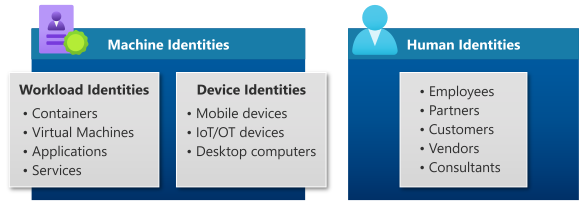
Identity Types and Zero Trust
Zero Trust requires:
- Explicit verification
- Least privilege
- Continuous evaluation
This applies to all identity types, not just users.
For example:
- A user may be trusted only from a compliant device
- An application may access only specific data
- A workload may communicate only with authorised services
SC-900 uses identity types to reinforce that Zero Trust is universal, not user-only.
Common Misconceptions SC-900 Helps Correct
SC-900 addresses several misunderstandings:
- “Only users need security controls.”
Applications and workloads also need identity protection. - “Devices don’t matter if the user is trusted.”
Device state is part of access decisions. - “Identity security stops after login.”
Identity security is continuous.
Understanding these points is important for both the exam and real-world discussions.
SC-900 Exam Tip
For SC-900:
- Be able to identify different identity types
- Understand why each exists
- Know how they relate to Zero Trust
- Avoid thinking in terms of configuration or tooling
If you can explain identity types in plain language, you’re exam-ready.
Final Thoughts: Identity Is More Than Just Users
Modern security is identity-driven.
By expanding the definition of identity to include:
- Users
- Devices
- Applications
- Workloads
Microsoft builds a security model that scales across cloud and hybrid environments.
SC-900 ensures learners understand this broader identity landscape before moving into deeper security or administration roles.
Also, view our detailed guide on what is SC-900 to understand Microsoft Security, Compliance, and Identity fundamentals.
For official and up-to-date exam objectives, learning paths, and reference material, refer to Microsoft Learn’s SC-900 documentation.
What’s Next in the SC-900 Series
Next, we’ll cover:
Role-Based Access Control (RBAC) in SC-900: How Access Is Structured







