Modern Microsoft 365 administration goes far beyond uptime monitoring and incident response. Once services are stable and secure, organizations inevitably ask a deeper, more strategic question:
Are users actually benefiting from the Microsoft 365 platform we deployed?
Microsoft 365 Adoption Score exists to help answer that question, but only when it is understood and used correctly.
For administrators preparing for the MS‑102 Microsoft 365 Administrator exam, the Microsoft 365 Adoption Score is not about monitoring people. It is about understanding adoption patterns, user experience, and environmental readiness.
This article explains:
- What Microsoft 365 Adoption Score is and is not
- Why Microsoft introduced it
- How administrators should interpret it responsibly
- How it appears in the MS‑102 exam
Why Microsoft Introduced the Microsoft 365 Adoption Score
Organizations often migrate to Microsoft 365 with expectations of immediate productivity gains. In reality, productivity outcomes depend on multiple factors, including:
- User adoption behavior
- Collaboration habits
- Device health and OS currency
- Network reliability
- Application update consistency
Traditional usage reports answer what activity occurred, but they rarely explain why adoption is low or why experiences are poor.
Microsoft introduced the Microsoft 365 Adoption Score to provide actionable insight, not judgment, into these conditions. It highlights friction points and adoption gaps that raw usage metrics alone cannot explain.
This philosophy aligns directly with the MS‑102 exam focus on operational insight and continuous improvement, not just configuration tasks.
What Microsoft 365 Adoption Score Is and Is Not
Understanding this distinction is critical, both in real‑world administration and for MS‑102 exam success.
What Microsoft 365 Adoption Score IS
- A tenant‑level insight tool
- A way to analyze organizational adoption trends
- A mechanism to identify experience and environmental readiness issues
- A structured framework for continuous improvement
What Microsoft 365 Adoption Score Is NOT
- An employee performance metric
- A user productivity ranking system
- A monitoring or surveillance tool
- A compliance or enforcement mechanism
Microsoft explicitly states that the Microsoft 365 Adoption Score is privacy‑by‑design, using aggregated, anonymized signals rather than individual tracking. MS‑102 exam questions frequently validate this conceptual understanding.
Where to Access the Microsoft 365 Adoption Score
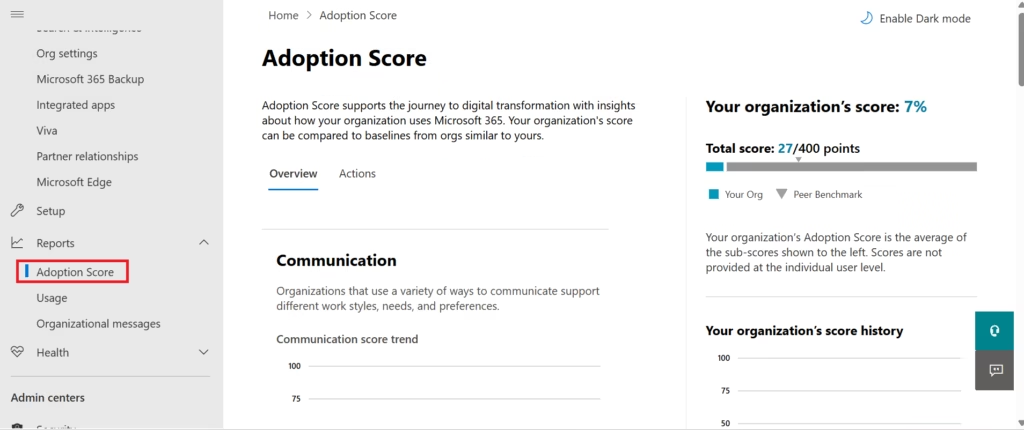
Microsoft 365 Adoption Score is available in the Microsoft 365 Admin Center:
Microsoft 365 Admin Center → Reports → Adoption Score
Only appropriate administrative roles (such as Global Administrator or Reports Reader) can access this data. End users do not see the Adoption Score or productivity insights.
The dashboard presents:
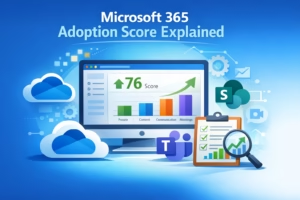
- Overall Adoption Score
- Breakdown by experience category
- Supporting insights and Microsoft‑provided improvement actions
Core Components of Microsoft 365 Adoption Score
Microsoft 365 Adoption Score is divided into two primary experience categories.
People Experiences
People Experiences focuses on how users collaborate and interact across Microsoft 365 workloads.
Key signals include:
- Microsoft Teams chats and channel collaboration
- File sharing and co‑authoring via OneDrive and SharePoint
- Email and calendar collaboration patterns
- Cross‑workload usage (Teams + SharePoint + OneDrive)
These insights help administrators answer:
- Are users collaborating digitally?
- Are modern workflows being adopted?
- Are legacy habits limiting platform value?
Importantly, these metrics reflect organizational behavior, not individual effectiveness.
Technology Experiences
Technology Experiences focus on the environment, enabling productivity.
Common insights include:
- Device OS compliance levels
- Microsoft 365 Apps update health
- Network connectivity and reliability
- Endpoint configuration consistency
Low Technology Experience scores often indicate:
- Outdated operating systems
- Poor network performance
- Unsupported client configurations
In MS‑102 scenario‑based questions, this distinction helps administrators determine whether productivity complaints stem from technology constraints rather than user resistance.
Adoption Score vs Usage Reports
This distinction frequently appears in MS‑102 exams.
| Tool | Purpose |
|---|---|
| Usage Reports | Show raw activity data |
| Adoption Score | Interprets adoption and experience |
Usage reports answer:
“What happened?”
Adoption Score helps explain:
“Why it might be happening.”
For example:
- Usage reports may show low Teams adoption
- Adoption Score may correlate with device issues or network instability
These tools are complementary, not interchangeable.
Hands‑On Lab: Establishing the Adoption Foundation
This Day‑1 lab focuses on enabling real adoption behaviors, not chasing immediate score increases.
Microsoft Adoption Score reflects trends over time, not instant changes.
Lab Environment
- Microsoft 365 tenant with M365 E3 licenses
- Users assigned licenses and signed in
- Access to Microsoft 365 Admin Center
Lab 1: Enable and Review Microsoft Adoption Score
- Access Reports → Adoption Score
- Review baseline scores and opportunity areas
- Note Microsoft‑recommended improvement actions
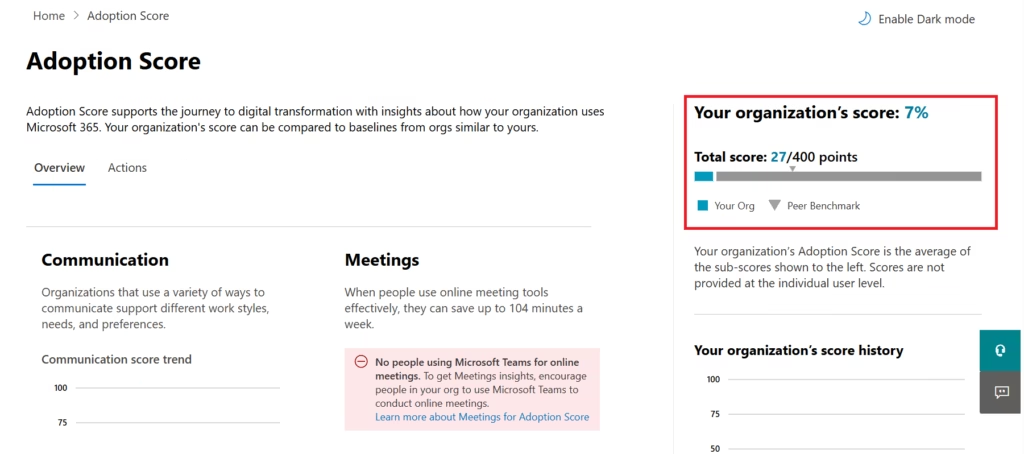
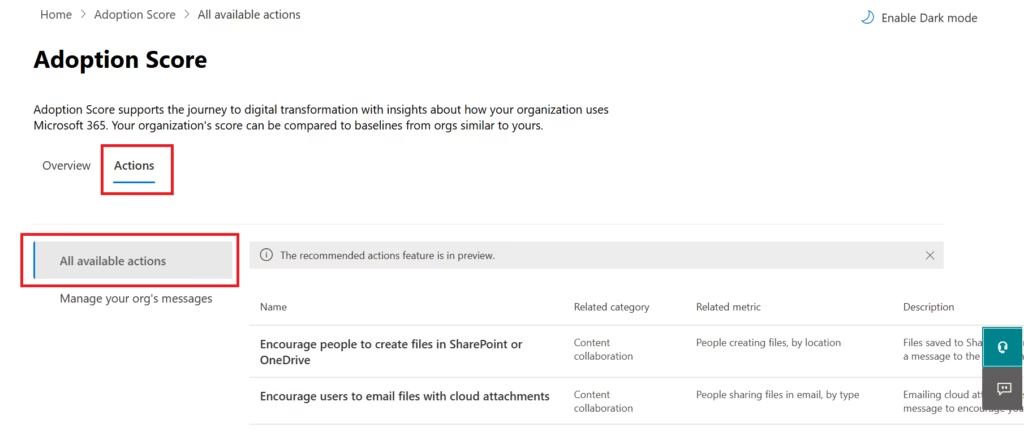
This establishes the starting point, which is essential for meaningful trend analysis.
Lab 2: OneDrive Adoption (People Experience)
Actions performed:
- Users signed in to Microsoft 365 (office.com)
- Uploaded and accessed files in OneDrive
- Shared files internally
Outcome:
- Establishes cloud identity usage
- Drives personal file storage adoption
Merely enabling OneDrive does not impact the Microsoft Adoption Score; user interaction does.
Lab 3: SharePoint Online Adoption (Content Collaboration)
Actions performed:
- Created a SharePoint Team Site
- Uploaded Word, Excel, and PowerPoint files
- Shared documents with edit permissions
- Performed co‑authoring
This directly contributes to Content Collaboration signals measured by the Microsoft Adoption Score.
Lab 4: Microsoft Teams Adoption (Communication & Meetings)
Actions performed:
- Created a Microsoft Team
- Used channel conversations and private chats
- Shared OneDrive and SharePoint files inside Teams
- Scheduled and joined Teams meetings
- Used screen sharing during meetings
These activities begin influencing both the Communication and Meetings experience categories.
Key Observation
Microsoft 365 Adoption Score does not update in real time.
Visible score improvements typically appear after several days of sustained usage.
Success is defined by:
- Adoption behaviors initiated
- Collaboration patterns established
- Environmental readiness verified
Privacy, Trust, and Administrator Responsibility
One of the most sensitive areas of the Adoption Score is trust.
Microsoft designed the Adoption Score to:
- Avoid exposing individual‑level behavior
- Prevent employee ranking
- Encourage positive adoption discussions
Administrators must ensure:
- Leadership understands what the score represents
- Data is not misused for performance management
- Insights are framed constructively
Misuse of the Adoption Score can erode user trust and damage governance maturity.
Real‑World Administrative Scenario
An organization reports:
“Users say Teams is slowing them down.”
Correct administrative workflow:
- Review Teams usage reports
- Analyze the Adoption Score technology experience
- Identify outdated clients or device issues
- Address root causes
- Communicate improvements
Adoption Score provides evidence‑based insight rather than assumptions.
MS‑102 values this structured approach.
MS‑102 Exam Focus: Adoption Score
Expect questions that assess whether you understand:
- Where is the Adoption Score located
- What data does it provide
- How it differs from usage reports
- That it does not evaluate individual performance
Example exam question:
Which tool helps administrators understand adoption trends without tracking individual productivity?
Correct answer: Adoption Score
Best Practices for Administrators
1️⃣ Use Adoption Score as a discussion tool, not a target
2️⃣ Correlate scores with usage reports, not instead of them
3️⃣ Address technology barriers before user training
4️⃣ Communicate improvements transparently
5️⃣ Review score trends over time—not daily fluctuations
Key Takeaways
- Adoption Score focuses on experience and adoption
- It is not a monitoring or enforcement tool
- Ethical usage is critical
- Understanding its purpose is required for MS‑102 success
Adoption Score represents Microsoft’s shift toward experience‑driven administration, where success is measured by enablement rather than enforcement.
Next Step
Continue your learning with:
Microsoft 365 Release Management
https://techcertguide.blog/microsoft-365-release-management-guide
Previous Topic
If you haven’t explored it yet:
Microsoft 365 Tenant Health Monitoring
Start from the Beginning
MS-102 Microsoft 365 Administrator Overview
https://techcertguide.blog/ms-102-microsoft-365-administration/
Official Microsoft Reference
https://learn.microsoft.com/en-us/certifications/exams/ms-102