Microsoft Entra ID Overview in SC-900
Modern security starts with identity.
In cloud and hybrid environments, networks are no longer the primary boundary. Users access applications from anywhere, on multiple devices, using cloud services that sit outside traditional perimeters.
This is why Microsoft Entra ID is a core topic in SC-900 (Microsoft Security, Compliance, and Identity Fundamentals).
SC-900 does not treat Entra ID as an admin tool.
It introduces Entra ID as the foundation of identity, access, and Zero Trust security in Microsoft environments.
This article provides a clear Microsoft Entra ID overview at SC-900 level, focusing on what it is, why it matters, and how it fits into modern security architecture.
What Is Microsoft Entra ID? (SC-900 Definition)
Microsoft Entra ID (formerly Azure Active Directory) is Microsoft’s cloud-based identity and access management service.
In simple terms:
Microsoft Entra ID verifies who you are and controls what you can access.
It is used to:
- Authenticate users
- Authorise access to applications and resources
- Enforce identity-based security policies
SC-900 focuses on understanding Entra ID conceptually, not on configuration.
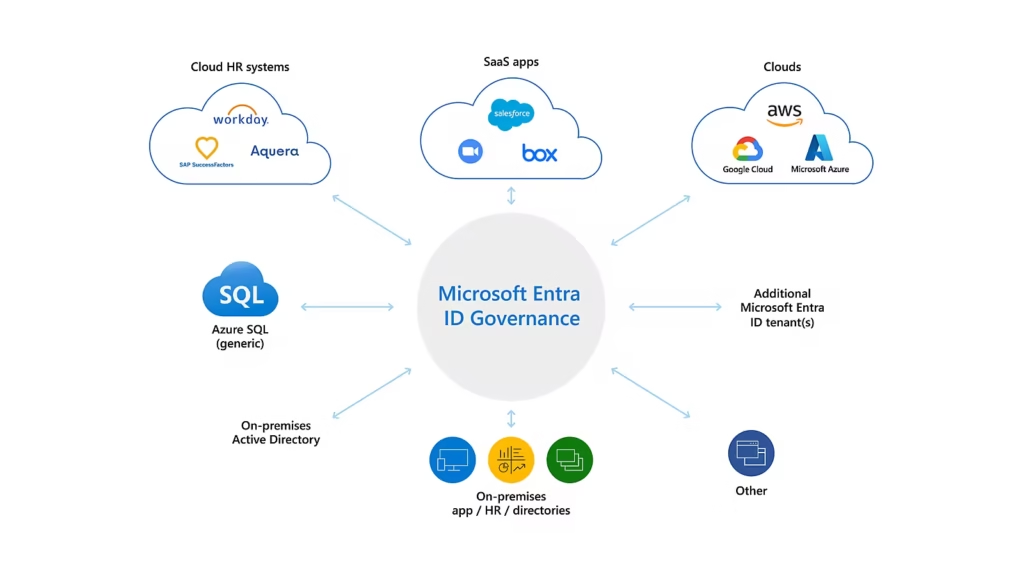
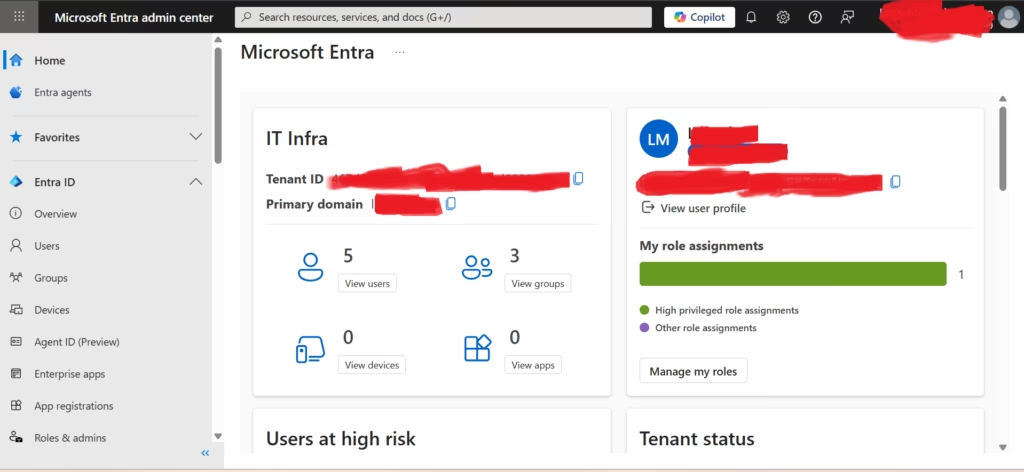
Microsoft Entra admin center shown for conceptual understanding only (SC-900 level).
Why Microsoft Renamed Azure AD to Entra ID
The rename from Azure Active Directory to Microsoft Entra ID reflects an important shift.
Entra ID is no longer just:
- A directory service
- A cloud version of on-prem Active Directory
It is now a central identity platform that supports:
- Cloud apps
- Hybrid environments
- Zero Trust security
- Modern authentication
SC-900 introduces Entra ID to help learners understand identity as a platform, not just a directory.
Identity as the Primary Security Perimeter
One of the most important ideas in SC-900 is this:
Identity is the new security perimeter
In modern environments:
- Attackers target credentials
- Users work remotely
- Devices are not always trusted
- Applications live in the cloud
Because of this, Microsoft uses Entra ID to:
- Verify identity
- Evaluate risk
- Control access dynamically
This identity-first approach underpins Zero Trust, Conditional Access, and Least Privilege.
Core Functions of Microsoft Entra ID (SC-900 View)
SC-900 explains Entra ID through its core functions, not its advanced features.
Authentication
Authentication answers the question:
Who are you?
Entra ID verifies identities using:
- Username and password
- Multi-Factor Authentication (MFA)
- Modern authentication methods
This ensures only legitimate users can sign in.
Authorisation
Authorisation answers the question:
What are you allowed to access?
After authentication, Entra ID controls:
- Which applications a user can access
- Which resources they can use
- What actions they are permitted to perform
SC-900 strongly emphasises the difference between authentication and authorisation.
Identity-Based Security Controls
Entra ID enables identity-driven security by supporting:
- Conditional access decisions
- Risk-based access
- Least privilege access
Instead of trusting users by default, access is evaluated every time.
Types of Identities in Microsoft Entra ID
SC-900 introduces different identity types at a high level.
These include:
- User identities – employees, administrators
- Device identities – managed or registered devices
- Application identities – apps and services
- External identities – guests and partners
Understanding that Entra ID manages more than just users is exam-relevant.
Microsoft Entra ID in Hybrid Environments
Many organisations use hybrid identity, combining:
- On-premises Active Directory
- Cloud-based Entra ID
Entra ID supports this by:
- Extending identities to the cloud
- Enabling consistent access control
- Supporting modern security models
SC-900 does not test configuration but expects awareness that hybrid identity is common.
Entra ID and Zero Trust
Microsoft Entra ID is the engine behind Zero Trust in Microsoft environments.
It enables Zero Trust by:
- Verifying identities explicitly
- Enforcing least privilege
- Evaluating access continuously
Without Entra ID, Zero Trust would not be enforceable in Microsoft cloud services.
This is why SC-900 places Entra ID at the centre of identity discussions.
What SC-900 Does NOT Expect You to Know About Entra ID
It’s important to understand the scope.
SC-900 does not expect:
- Portal configuration steps
- PowerShell commands
- Advanced role design
- Troubleshooting identity issues
The exam tests understanding, not administration.
Common Misconceptions About Microsoft Entra ID
SC-900 helps correct these misunderstandings:
- “Entra ID is just Azure AD with a new name.”
It represents a broader identity platform. - “Entra ID is only for cloud users.”
It supports hybrid and on-prem integration. - “Identity security starts after login.”
Identity security is continuous, not one-time.
Understanding these points is important for both the exam and real-world discussions.
Why Microsoft Entra ID Matters for IT Professionals
Even non-security roles interact with Entra ID daily:
- User sign-ins
- Application access
- MFA prompts
- Access approvals
SC-900 introduces Entra ID early to ensure learners build identity awareness before moving into deeper security topics.
SC-900 Exam Tip
For SC-900:
- Know what Entra ID is
- Understand why identity is central to security
- Remember the difference between authentication and authorisation
- Avoid thinking in terms of configuration steps
If you can explain Entra ID in simple words, you’re exam-ready.
Final Thoughts: Identity Is the Foundation
Microsoft Entra ID sits at the centre of modern Microsoft security.
It enables:
- Secure access
- Risk-based decisions
- Zero Trust enforcement
- Scalable cloud security
SC-900 ensures learners understand this foundation before moving into advanced identity and security roles.
Also, view our detailed guide on what is SC-900 to understand Microsoft Security, Compliance, and Identity fundamentals.
For official and up-to-date exam objectives, learning paths, and reference material, refer to Microsoft Learn’s SC-900 documentation.
What’s Next in the SC-900 Series
Next, we’ll cover:
Identity Types in SC-900: Users, Devices, Applications & Workloads







