MS-102 Teaches Us Where Zero Trust Breaks.

SC-900 to MS-102 Transition
If you’ve been following Microsoft security fundamentals, Zero Trust probably feels like common sense by now.
Understanding the SC-900 to MS-102 Transition: Where Zero Trust Breaks in Real Microsoft 365 Tenants is essential for effective security implementation, particularly during the sc-900-to-ms-102-transition.
In SC-900, Microsoft explains it clearly:
Never trust. Always verify.
Identity becomes the perimeter.
Access is continuously evaluated.
Risk is reduced through controls like MFA, Conditional Access, and monitoring.
Conceptually, it’s elegant.
Operationally, it’s fragile.
That fragility is where MS-102 thinking begins.
This highlights the importance of the SC-900 to MS-102 Transition: Where Zero Trust Breaks in Real Microsoft 365 Tenants in practical applications, especially in the context of sc-900-to-ms-102-transition.
Zero Trust Works Perfectly — in Perfect Tenants
SC-900 does its job well. It teaches:
Understanding the sc-900-to-ms-102-transition
- Why credentials are the new attack surface
- Why device trust matters
- Why security controls must be layered
- Why identity-centric security is unavoidable
Navigating the sc-900-to-ms-102-transition
Understanding the SC-900 to MS-102 Transition: Where Zero Trust Breaks in Real Microsoft 365 Tenants is essential for effective security implementation.
At a concept level, Zero Trust assumes:
- Clean user identities
- Predictable authentication flows
- Modern applications
- No business-critical exceptions
As a senior administrator, I can tell you this plainly:
No production Microsoft 365 tenant looks like that.
Where Zero Trust Starts Breaking in Real Environments
The moment you move from learning security to running a tenant, theory meets reality.
Here are situations every experienced M365 admin recognizes:
- Service accounts that cannot complete MFA
- Legacy applications that break with modern authentication
- Executives locked out while traveling
- Emergency “break-glass” accounts that bypass controls
- External users who need access immediately, not after governance reviews
- Automation scripts that fail when Conditional Access is tightened
None of these are attacker techniques.
They are operational constraints.
Zero Trust does not account for them automatically.
Administrators must.
The Real Shift from SC-900 to MS-102
This is the mindset change most people underestimate.
SC-900 mindset:
“Is this secure?”
MS-102 mindset:
“What will this break if I enable it?”
Security training focuses on controls.
Administration focuses on consequences.
As an admin, you are not protecting diagrams —
you are protecting:
- Payroll processing
- Email delivery
- Executive access
- Business continuity
Sometimes that means negotiating with Zero Trust, not blindly enforcing it.
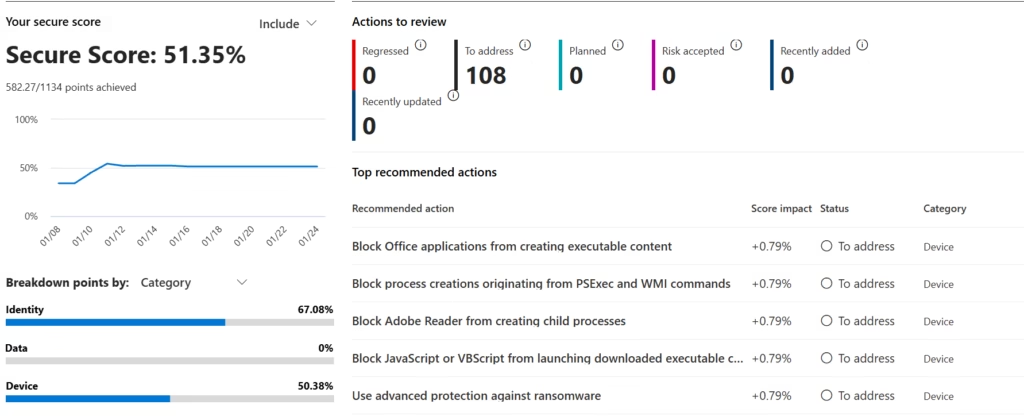
Secure Score: A Perfect Example of the Gap
Microsoft Secure Score often recommends:
- Enforcing MFA everywhere
- Blocking legacy authentication
- Restricting sign-ins aggressively
From a security perspective, this is correct.
From an admin perspective, unanswered questions remain:
- Which service accounts will stop working?
- Which third-party apps will fail silently?
- Who gets locked out first?
- How do you recover at 2 AM?
Secure Score highlights what should be done.
MS-102-level administration answers how to do it safely.
That difference is critical.
Why Zero Trust Needs Administrators to Survive
Zero Trust is not self-sustaining.
It only works when:
- Users are intentionally designed
- Groups are meaningful and controlled
- Roles are scoped and temporary
- Exceptions are documented and reviewed
- Identity lifecycle is managed, not ignored
These are administrative disciplines, not security slogans.
Most real-world security incidents don’t begin with attackers —
They begin with well-intended admin changes made without understanding the downstream impact.
Mini-Lab: Observe the Gap
This is an observation exercise, not a deployment.
Step 1
Open Microsoft Secure Score in your tenant.
Step 2
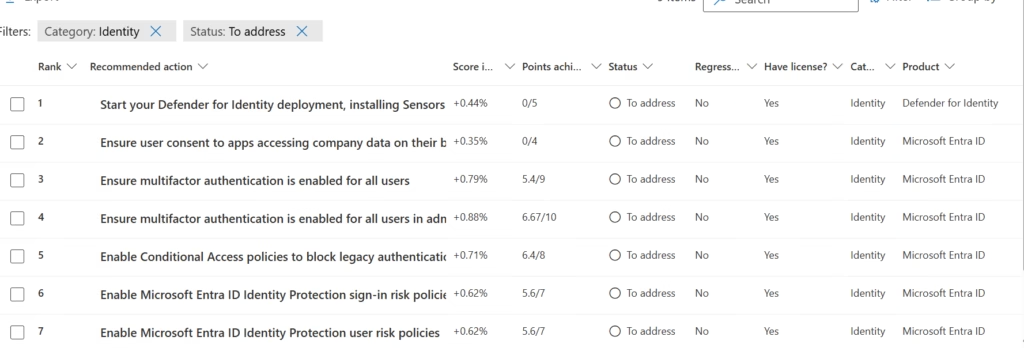
Filter recommendations to Identity-related items only.
Step 3
For each recommendation, ask:
- Which users does this affect?
- Which groups are involved?
- Which business process depends on this access?
- What is the rollback plan?
If those answers aren’t clear, you’ve just identified the gap between security knowledge and administrative readiness.
Why This Post Exists Before MS-102 Content
Before we talk about:
- Microsoft Entra ID users and groups
- Exchange Online
- SharePoint Online
- Microsoft Teams
- Conditional Access
- Compliance and governance
One principle must be clear:
Administrators don’t implement Zero Trust.
They operationalize it under imperfect conditions.
That operational reality is what MS-102 is really about.
What’s Coming Next
In the next post, we’ll tackle the real foundation of Microsoft 365 administration:
Why identity is not a security feature — it’s an admin responsibility.
Because if identity design is weak,
no security control can compensate for it.
Final Thought
SC-900 teaches you why security matters.
MS-102 teaches you why every checkbox has a business impact.
Understanding where Zero Trust breaks is not a weakness
it’s the starting point of becoming a real Microsoft 365 administrator.
Also, view our detailed guide on what is SC-900 to understand Microsoft Security, Compliance, and Identity fundamentals.
For official and up-to-date exam objectives, learning paths, and reference material, refer to Microsoft Learn’s SC-900 documentation.







