Your Microsoft 365 tenant is either compliant with ISO 27001, GDPR, or NIST right now, or it isn’t. Microsoft Purview Compliance Manager tells you exactly where you stand, what to fix, and how much each fix is worth.
In this guide, you’ll explore Microsoft Purview Compliance Manager from the Overview dashboard through to building a custom regulation template with your own controls. Specifically, you’ll learn:
- How the Microsoft Purview Compliance Manager compliance score is calculated
- How to read assessments and understand your improvement actions
- How to navigate the Regulations library (391 templates)
- How to create a custom regulation template with your own controls
- MS-102 exam tips for icrosoft Purview Compliance Manager
What Is Microsoft Purview Compliance Manager?
Microsoft Purview Compliance Manager is a risk assessment dashboard inside the Microsoft Purview compliance portal. It measures how well your Microsoft 365 environment aligns with regulatory standards, GDPR, ISO 27001, NIST 800-53, PCI DSS, and hundreds more, and gives you a prioritized list of actions to improve that alignment.
The central output is a compliance score, a number from 0 to your maximum possible points, expressed as a percentage. It is not a certification. Reaching 100% in Microsoft Purview Compliance Manager does not mean your organization is certified to ISO 27001. It means you have implemented the Microsoft 365 controls that Microsoft recommends for that standard. Third-party auditors and process controls are your responsibility.
What Microsoft Purview Compliance Manager does exceptionally well is tell you which Microsoft 365 settings directly contribute to regulatory compliance and give you step-by-step implementation guidance for each one.
How the Microsoft Purview Compliance Score Works
The compliance score has two components:
| Component | Who Controls It | Example |
|---|---|---|
| Your points | You, by implementing improvement actions | Enable MFA: +27 points |
| Microsoft managed points | Microsoft automatically applied for platform-level controls | Data centre physical security, service encryption |
Your score = (Your points achieved + Microsoft-managed points achieved) ÷ Total possible points.
In a typical Microsoft 365 tenant, Microsoft already handles the majority of points automatically. Your points are the gap you need to close through configuration and policy implementation.
Key exam fact: The compliance score is a relative measure of risk reduction, not an absolute compliance certification. Admins sometimes confuse it with a pass/fail audit result — it is neither.
Step-by-Step Lab: Explore Microsoft Purview Compliance Manager
Prerequisites: Compliance Administrator or Global Administrator role. Access to purview.microsoft.com → Compliance Manager.
Step 1: The Overview Dashboard
Navigate to purview.microsoft.com → select Compliance Manager from the left navigation (or from the Solutions menu).
The Overview page is your compliance command center. It shows:
- Overall compliance score: displayed as a dial and percentage
- Key improvement actions: the highest-impact actions you haven’t completed yet
- Solutions that affect your score: breakdown by Microsoft solution (Audit, DLP, eDiscovery, etc.)
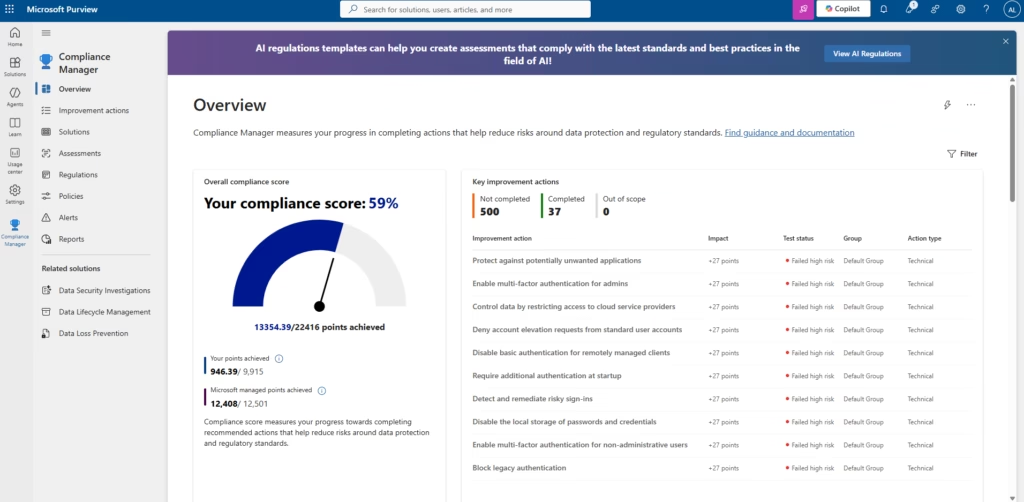
In this lab tenant, the score shows 59% (13,354.39/22,416 points). Microsoft managed points (12,408/12,501) are nearly complete; the remaining gap is almost entirely in the Your points bucket (946.39/9,915). This is typical of a new or trial tenant where no improvement actions have been implemented yet.
The Solutions that affect your score panel on the right show how many remaining actions exist per solution: Compliance Score (304 points, 28 actions), Audit (79 points, 9 actions), and so on. This tells you where to focus first.
💡 Best Practice: Start with the Solutions that affect your score panel rather than the raw improvement actions list. Find the solution with the highest remaining points and the fewest remaining actions that’s your best ROI for score improvement.
Step 2: Assessments
Click Assessments in the left navigation.
Assessments are the core working unit of Microsoft Purview Compliance Manager. Each assessment maps your environment to a specific regulation or standard, showing you which controls are satisfied and which are outstanding.
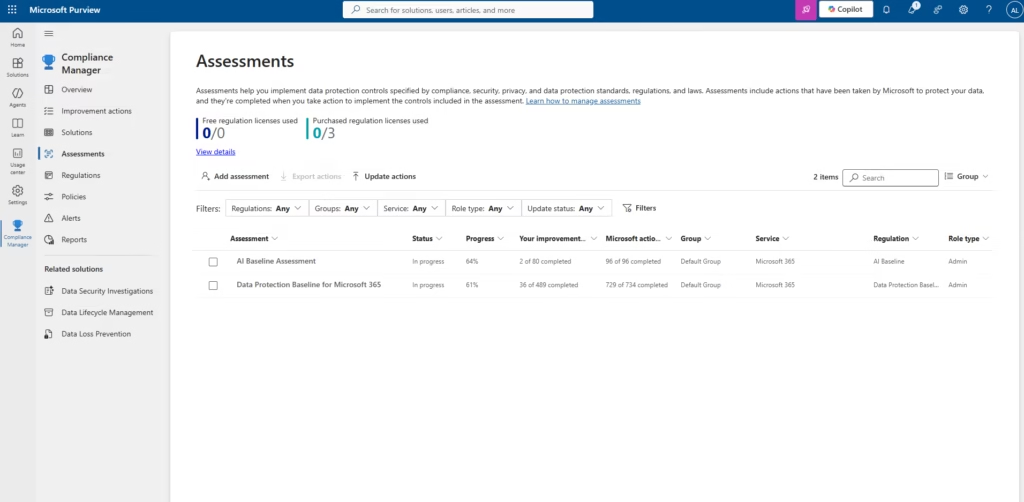
By default, every Compliance Manager tenant includes two assessments:
| Assessment | Regulation | Purpose |
|---|---|---|
| Data Protection Baseline for Microsoft 365 | Microsoft’s own baseline | Foundational data protection controls across M365 |
| AI Baseline Assessment | AI Baseline regulation | Controls for responsible AI deployment |
Notice the columns: Progress (overall %), Your improvement actions (actions you own), Microsoft actions (handled by Microsoft). In the AI Baseline, Microsoft has already completed 96/96 of its actions your 2/80 is the gap.
Click Data Protection Baseline for Microsoft 365 to open the assessment details.
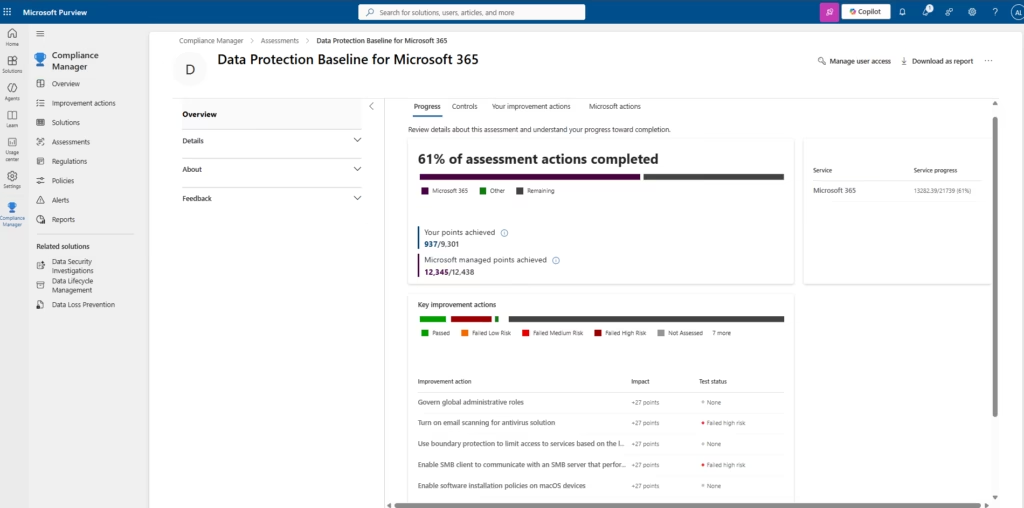
The assessment detail shows:
- Progress bar: purple for Microsoft 365 managed actions, dark for remaining
- Your points achieved: 937/9,301, this is what you’re working on
- Microsoft managed points: 12,345/12,438, nearly fully handled
- Key improvement actions: highest-impact items sorted by points
💡 Best Practice: Use the Download as report button (top right of an assessment) to export assessment progress as a PDF. This is useful for compliance evidence packages showing an auditor your current state against a specific standard without giving them portal access.
Step 3: Improvement Actions
Click Improvement actions in the left navigation.
This page lists every recommended action across all your assessments 500 items in this tenant. Each action shows points available, which regulation it satisfies, which solution it belongs to, and its current test status.
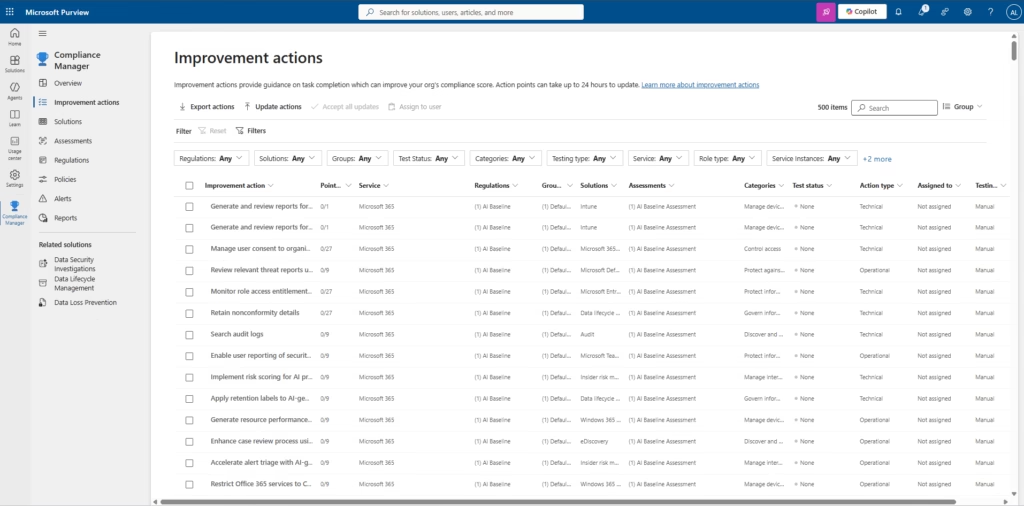
Use the filters to narrow the list:
- Regulations: ISO/IEC 27001:2013: see only ISO-relevant actions
- Test status: None: see actions not yet assessed
- Categories: Protect information: filter by compliance domain
Click any action to open its detail page.
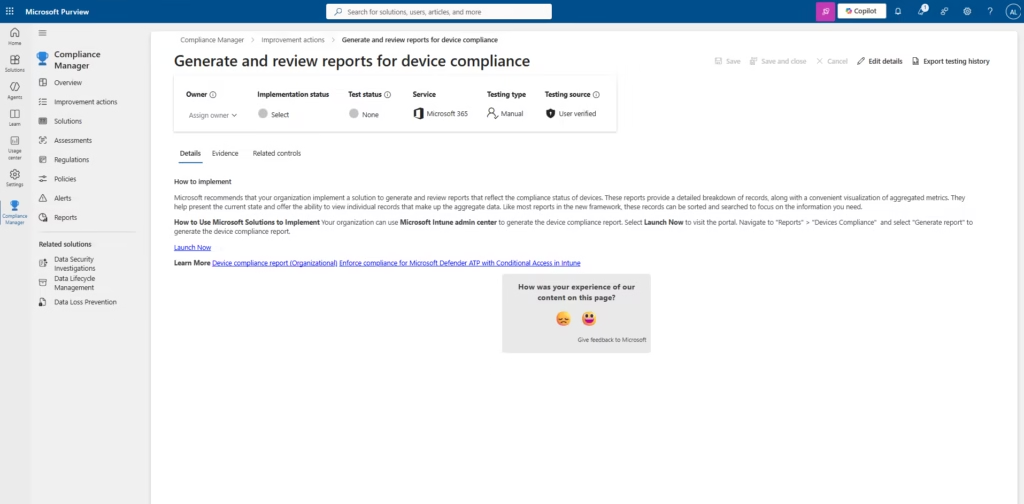
The improvement action detail page shows:
- Owner: assign to the responsible admin or team
- Implementation status: Not implemented, Implemented, Alternative implementation, Planned
- Test status: None, Passed, Failed (Low/Medium/High risk), Not in scope
- How to implement: step-by-step guidance from Microsoft
- Evidence tab: upload screenshots, documents, or notes as audit evidence
- Related controls tab: Which regulation controls this action
💡 Best Practice: Assign owners to improvement actions before working through them. Unassigned actions are no one’s responsibility assigned actions create accountability. Use the Assign to user button at the top of the Improvement actions list to bulk-assign by category or solution.
⚠️ Common Mistake: Marking an action as “Implemented” without uploading evidence. For any regulatory compliance programme, implementation claims without evidence are worthless. Attach at least one screenshot or policy document to each action you mark as complete.
Step 4: The Regulations Library
Click Regulations in the left navigation.
The Regulations library contains 391 regulation templates organized into categories. Each template defines the controls your organization needs to assess against a specific standard.
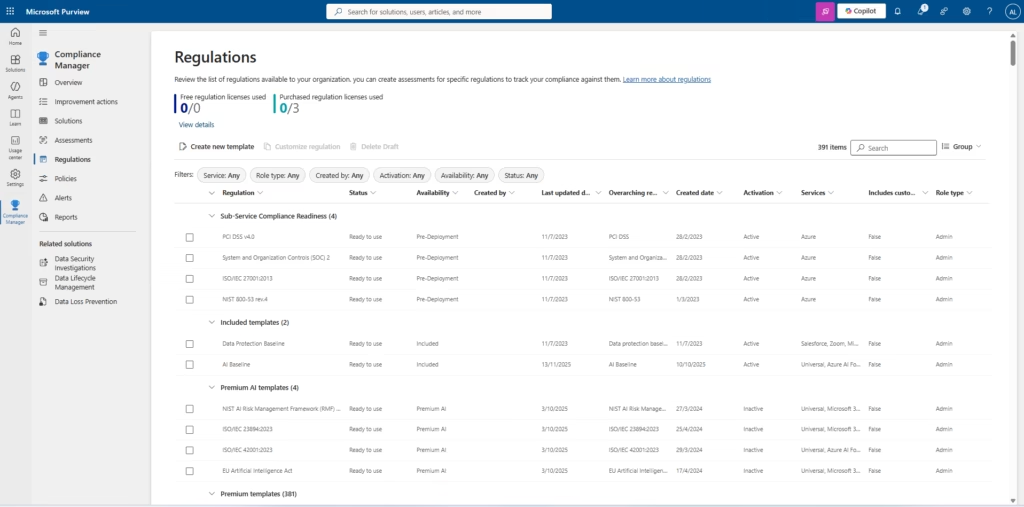
The regulation categories:
| Category | Description | Examples |
|---|---|---|
| Sub-Service Compliance Readiness | Pre-deployed, always active | PCI DSS v4.0, SOC 2, ISO/IEC 27001:2013, NIST 800-53 |
| Included templates | Free, always available | Data Protection Baseline, AI Baseline |
| Premium AI templates | Requires premium licence | NIST AI RMF, ISO/IEC 23894, EU AI Act |
| Premium templates | Requires a regulation license (381 total) | GDPR, HIPAA, APRA CPS 234, hundreds more |
The Availability column shows whether you’ve activated a template. Free templates can be activated immediately. Premium templates consume a regulation license (shown at the top of the page as “Purchased regulation licenses used”).
Step 5: View a Regulation Detail
Click ISO/IEC 27001:2013 from the Regulations list to see what’s inside.
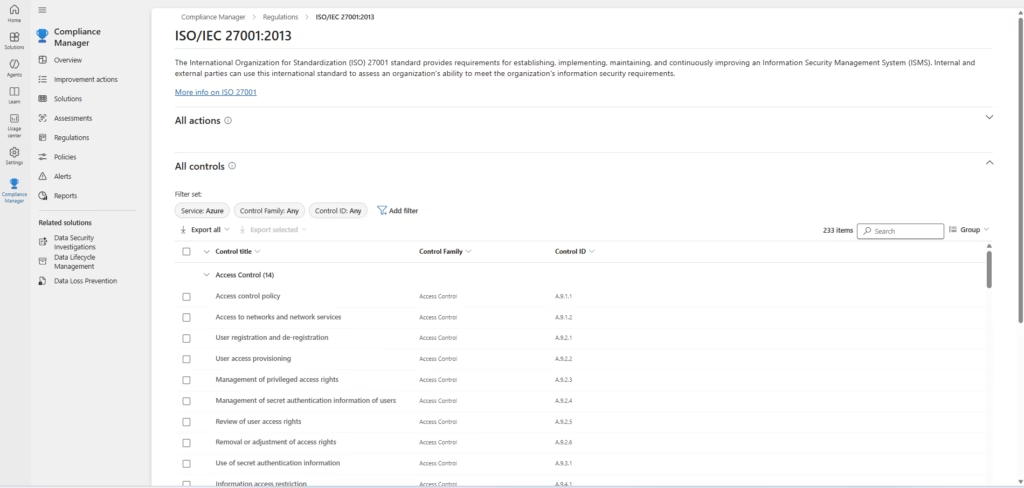
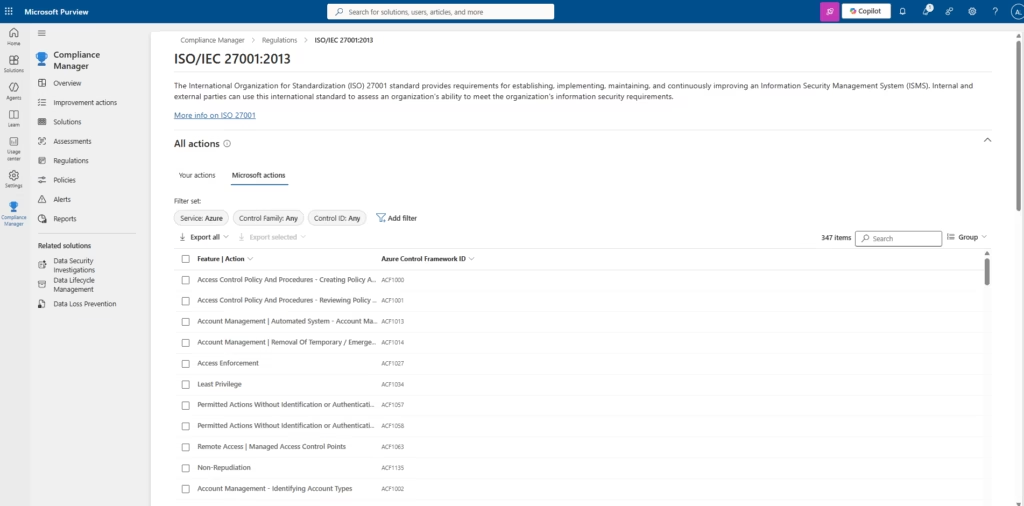
The regulation details have two tabs: All controls and Microsoft actions:
- All controls (233): every ISO 27001 control, grouped by control family (Access Control, Cryptography, Physical security, etc.), each with its ISO control ID (A.9.1.1, A.9.2.3, etc.)
- Microsoft actions (347): Microsoft’s own actions mapped to ISO controls, showing what Microsoft manages on your behalf in the Azure Control Framework
Best Practices for Microsoft Purview Compliance Manager
- Assign improvement actions before you start. Actions with no owner are never completed. Spend 30 minutes assigning categories to team members before anyone touches a single action.
- Upload evidence for every action you mark as implemented. A screenshot of the configured setting, a policy document, or an export from the admin portal. Unsubstantiated “Implemented” markings fail audits.
- Use Download as a report quarterly. Export assessment PDFs at the end of each quarter. Build a compliance evidence library that shows your trajectory over time. Auditors want to see improvement, not just a current score.
- Don’t chase the score. 500 improvement actions exist. Focus on the ones that actually reduce your organization’s real risk, not the 27-point actions that require decommissioning legacy protocols your users don’t use anyway.
- Check the regulation license usage. Premium regulation templates consume licenses. Don’t activate 20 premium templates you won’t actually use; you have a fixed number of purchased licenses.
MS-102 Exam Tips
Scenario you’ll likely see: “An organisation wants to measure their Microsoft 365 environment’s alignment with ISO 27001 controls and track improvement actions assigned to specific administrators. What feature should they use?”
Correct answer: Microsoft Purview Compliance Manager — create an ISO 27001 assessment, assign improvement actions to admins, track progress in the dashboard Not: Microsoft Secure Score (Secure Score measures security posture, not regulatory compliance) | Compliance Manager reports (reports are outputs, not the tracking tool itself) | Microsoft Defender for Cloud (cloud workload security, not M365 compliance assessments)
Remember: Microsoft Purview Compliance Manager = compliance posture. Secure Score = security posture. Both have scores. Both live in the Microsoft ecosystem. The exam distinguishes them based on context regulatory standards vs security best practices.
Also know for the exam:
- Compliance score = your points + Microsoft managed points ÷ total possible
- A high score does not mean your organisation is certified to any standard
- Assessments map to regulations; Improvement actions are the tasks inside assessments
- You can create custom templates from a blank start or by uploading a PDF
- Microsoft managed points are handled automatically — you cannot fail them
- Premium templates require regulation licences; Included templates are free
- Improvement actions can be assigned to specific users and tracked with evidence
FAQ
Q: What is the difference between the compliance score and Microsoft Secure Score?
A: Microsoft Purview Compliance Manager’s compliance score measures your alignment with regulatory standards (ISO 27001, GDPR, NIST, etc.) it is about legal and regulatory risk. Microsoft Secure Score measures your security configuration against Microsoft’s security best practices — it is about attack surface reduction. Both use a points system, but they measure different things and live in different portals.
Q: Does a 100% compliance score in Microsoft Purview Compliance Manager mean my organization is certified?
A: No. The compliance score reflects how well your Microsoft 365 configuration aligns with a standard’s requirements, as interpreted by Microsoft. Actual certifications (ISO 27001, SOC 2, PCI DSS) require third-party audits, process documentation, and operational controls that Microsoft Purview Compliance Manager cannot verify. The score is a useful indicator and audit preparation tool, not a certification.
Q: How often does the compliance score update?
A: Improvement action scores update within 24 hours of a configuration change in Microsoft 365. Microsoft managed points update continuously. The overall score refreshes daily. If you implement a change and the score doesn’t update immediately, wait 24 hours before investigating.
Q: Can I create an assessment for a regulation not in the Regulations library?
A: Yes, use the custom template feature. Create a blank template, add your controls manually (or upload a PDF of your regulation and let Compliance Manager extract them), publish the template, then create an assessment based on it. This is the path for internal policy frameworks, industry-specific standards, or regulations newer than Microsoft’s library.
Q: Who can see and manage Microsoft Purview Compliance Manager?
A: The Compliance Administrator and Global Administrator roles have full access. The Compliance Data Administrator role can view assessments but has limited editing rights. Organization-specific improvement actions can be assigned to any user they receive a notification and can update their action’s test status and evidence without needing Compliance Administrator rights.
Conclusion
You’ve navigated the full Microsoft Purview Compliance Manager workflow from reading your compliance score and understanding the gap between your points and Microsoft-managed points, through working on improvement actions with evidence, to building a custom regulation template from scratch. These capabilities are tested directly in the MS-102 exam and are equally valuable in production for any organization managing regulatory obligations in Microsoft 365.
Related Posts in the MS-102 Series
- Related: Microsoft Purview DLP Policies: Proven MS-102 Lab Guide (2026)
- Related: eDiscovery in Microsoft Purview: Proven MS-102 Lab Guide (2026)
- Related: Microsoft Purview Adaptive Scopes: MS-102 Lab Guide
- Related: Microsoft Purview Sensitivity Labels: MS-102 Lab Guide
Official Microsoft Reference: Get started with Microsoft Purview Compliance Manager, Microsoft Learn
1 thought on “Microsoft Purview Compliance Manager: Proven Lab (2026)”