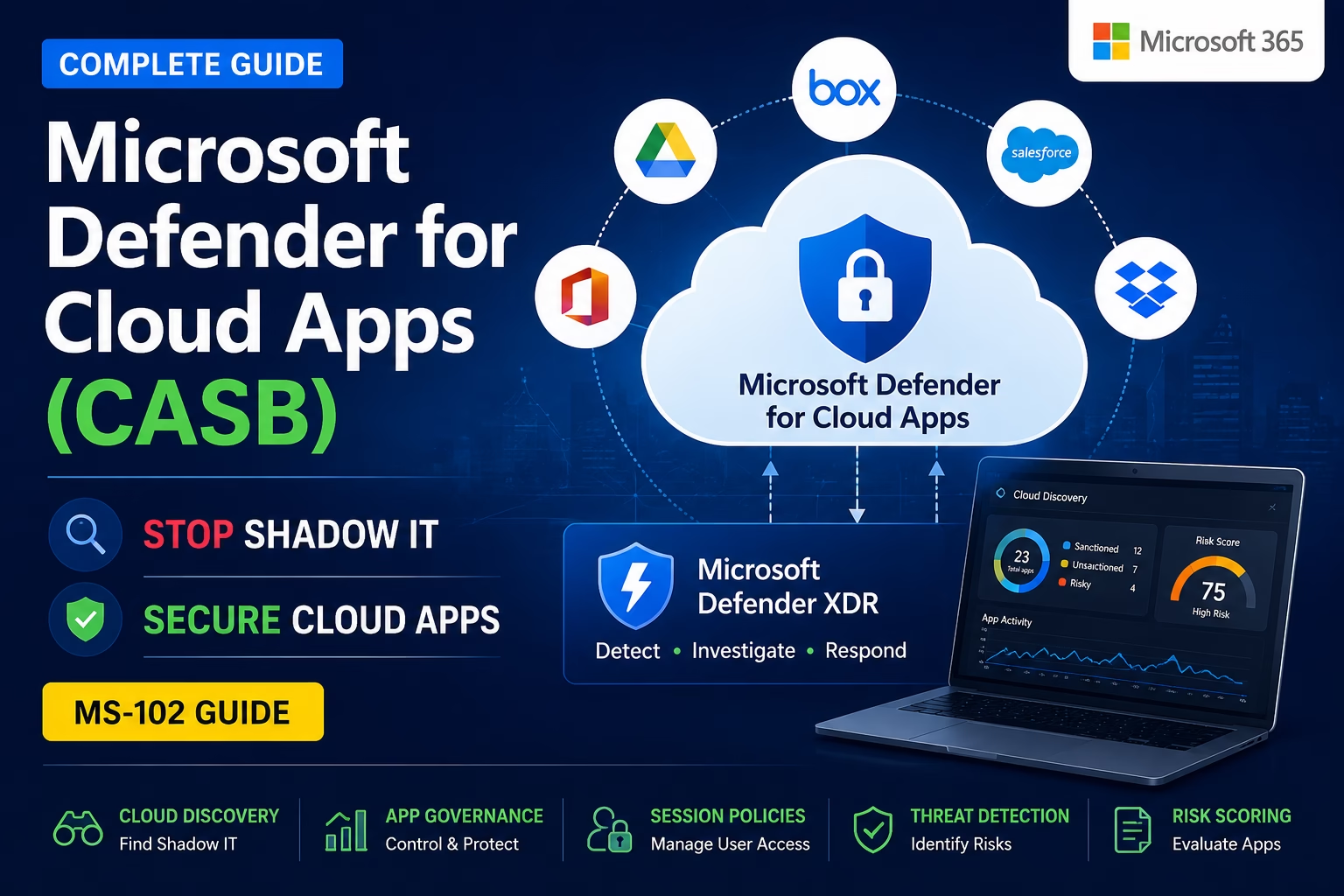
Modern organizations rely heavily on cloud applications.
Employees use:
- Microsoft 365
- Dropbox
- Google Drive
- Slack
- Zoom
- AI tools
- SaaS platforms
But here’s the problem:
IT teams often don’t know which cloud apps users are accessing.This creates:
- Shadow IT
- Data leakage risks
- Unauthorized access
- Compliance issues
- OAuth abuse
- Malware exposure
This is where Microsoft Defender for Cloud Apps becomes critical.
Microsoft Defender for Cloud Apps helps organizations discover, monitor, and control cloud application usage across their environment.
For anyone preparing for the MS-102: Microsoft 365 Administrator certification, understanding Defender for Cloud Apps is essential because cloud app governance and SaaS security are now core parts of Microsoft 365 security operations.
In this guide, we’ll cover:
- What CASB is
- What Shadow IT means
- How Microsoft Defender for Cloud Apps works
- Cloud discovery and app governance
- Session policies explained
- Step-by-step lab walkthrough
- Best practices
- MS-102 exam tips
Learning Objectives
After completing this guide, you will be able to:
- Explain what a CASB (Cloud Access Security Broker) is.
- Identify the risks associated with Shadow IT.
- Describe how Microsoft Defender for Cloud Apps discovers and controls cloud app usage.
- Set up Microsoft Defender for Cloud Apps in a lab environment.
What is CASB?
CASB = Cloud Access Security Broker
A CASB acts as a security layer between:
- Users
- Cloud applications
- Organizational data
It helps organizations:
- Discover cloud apps
- Monitor SaaS usage
- Enforce security policies
- Protect sensitive data
- Detect risky activity
- Control cloud access
Think of CASB as:
A security control point for cloud applicationsWhat is Microsoft Defender for Cloud Apps?
Microsoft Defender for Cloud Apps is Microsoft’s CASB solution.
It provides visibility into:
- Shadow IT
- Cloud application usage
- OAuth app permissions
- User activity
- Risky cloud behavior
- Unsanctioned applications
It integrates with:
- Microsoft 365
- Azure
- Third-party SaaS apps
- Microsoft Defender XDR
This helps security teams protect cloud environments more effectively.
What is Shadow IT?
Shadow IT refers to unauthorized cloud applications used without IT approval.
Examples:
- Personal Dropbox accounts
- Unauthorized Google Drive usage
- AI tools storing company data
- File-sharing platforms
- Unapproved SaaS applications
Employees often use these tools to improve productivity.
But they create major security risks.
Why Shadow IT is Dangerous
Shadow IT can lead to:
| Risk | Example |
|---|---|
| Data leakage | Uploading confidential files |
| Compliance violations | Unapproved data storage |
| Malware exposure | Unsafe SaaS apps |
| OAuth abuse | Malicious app permissions |
| Account compromise | Weak third-party security |
Without visibility:
Organizations cannot protect what they cannot see.How Microsoft Defender for Cloud Apps Works
Microsoft Defender for Cloud Apps analyzes:
- Firewall logs
- Proxy logs
- Cloud app APIs
- User sessions
- OAuth permissions
- Activity logs
This helps identify:
- Which apps are being used
- Risk level of applications
- Suspicious cloud activity
- Data movement patterns
Core Features of Defender for Cloud Apps
1. Cloud Discovery
Cloud Discovery identifies cloud applications used inside the organization.
This helps detect:
- Shadow IT
- Risky applications
- Unsanctioned cloud usage
Apps are analyzed using:
- Risk scoring
- Compliance certifications
- Security posture
- Industry reputation
This is one of the most important CASB features.
2. App Governance
App governance helps control:
- OAuth permissions
- Third-party app access
- Excessive permissions
- Risky SaaS integrations
This is critical because attackers often abuse OAuth applications.
3. Session Policies
Session policies provide real-time access control.
Examples:
- Block downloads
- Restrict uploads
- Prevent copy/paste
- Monitor risky sessions
Very useful for unmanaged devices.
4. Threat Detection
Defender for Cloud Apps detects:
- Impossible travel activity
- Suspicious OAuth apps
- Unusual cloud behavior
- Data exfiltration attempts
It integrates with Microsoft Defender XDR for investigation workflows.
5. Risk Scoring
Each cloud application receives a risk score based on:
- Security controls
- Encryption
- Compliance
- Reputation
- Industry standards
This helps admins decide:
Which apps should be approved or blocked?Microsoft Defender for Cloud Apps Architecture
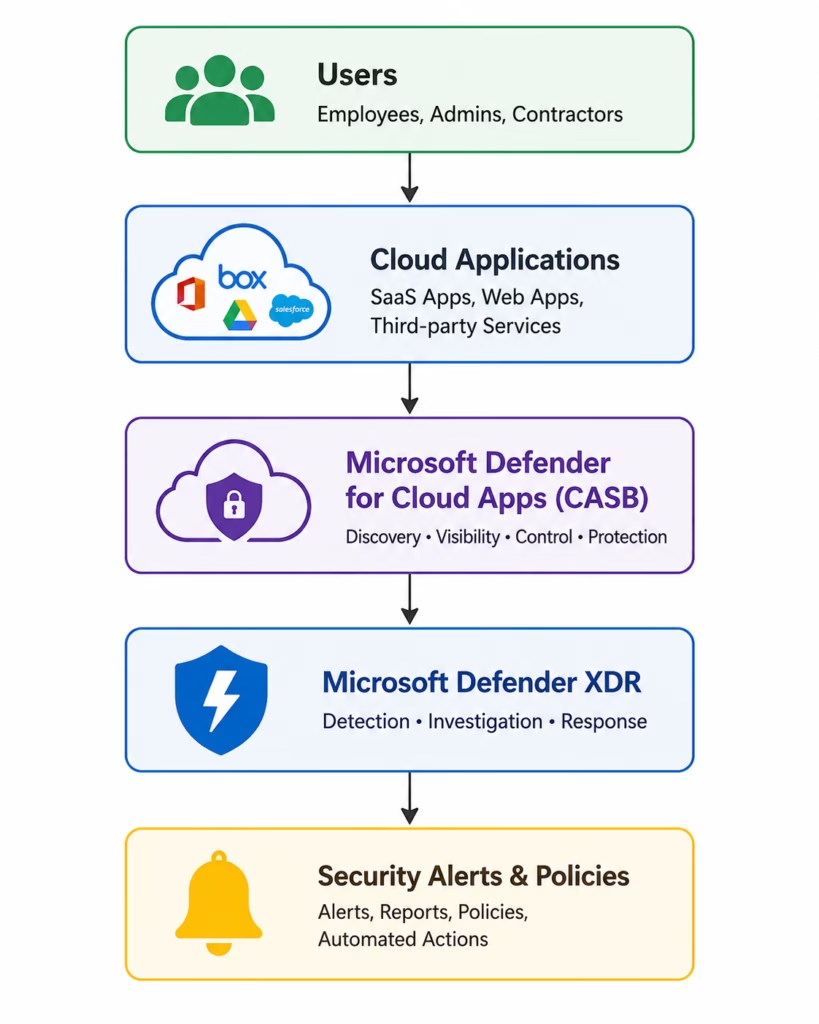
🔄 CASB Monitoring Flow
Microsoft Defender for Cloud Apps Lab Setup
This is your practical MS-102 lab section.
Step 1: Open Microsoft Defender Portal
Go to:
Microsoft Defender PortalSign in with:
- Global Administrator
- Security Administrator
Step 2: Navigate to Cloud Apps
Go to:
Cloud AppsYou will see:
- Cloud Discovery
- Policies
- OAuth apps
- Connected apps
- Activity logs
Step 3: Review Discovered Apps
Open:
Cloud Discovery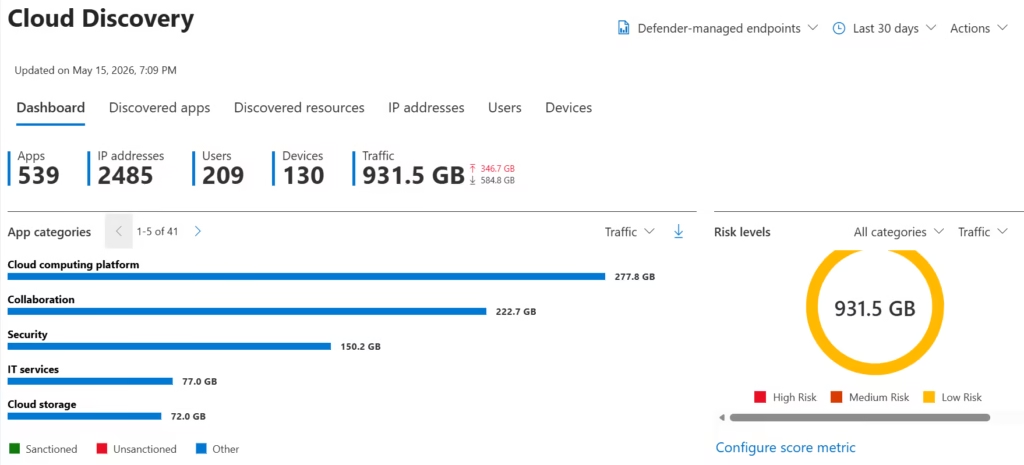
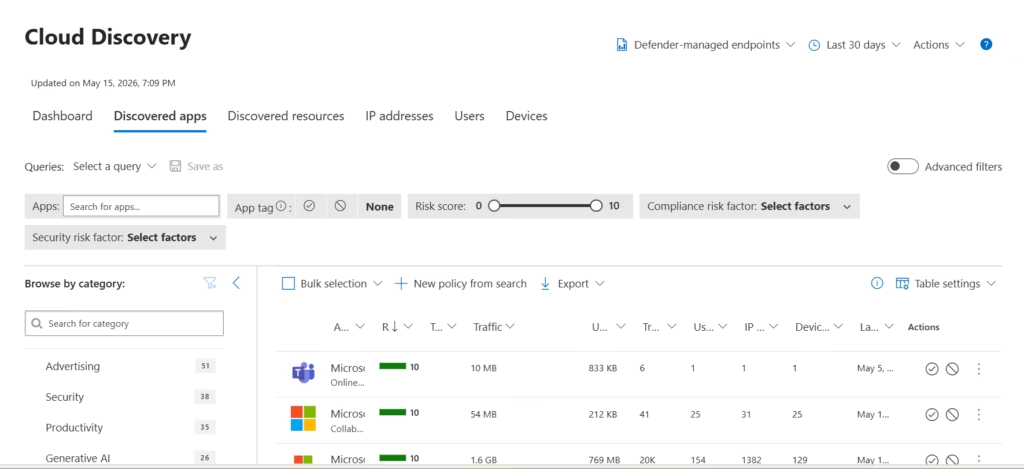
Here you can review:
- Applications in use
- Risk scores
- User activity
- Data usage
- Sanctioned vs unsanctioned apps
This helps identify Shadow IT.
Step 4: Review Risk Scores
Select an application.
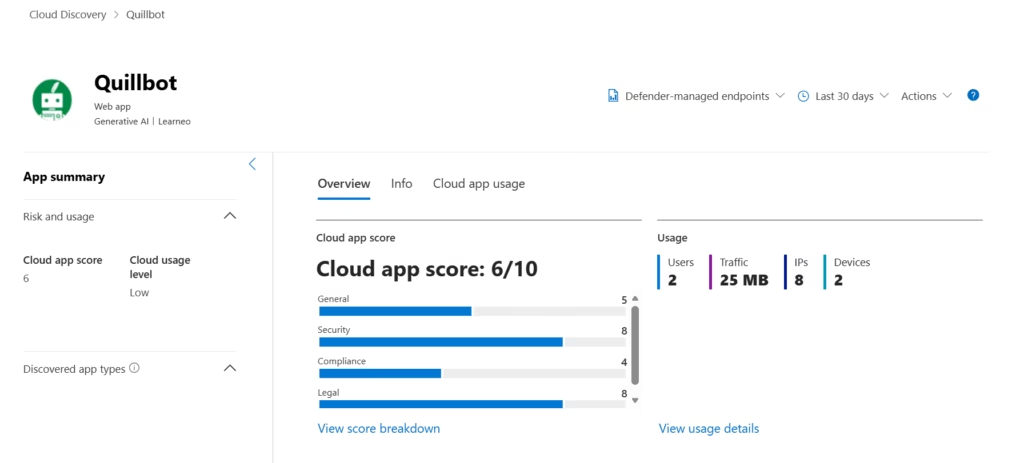
Review:
- Security score
- Compliance status
- Encryption support
- Certifications
- Risk factors
This helps evaluate SaaS security posture.
Step 5: Create a Basic Policy
Go to:
Policies → Create PolicyExample policy:
Detect risky OAuth applications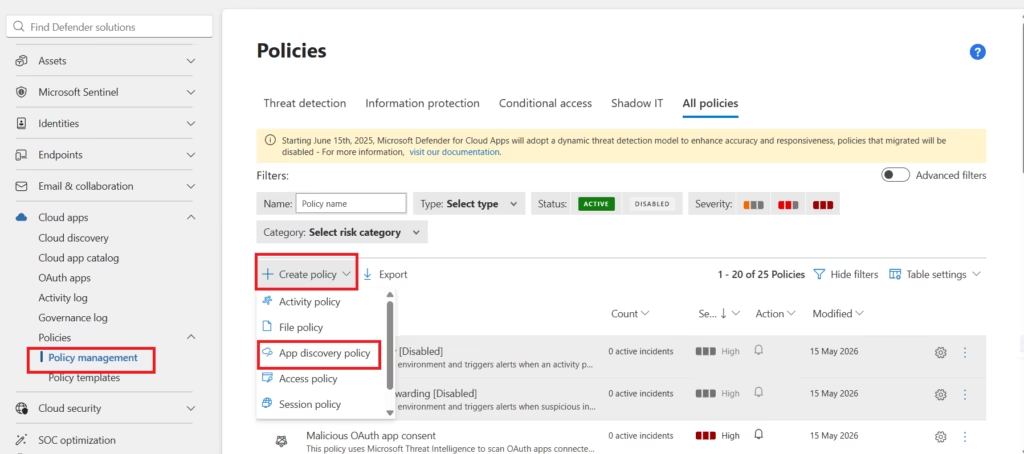
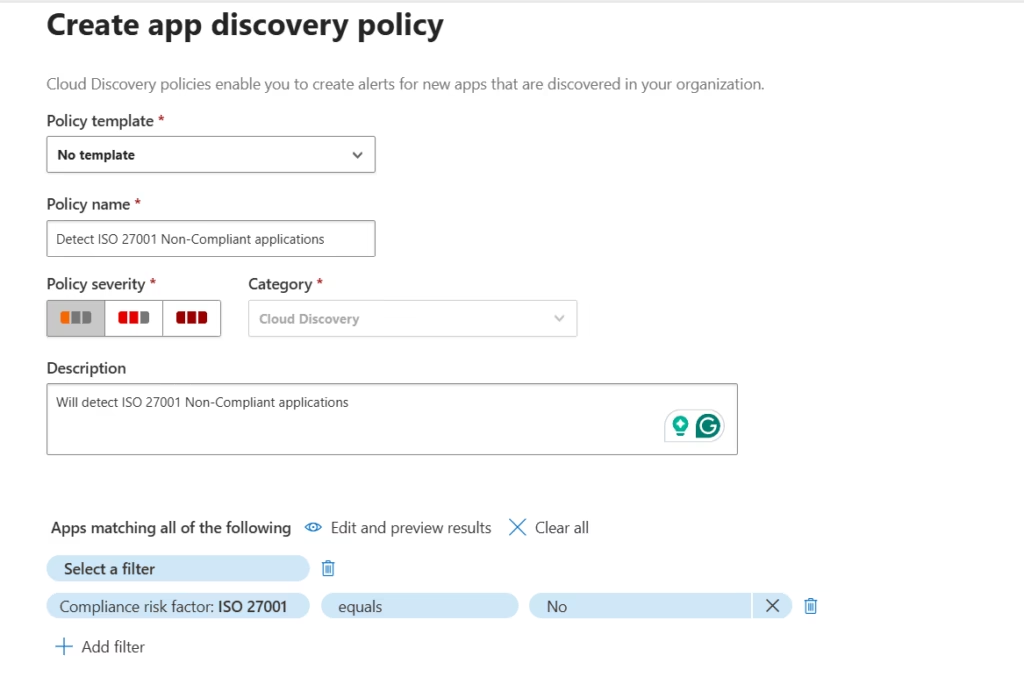
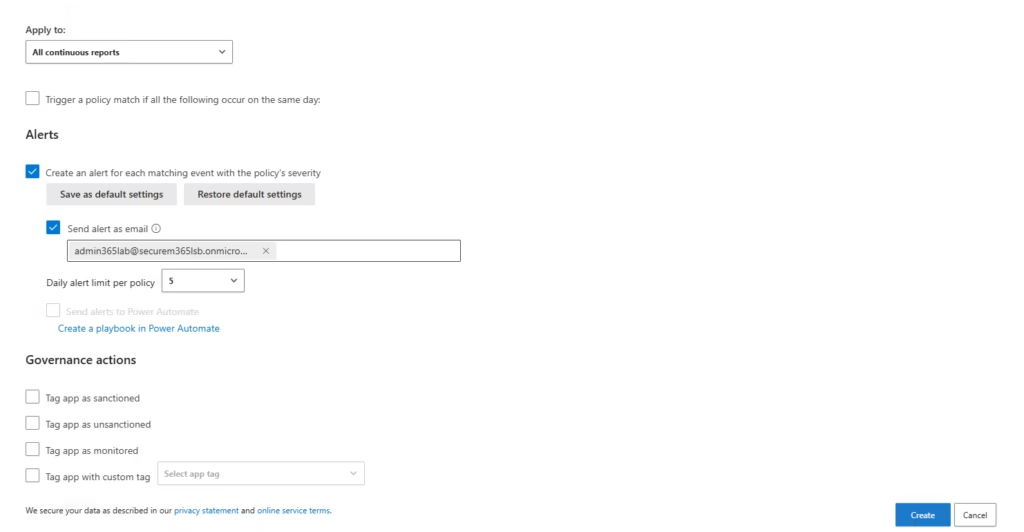
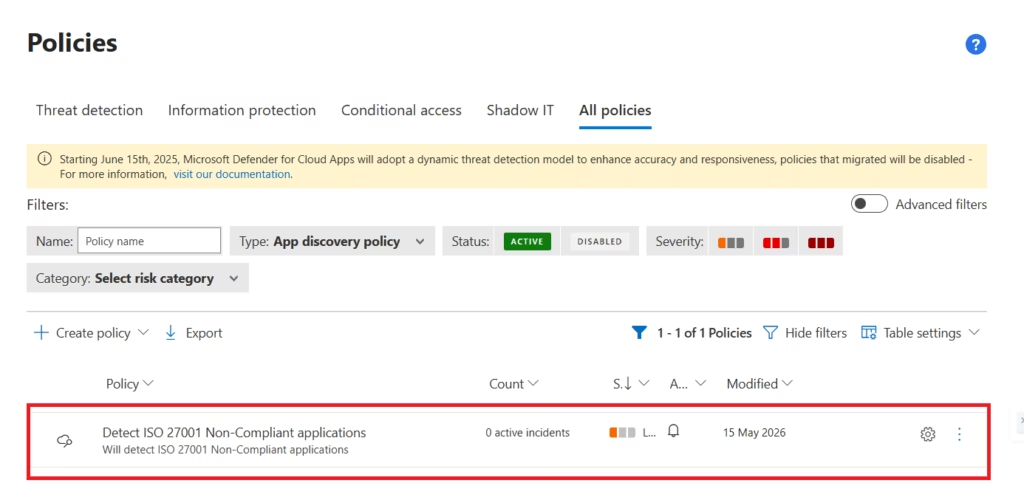
You can configure alerts for:
- Excessive permissions
- Risky access
- Unusual activity
Step 6: Review OAuth Apps
Open:
OAuth Apps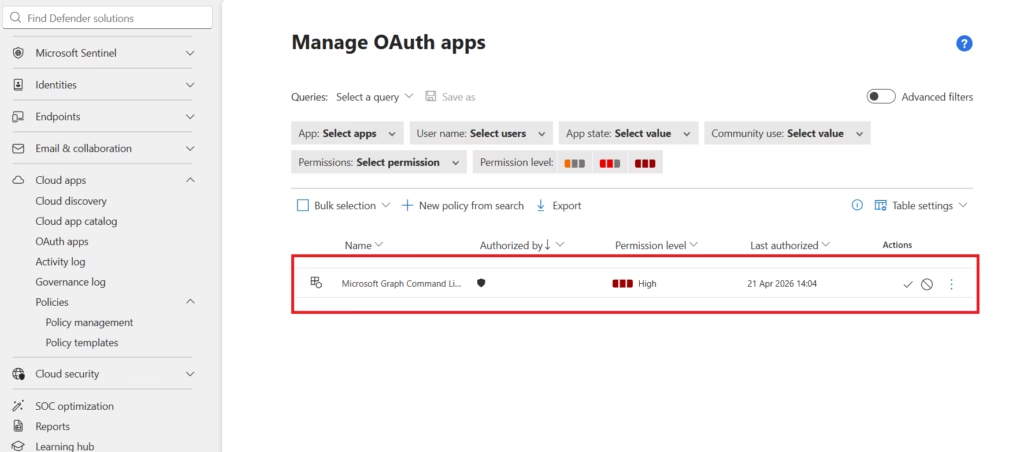
This section shows:
- Third-party integrations
- Granted permissions
- User consent activity
Very important for security monitoring.
Step 7: Monitor Activity Logs
Go to:
Activity Log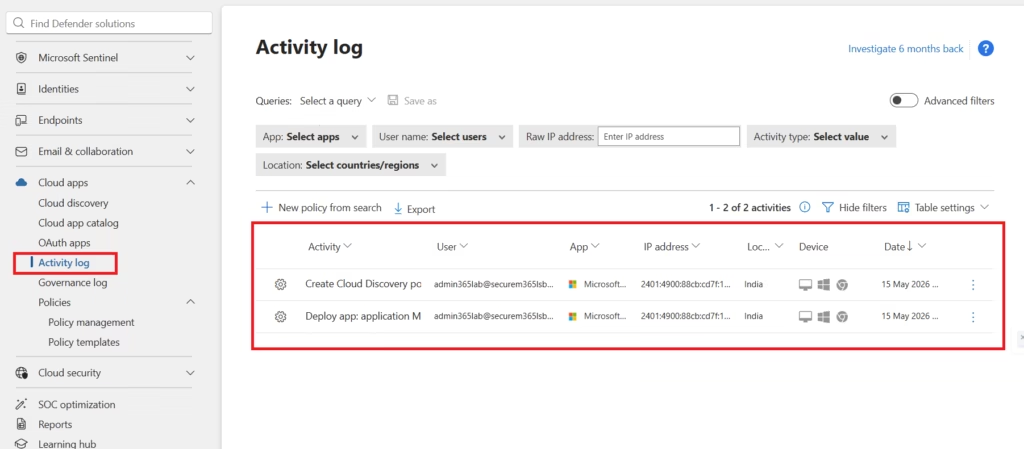
Review:
- File uploads
- Cloud logins
- App usage
- Suspicious activities
This helps investigate cloud threats.
Real-World Use Cases
Organizations commonly use Defender for Cloud Apps to:
| Use Case | Example |
|---|---|
| Shadow IT discovery | Detect unauthorized SaaS apps |
| Data protection | Prevent sensitive uploads |
| OAuth monitoring | Detect risky app permissions |
| Session control | Restrict unmanaged devices |
| Compliance | Monitor cloud data movement |
This is highly valuable in modern hybrid environments.
Best Practices from Real-World Security Teams
As a senior infrastructure and security engineer, I strongly recommend:
- Review Shadow IT Regularly:
- Employees constantly adopt new SaaS apps.
- Visibility must remain continuous.
- Monitor OAuth Permissions:
- OAuth abuse is increasingly common.
- Review third-party app permissions frequently.
- Use Session Policies Carefully:
- Overly aggressive restrictions can impact user productivity. Balance security with usability.
- Sanction Approved Applications:
- Mark trusted apps as sanctioned.
- Block risky or unnecessary services.
- Integrate with Defender XDR:
- Centralized investigation improves incident response.
Defender for Cloud Apps vs Defender for Endpoint
| Feature | Defender for Cloud Apps | Defender for Endpoint |
|---|---|---|
| Focus | Cloud app security | Device security |
| Monitors | SaaS applications | Endpoints |
| Detects | Shadow IT | Malware |
| Controls | Session policies | Endpoint protection |
Both solutions complement each other.
MS-102 Exam Tip
Scenario:
“A company wants visibility into unauthorized cloud application usage and risky SaaS apps.”
Correct answer:
Microsoft Defender for Cloud AppsNot:
- Microsoft Defender for Endpoint
- Intune
- Exchange Online Protection
- Microsoft Defender for Identity
Very common exam scenario.
Common Admin Mistakes
- Ignoring OAuth Permissions:
- Third-party app abuse is a major attack vector.
- Focusing Only on Microsoft Apps:
- Shadow IT often involves external SaaS platforms.
- Not Reviewing Risk Scores:
- App reputation matters.
- Overblocking Applications:
- Security controls should not completely disrupt productivity.
Final Thoughts
Cloud applications are now everywhere.
Employees install and use SaaS tools faster than IT teams can track them.
Without visibility:
Shadow IT becomes a serious business risk.Microsoft Defender for Cloud Apps helps organizations regain visibility, control cloud application access, and protect sensitive data across SaaS environments.
For MS-102 candidates, this is exam-critical.
For administrators, it is business-critical.
Because modern security is no longer just about endpoints or email.
It is also about controlling the cloud applications that users trust every day.Next in the MS-102 Security Series
Investigating Alerts in Microsoft Defender XDR (MS-102 Operations Guide)
https://techcertguide.blog/investigating-alerts-in-microsoft-defender-xdr
Because detecting threats is important, but knowing how to investigate them is where security operations truly begin.
Previous Topic
If you haven’t read it yet: Complete Microsoft Defender for Identity Lab Setup Guide
Start from the Beginning
MS-102 Microsoft 365 Administrator Overview
https://techcertguide.blog/ms-102-microsoft-365-administration
Official Microsoft Reference
https://learn.microsoft.com/en-us/certifications/exams/ms-102CategoriesMS-102
3 thoughts on “Complete Microsoft Defender for Cloud Apps (CASB) Guide: Stop Shadow IT & Secure Cloud Apps (MS-102)”