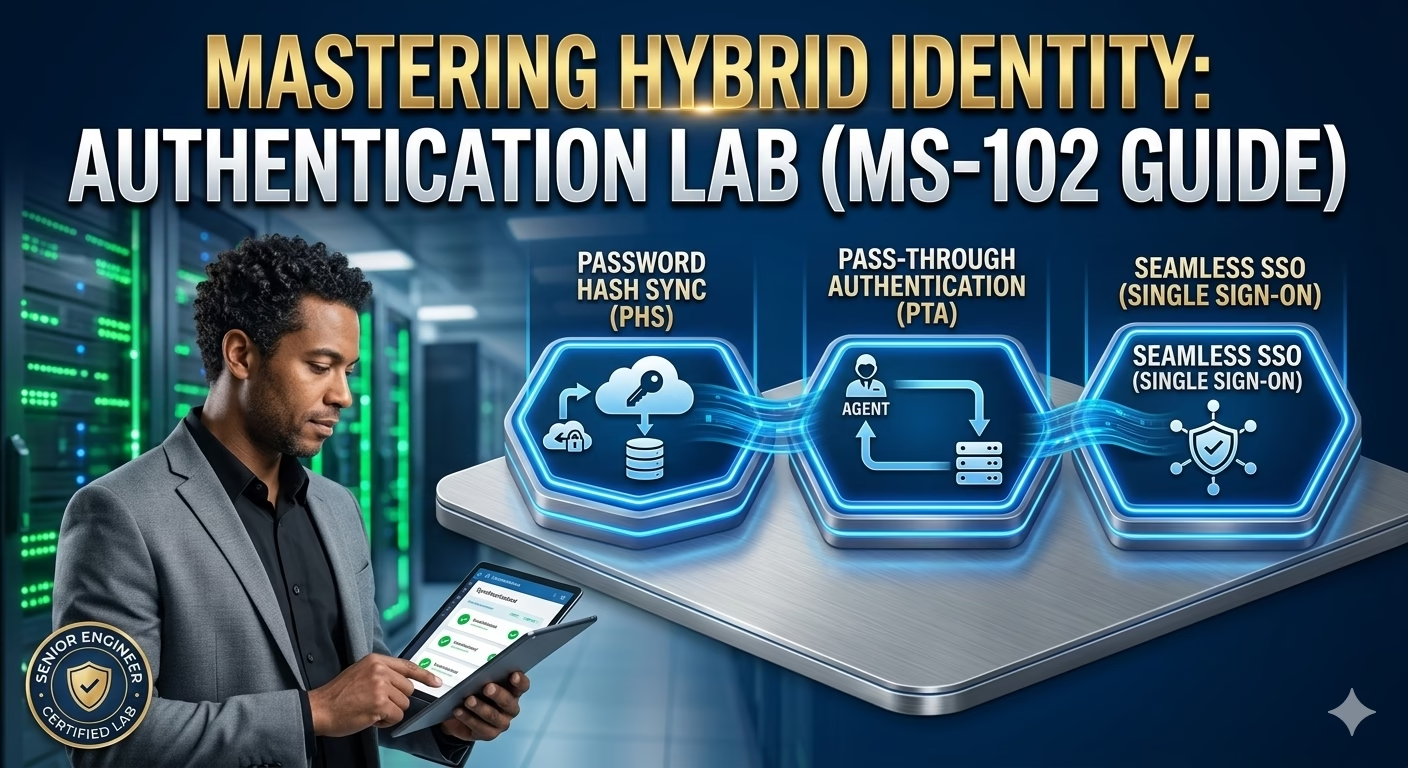
Password Hash Sync vs Pass‑Through Authentication vs Seamless SSO (with Lab)
Installing Microsoft Entra Connect is only the first step in a hybrid identity deployment. The real design decision begins with how users authenticate with Hybrid Authentication Methods.
Microsoft supports multiple authentication models in hybrid environments, each with different security implications, infrastructure dependencies, and administrative responsibilities. For the MS‑102 Microsoft 365 Administrator exam, understanding why and when to use each authentication method is more important than memorizing configuration steps.
This post explains:
- Password Hash Synchronization (PHS)
- Pass‑Through Authentication (PTA)
- Seamless Single Sign‑On (SSO)
- How these methods work together
- When to choose one over another
- Hands‑on lab validation
Learning Objectives
After completing this guide, you will be able to:
- Compare Password Hash Synchronization, Pass-Through Authentication, and Seamless SSO.
- Validate hybrid authentication methods through hands-on testing.
- Identify common authentication configuration mistakes.
- Describe MS-102 exam focus areas related to hybrid authentication.
Why Authentication Choice Matters
Authentication directly affects:
- User sign‑in experience
- Security posture
- Infrastructure dependency
- Availability during outages
- Troubleshooting complexity
Choosing the wrong authentication method can:
- Increase downtime
- Introduce security risk
- Make troubleshooting difficult
- Complicate tenant operations
MS‑102 tests administrators on decision‑making, not just defaults.
Comparing Hybrid Authentication Methods
Microsoft supports the following hybrid sign‑in methods:
| Authentication Method | Primary Auth Location |
|---|---|
| Password Hash Sync (PHS) | Microsoft Entra ID |
| Pass‑Through Authentication (PTA) | On‑premises AD |
| Seamless SSO | Enhancement layer |
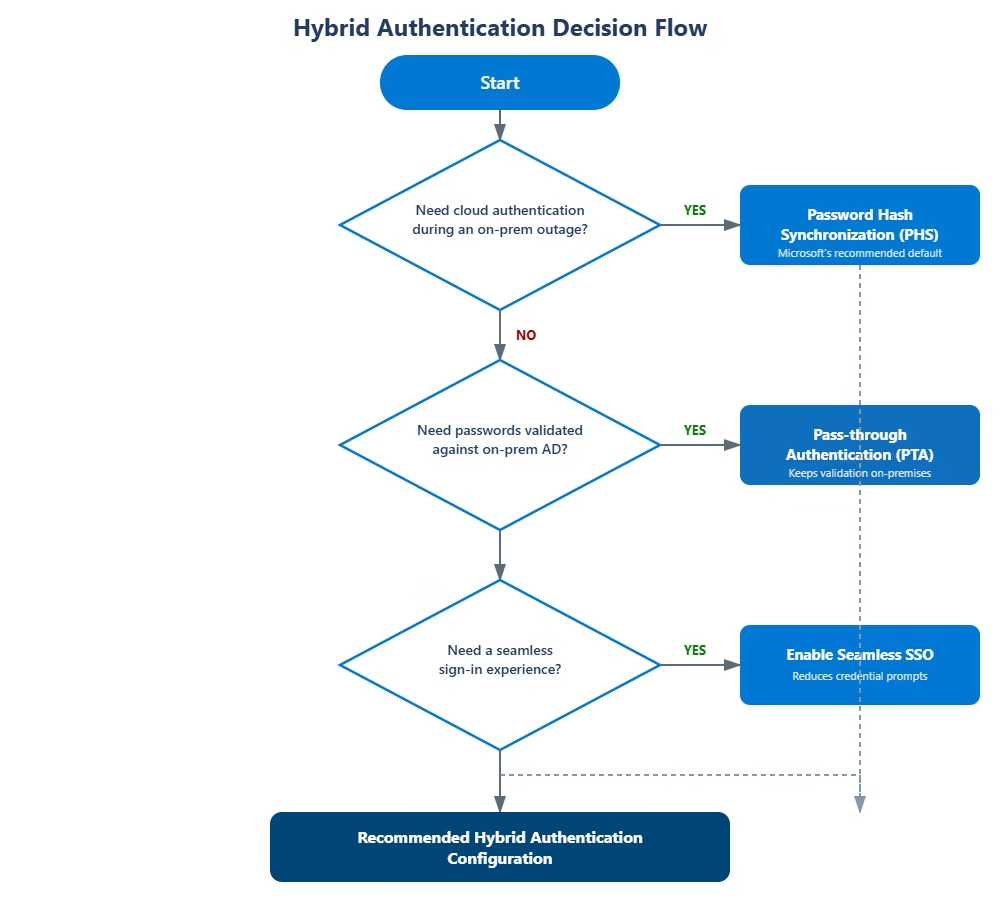
Seamless SSO is not an authentication method by itself. It works on top of PHS or PTA.
Password Hash Synchronization (PHS)
What Is Password Hash Synchronization?
With PHS:
- A hash of the user’s on‑prem password hash is synchronized to Entra ID
- Authentication occurs entirely in the cloud
- No on‑prem dependency during sign‑in
Passwords are:
- Hashed
- Salted
- Re‑hashed
- Transmitted securely
No plain‑text passwords are ever sent to Microsoft.
Why Microsoft Recommends PHS
PHS is: Simple
- Secure
- Highly available
- Cloud‑native
It supports:
- Microsoft Entra smart lockout
- Passwordless authentication
- Conditional Access
- Sign in during on‑prem outages
MS‑102 Exam Insight:
Password Hash Synchronization is the default and recommended authentication method.
When to Use PHS
Choose PHS when:
- You want minimal infrastructure dependency
- You want resilience during AD outages
- You prefer cloud‑based authentication
- You want easier troubleshooting
Most organizations use PHS.
Pass‑Through Authentication (PTA)
What Is Pass‑Through Authentication?
With PTA:
- User credentials are validated directly against the on‑prem AD
- Entra ID forwards authentication requests to on‑prem agents
- Passwords are not stored in the cloud
PTA requires:
- Always‑available on‑prem infrastructure
- At least 3 authentication agents (recommended)
Senior Engineer Note: While PTA is often requested for “security compliance,” it creates a massive “Circular Dependency.” If your on-premises internet circuit goes down, your users can’t even sign into the cloud to check the status page. Always recommend PHS as a backup even if PTA is the primary method.
PTA Authentication Flow
1️⃣ User enters credentials
2️⃣ Entra ID forwards the request
3️⃣ PTA agent validates with AD
4️⃣ Result returned to Entra ID
This introduces additional latency and dependency.
When to Use PTA
Choose PTA when:
- Regulatory requirements prohibit cloud password hashes
- Organization insists on AD‑based validation
- Infrastructure redundancy is in place
MS‑102 Insight:
PTA increases dependency on on‑prem availability.
Seamless Single Sign‑On (SSO)
What Is Seamless SSO?
Seamless SSO allows:
- Domain‑joined devices
- Inside the corporate network, to authenticate without entering credentials
It works with:
- PHS
- PTA
Seamless SSO uses:
- Kerberos
- Computer trust
- Entra ID configuration object
Seamless SSO Requirements
- Domain‑joined devices
- Line‑of‑sight to domain controllers
- Browsers that support integrated authentication
It improves user experience but does not replace hybrid authentication methods.
Authentication Method Comparison (MS‑102‑Friendly)
| Feature | PHS | PTA | Seamless SSO |
|---|---|---|---|
| Cloud auth | Yes | No | No |
| On‑prem dependency | No | Yes | Yes |
| Supports passwordless | Yes | No | No |
| Sign‑in during AD outage | Yes | No | No |
| Improves UX | No | No | Yes |
Hands‑On Lab: Validate Hybrid Authentication Methods
Lab Objective:
Understand and verify hybrid authentication behavior using Entra ID tools.
Step 1: Verify Password Hash Sync
- Open Synchronization Service Manager
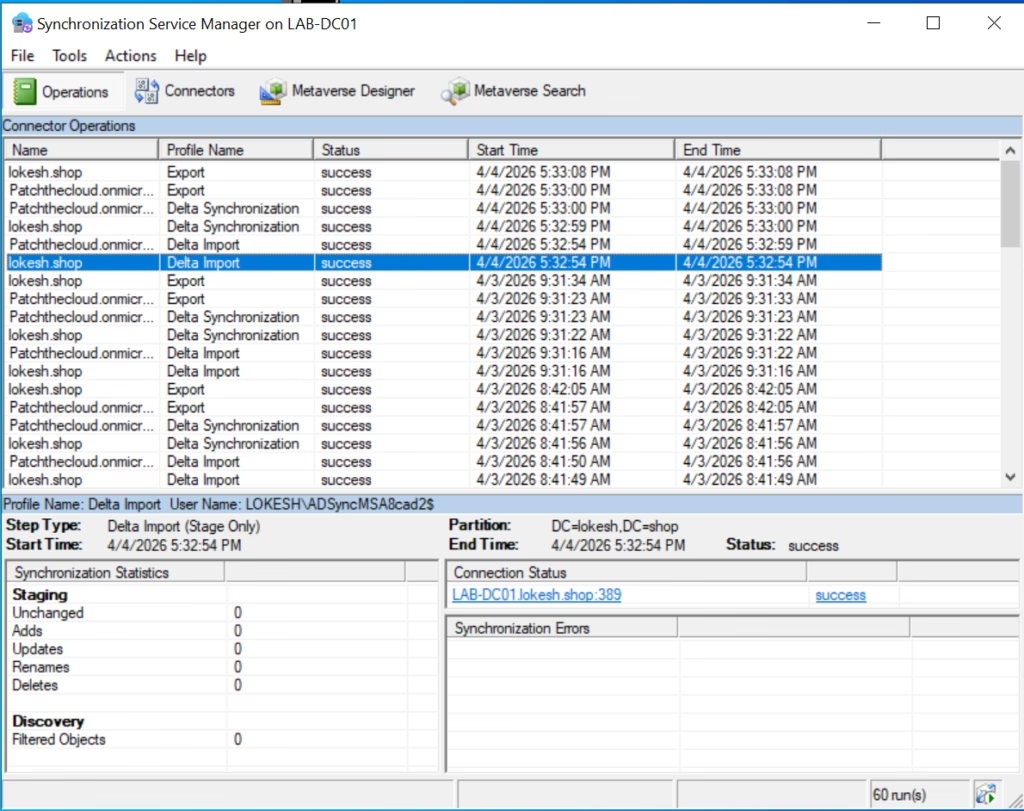
- Confirm:
- Password hash synchronization is enabled
- Check Entra ID → Entra Connect → Connect Sync
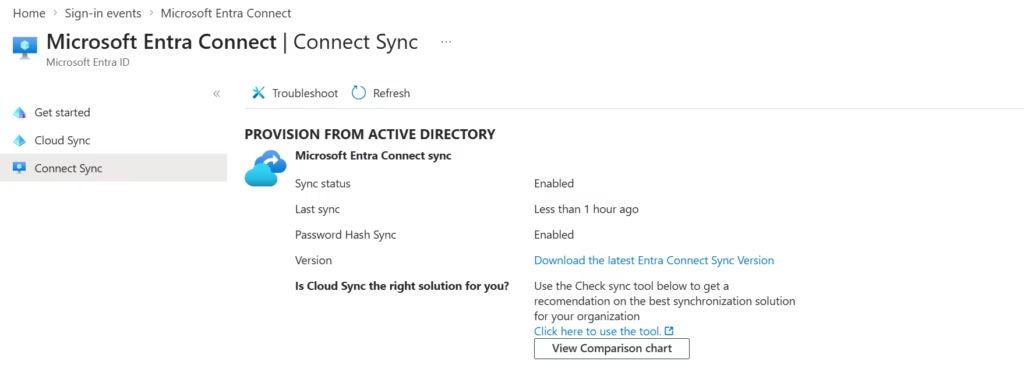
Look for:
- Authentication method = Password hash synchronization
Step 2: Confirm Seamless Single Sign‑On Was Enabled During Installation
During the Microsoft Entra Connect installation, Seamless Single Sign‑On (SSO) was enabled as part of the initial configuration. No additional configuration or change is required after installation.
This step focuses on verifying that Seamless SSO is enabled and functioning as expected.
Step 2.1: Confirm Seamless SSO Status in Microsoft Entra Connect
- Open the Microsoft Entra admin center
- Navigate to:
Microsoft Entra ID → Microsoft Entra Connect → Connect Sync
- Review the User sign‑in section
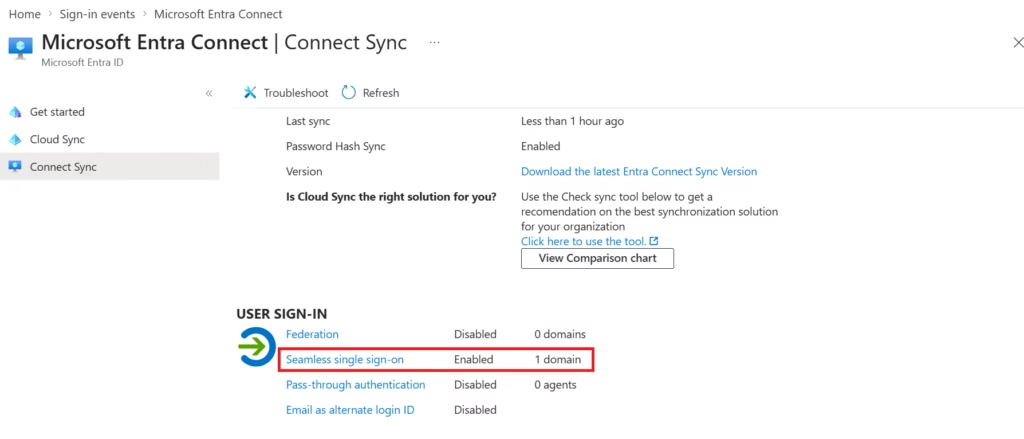
Expected Configuration
Seamless single sign-on: Enabled (1 domain)
Password Hash Synchronization: Enabled
Pass-through authentication: Disabled
This confirms that:
- Seamless SSO was enabled during installation
- It is applied to the tenant domain
- The authentication model is PHS + Seamless SSO
Note: This configuration is created automatically when Seamless SSO is selected during the Entra Connect setup wizard.
Step 2.2: Verify Seamless SSO Computer Account in Active Directory
Seamless SSO requires a dedicated computer account in Active Directory to support Kerberos authentication.
Verification Steps:
- Open Active Directory Users and Computers
- Navigate to:
Domain name → Computers
- Confirm the computer account exists:
AZUREADSSOACC
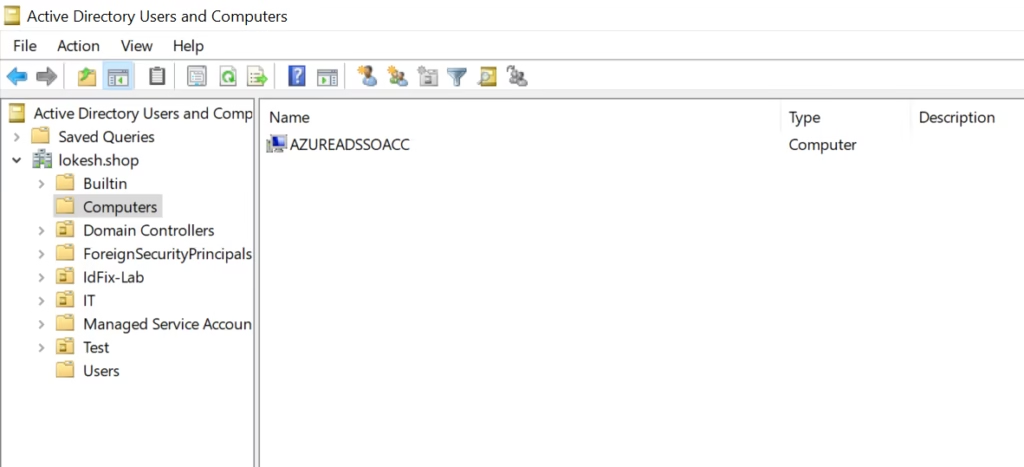
Expected Result
AZUREADSSOACCThe computer account exists- Account is enabled
- Created during Entra Connect installation
The presence of this account confirms that Seamless SSO was successfully configured.
Optional: End‑User Sign‑In Validation (Environment‑Dependent)
In production environments, Seamless SSO can be validated by signing in from a domain‑joined device inside the corporate network.
However, in lab environments, this validation is often not possible due to:
- VM networking
- Lack of Kerberos line‑of‑sight
- Non‑production DNS or routing
Lab Note:
End‑user sign‑in testing is not required to confirm Seamless SSO configuration for this lab or for MS‑102 scenarios.
Step 3: Simulate PTA Awareness (Conceptual)
This lab does not configure or enable Pass‑Through Authentication (PTA). Password Hash Synchronization (PHS) remains the active authentication method.
This step confirms PTA awareness and validation of the current authentication state, which is commonly tested conceptually in MS‑102
Review:
- PTA agent requirements
- Availability dependencies
- Failure scenarios
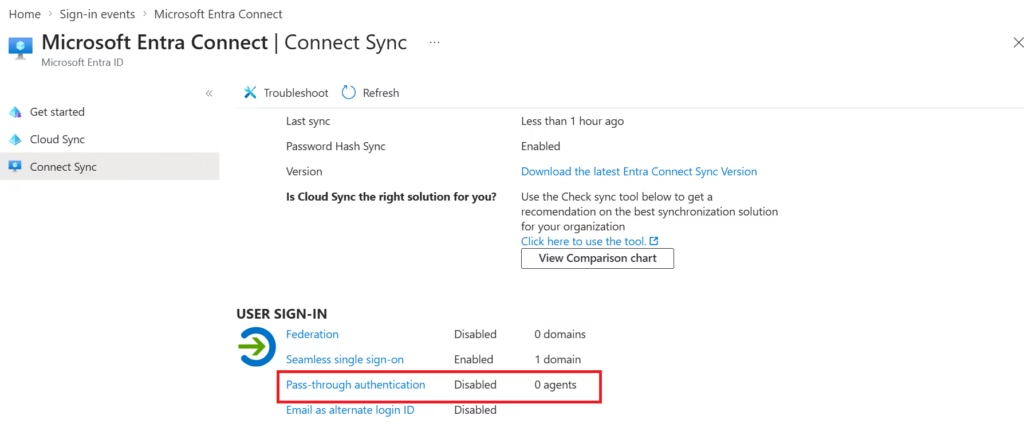
Expected Result:
Pass-through authentication: Disabled
Password Hash Synchronization: Enabled
Seamless single sign-on: Enabled
Lab Note:
Pass‑Through Authentication is not configured in this deployment. PTA requires authentication agents and introduces an on‑premises availability dependency. This lab uses Password Hash Synchronization for improved resiliency and simplicity.
This is often tested conceptually in MS‑102.
Common Authentication Mistakes
- Choosing PTA without redundancy
- Disabling PHS unnecessarily
- Assuming Seamless SSO replaces authentication
- Forgetting about the on‑prem dependency implications
MS‑102 Exam Focus Areas
Expect questions such as:
- Which Hybrid Authentication Method supports sign‑in during on‑prem outages?
- Which method is recommended by Microsoft?
- When is PTA required?
- What role does Seamless SSO play?
Correct answers depend on scenario context, not memorization.
Conclusion: Mastering the Identity Frontier
Choosing the right Hybrid Authentication Method is one of the most critical architectural decisions a Senior IT Infrastructure Engineer will make. It is not just about toggling a switch in Entra Connect; it is about balancing high availability, security compliance, and a seamless user experience. Whether you opt for the cloud-native resilience of Password Hash Synchronization or the on-premises control of Pass-Through Authentication, your goal is to build a foundation that scales.
For those preparing for the MS-102 exam, remember that Microsoft evaluates your ability to match the business requirements to the technical reality. A robust Hybrid Authentication Method ensures that even during local infrastructure outages, your users stay productive and your tenant stays secure. Use the hands-on lab steps we’ve covered to validate your configuration and move one step closer to your certification.
Key Takeaways
- Authentication choice defines identity resilience
- PHS is the default for good reason
- PTA adds operational complexity
- Seamless SSO enhances user experience
- MS‑102 tests reasoning, not clicks
What’s Next in the Series
Now that the hybrid authentication method is understood, the next logical step is controlling sync scope and data flow.
➡️ Next Post:
OU and Attribute Filtering in Microsoft Entra Connect (with Lab)
Previous Topic
If you haven’t explored it yet:
Installing Microsoft Entra Connect Step-by-Step (MS-102)
Previous MS-102 Lab: Installing Microsoft Entra Connect Step-by-Step
Start from the Beginning
MS-102 Microsoft 365 Administrator Overview
Start MS-102 Learning Path: Microsoft 365 Administrator Overview
Official Microsoft Reference
Official Microsoft Learn – MS-102 Exam Page
2 thoughts on “Mastering Hybrid Authentication Methods: PHS, PTA, and SSO (MS-102 Lab Guide)”