Once identity foundations, authentication, and tenant configuration are in place, Microsoft 365 administration moves into its most critical phase: security operations.
This is the point where Microsoft 365 administrators stop thinking only about configuration and start thinking about threat detection, investigation, and response.
At the center of Microsoft 365 security operations is Microsoft Defender XDR.
For the MS‑102 Microsoft 365 Administrator exam, understanding Microsoft Defender XDR is not about memorizing product names. It is about understanding:
- How Microsoft detects threats across services
- How security signals are correlated
- What administrators are responsible for acting on
- Where investigation and response actually happen
This post explains the architecture of Microsoft Defender XDR and clearly defines the administrator’s role within the Defender security lifecycle.
Learning Objectives
After completing this guide, you will be able to:
- Explain what Microsoft Defender XDR is and why it exists.
- Describe the Defender XDR architecture at a conceptual level.
- Differentiate alerts from incidents.
- Identify the administrator’s responsibility within Defender XDR.
What Is Microsoft Defender XDR?
Microsoft Defender XDR (Extended Detection and Response) is Microsoft’s unified security operations platform for Microsoft 365.
Rather than treating security incidents as isolated events, Defender XDR:
- Collects signals across Microsoft 365 services
- Correlates related activity
- Builds incidents instead of standalone alerts
- Provides investigation context and response actions
Defender XDR is not a single protection feature. It is a security control plane that sits on top of Microsoft’s individual protection services.
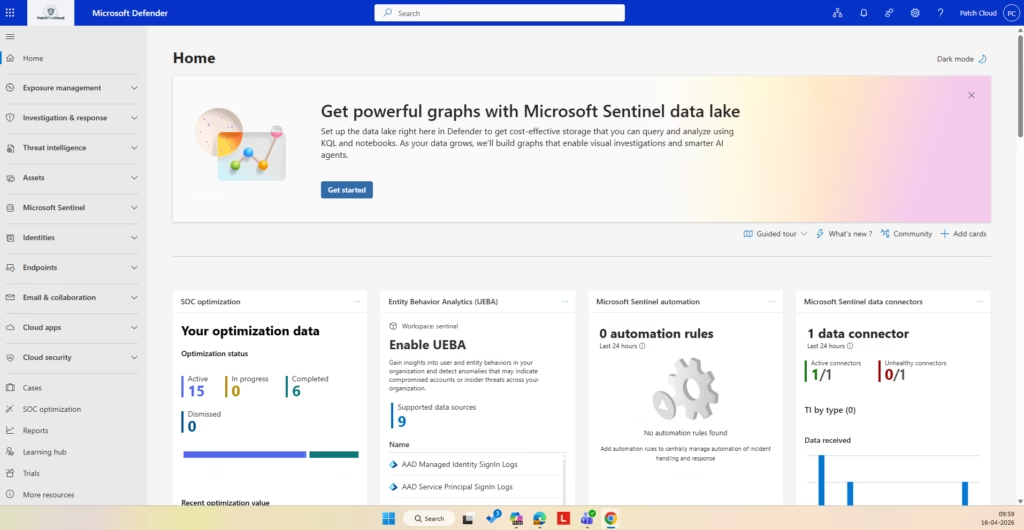
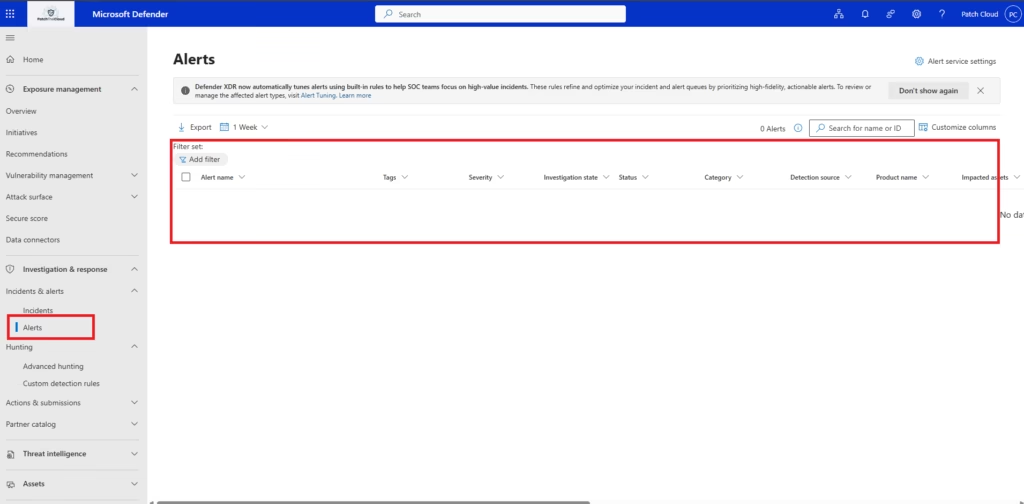
This section provides a read‑only walkthrough of the Microsoft Defender portal to help administrators understand where alerts and incidents are surfaced. No configuration changes are made at this stage
Why Defender XDR Exists
Before Defender XDR, security tools often operated in silos:
- Email threats were handled in one system
- Identity threats in another
- Endpoint threats somewhere else
Attackers do not operate in silos.
A typical attack might involve:
- A phishing email
- Credential theft
- Privilege escalation
- Lateral movement
- Data exfiltration
Defender XDR exists to connect these steps into one security narrative, allowing administrators to see the full attack chain instead of disconnected alerts.
Defender XDR Architecture Overview
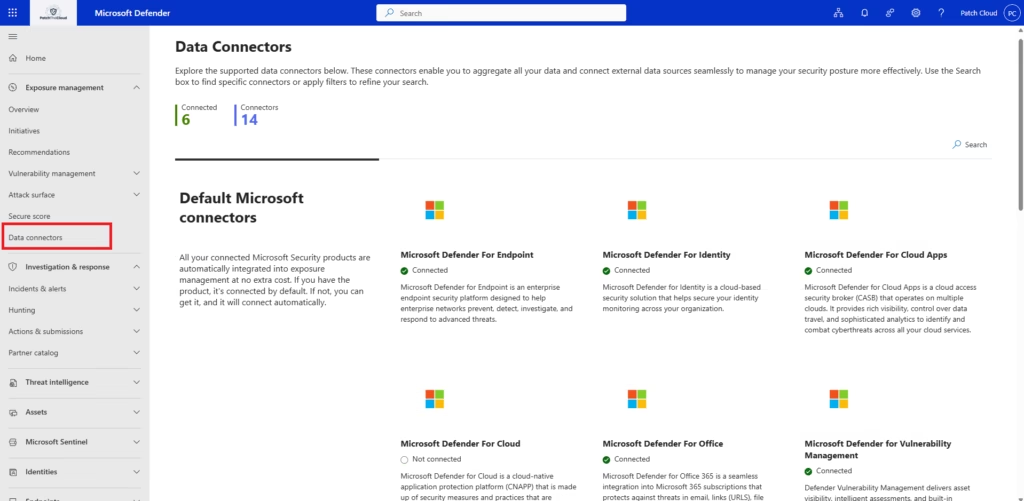
Microsoft Defender XDR works by integrating signals from multiple Microsoft security services into a single detection and response workflow.
Core Signal Sources
Defender XDR aggregates data from:
- Microsoft Defender for Office 365 (email and collaboration threats)
- Microsoft Entra ID (identity and authentication events)
- Microsoft Defender for Endpoint (device behavior)
- Microsoft Defender for Identity (on‑prem identity threats)
- Microsoft Defender for Cloud Apps (cloud app behavior)
Each service contributes signals, not conclusions. Defender XDR performs the correlation.
Alerts vs Incidents (Critical Concept)
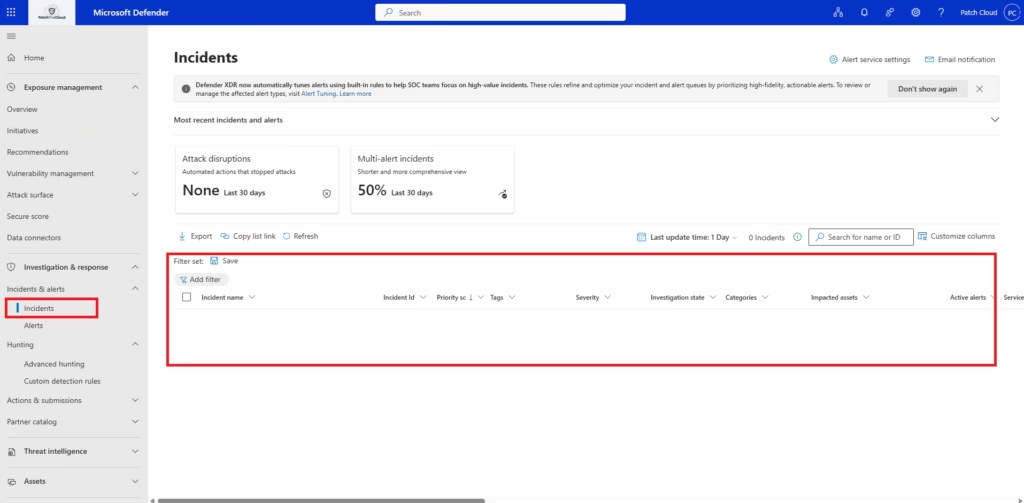
A key architectural concept in Defender XDR is the difference between alerts and incidents.
Alerts
- Indicate a suspicious or malicious activity
- Generated by a single protection engine
- Represent one piece of a larger story
Incidents
- Aggregate related alerts
- Represent a complete attack scenario
- Are the primary unit of investigation
👉 Administrators work incidents, not individual alerts.
This distinction is frequently tested in MS‑102.
Security Lifecycle in Defender XDR
Microsoft Defender XDR follows a structured security lifecycle.
Detection
Protection services detect suspicious activity and generate alerts.
Correlation
Defender XDR correlates related alerts into incidents.
Investigation
Administrators review:
- Affected users
- Affected devices
- Attack timeline
- Evidence and artifacts
Response
Admins or automation take actions such as:
- Blocking users
- Isolating devices
- Removing malicious emails
- Resetting credentials
Recovery and Improvement
Lessons learned feed back into:
- Secure Score improvements
- Policy hardening
- Ongoing security posture management
MS‑102 evaluates understanding of this lifecycle far more than individual button clicks.
🔄 Unified Security Operations Flow
The Administrator’s Responsibility in Defender XDR
Microsoft Defender XDR does not replace administrators.
Microsoft provides:
- Detection engines
- Threat intelligence
- Correlation logic
- Automated investigation capabilities
Administrators are responsible for:
- Ensuring protection features are enabled
- Reviewing alerts and incidents
- Making remediation decisions
- Improving security posture over time
- Balancing automation with manual oversight
This division of responsibility is core to Domain 3.
Defender XDR vs Individual Defender Products
Another common misunderstanding is thinking Defender XDR replaces Defender for Office 365 or other services.
It does not.
| Component | Role |
|---|---|
| Defender XDR | Security operations platform |
| Defender for Office 365 | Email & collaboration protection |
| Defender for Endpoint | Device protection |
| Defender for Identity | On‑prem identity attack detection |
| Defender for Cloud Apps | Cloud app monitoring |
Defender XDR unifies these; it does not eliminate them.
Why Secure Score and Threat Analytics Come Next
Defender XDR handles active threats, but administrators must also think proactively.
This is why Domain 3 proceeds with:
- Secure Score → measuring and improving posture
- Threat Analytics → understanding emerging attack trends
Defender XDR responds to attacks today.
Secure Score and Threat Analytics help reduce attacks tomorrow.
Defender XDR in MS‑102 Exam Context
MS‑102 does not require deep SOC expertise, but it does expect administrators to:
- Recognize Defender XDR as the central security platform
- Understand alerts vs incidents
- Know which Defender components feed into XDR
- Identify where investigations are performed
- Understand basic response responsibilities
Most exam questions are scenario‑based, not feature‑based.
Common Misconceptions
❌“Defender XDR automatically fixes everything.”
❌ “Administrators don’t need to investigate alerts.”
❌ “Each Defender tool works independently.”
❌ “Security posture is static once configured.”
✅ Defender XDR supports admins; it does not replace them
✅ Human decision‑making remains essential
Key Takeaways
- Microsoft Defender XDR is the security operations hub for Microsoft 365
- It correlates alerts into incidents across services
- Administrators investigate incidents, not isolated alerts
- Defender XDR works with other Defender components
- Domain 3 focuses on detection, investigation, and response
- MS‑102 tests understanding of security workflows, not just features
What Comes Next in Domain 3
With the Defender XDR architecture understood, the next logical step is measuring and improving the security posture.
➡️ Next Post:
Microsoft Secure Score Explained: Measure & Improve Security Posture (MS‑102 Guide)
Previous Topic
If you haven’t explored it yet:
The Essential Microsoft 365 Security Foundations: Unlock Your Potential for MS-102
Start from the Beginning
MS-102 Microsoft 365 Administrator Overview
https://techcertguide.blog/ms-102-microsoft-365-administration
Official Microsoft Reference
https://learn.microsoft.com/en-us/certifications/exams/ms-102
3 thoughts on “Microsoft Defender XDR Explained: Essential Architecture & Admin Tips for MS-102”