Once Microsoft Defender XDR is in place and administrators understand how incidents and alerts are investigated, the next critical question becomes:
How is Microsoft Secure Score for the tenant overall?
Detecting threats is important, but preventing them before they happen is even more valuable.
This is where Microsoft Secure Score becomes one of the most important tools in Microsoft 365 administration.
For the MS-102 Microsoft 365 Administrator exam, Secure Score is not just a dashboard—it represents how Microsoft measures tenant security posture and guides administrators toward stronger protection.
This post explains:
- What is Microsoft Secure Score
- How scoring works
- What actions improve the score
- The administrator’s responsibility
- Why Secure Score matters in real-world environments
Learning Objectives
After completing this guide, you will be able to:
- Explain what Microsoft Secure Score measures.
- Differentiate Secure Score from Compliance Score.
- Identify how Secure Score improvement actions strengthen tenant security.
- Describe the administrator’s responsibility in maintaining Secure Score.
What Is Microsoft Secure Score?
Microsoft Secure Score is a security analytics tool that helps organizations measure and improve their security posture across Microsoft 365 services.
It provides:
- A numerical security score
- Recommended improvement actions
- Risk reduction guidance
- Visibility into security configuration gaps
Instead of guessing whether your environment is secure, Secure Score gives administrators a measurable way to evaluate protection levels.
👉 Think of Microsoft Secure Score as a security health report for your tenant
Why Microsoft Secure Score Exists
Many organizations enable Microsoft 365 services without fully configuring security protections.
Common examples include:
- MFA not enforced
- Legacy authentication is still enabled
- Admin accounts are not protected
- Excessive sharing permissions
- Missing Defender protections
These gaps create real attack opportunities.
Microsoft Secure Score exists to:
- Identify these weaknesses
- Prioritize improvements
- Reduce attack surface
- Help administrators make informed security decisions
It shifts security from reactive to proactive.
How Secure Score Works
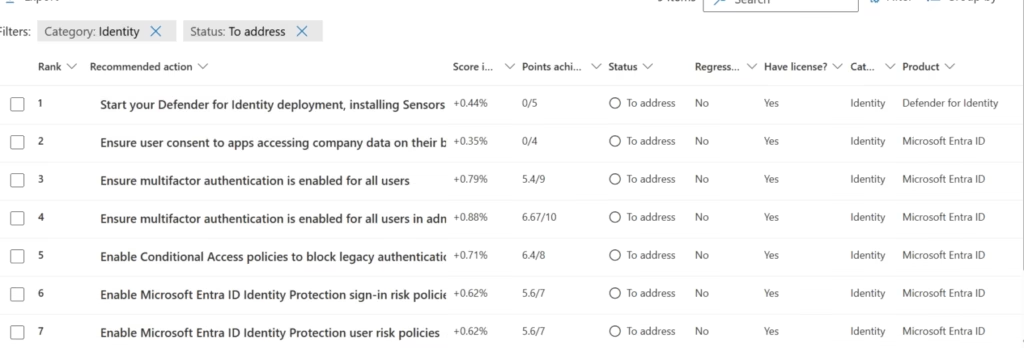
Filter recommendations to Identity-related items only.
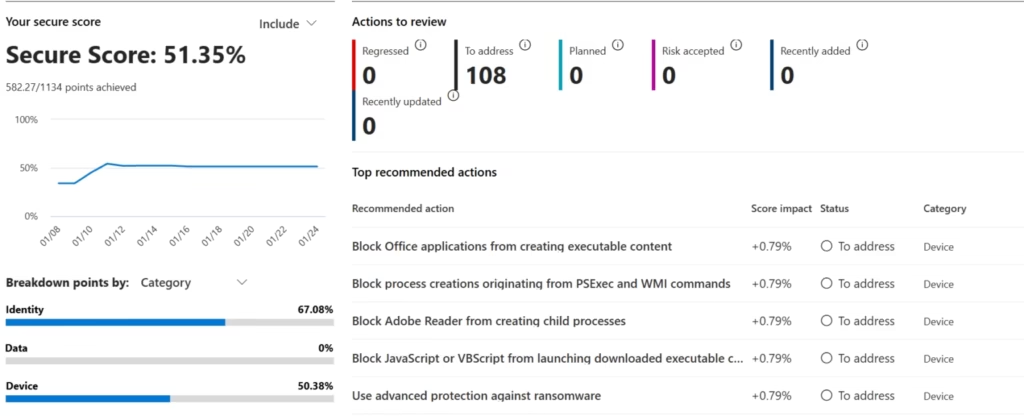
Secure Score assigns points based on completed security recommendations.
Each recommendation has:
- A risk impact level
- A point value
- Implementation guidance
Example actions include:
- Enable MFA for admins
- Block legacy authentication
- Protect privileged accounts
- Enable mailbox auditing
- Configure attack surface reduction rules
When administrators implement these controls, the score increases.
Higher score = stronger security posture
👉 But Secure Score is not about reaching 100%
It is about improving security based on business needs.
Secure Score vs Compliance Score
This is a common MS-102 exam distinction.
Secure Score
Focuses on:
- Security posture
- Identity protection
- Threat reduction
- Technical security controls
Compliance Score
Focuses on:
- Regulatory requirements
- Data governance
- Legal compliance
- Privacy obligations
👉 Secure Score = “How secure are we?”
👉 Compliance Score = “How compliant are we?”
This difference is frequently tested in MS-102.
Secure Score Improvement Actions
Secure Score provides specific recommendations across multiple services.
Common Categories
Identity Protection
- Enable MFA
- Protect admin accounts
- Review risky sign-ins
Device Security
- Endpoint protection
- Device compliance policies
- Attack surface reduction
Data Protection
- Sharing controls
- Sensitivity labels
- Email protection policies
App Security
- OAuth app review
- Consent restrictions
- Defender for Cloud Apps monitoring
Administrators must evaluate recommendations based on business impact—not blindly apply everything.
Important Real-World Example
Suppose Secure Score recommends:
- Disable legacy authentication
This improves security significantly.
However:
Some legacy business applications may still depend on it.
Administrators must decide:
- Immediate enforcement
OR - Phased migration
This is why Secure Score supports decision-making—it does not replace it.
Administrator Responsibility
Microsoft provides:
- Recommendations
- Risk visibility
- Security benchmarking
Administrators are responsible for:
- Reviewing recommendations
- Prioritizing improvements
- Balancing security with operations
- Documenting accepted risks
- Continuously improving posture
Secure Score is a guidance system—not an automatic enforcement engine.
This responsibility is heavily emphasized in MS-102.
Secure Score and Continuous Improvement
Security posture is never static.
New threats emerge.
Configurations drift.
Users change behavior.
New services are introduced.
Because of this, Secure Score must be treated as an ongoing process, not a one-time project.
Good administrators review:
- Weekly improvements
- Monthly score trends
- High-risk recommendations
- Identity-related exposures
👉 Secure Score is part of operational security hygiene
Secure Score + Defender XDR Relationship
This is a powerful Domain 3 connection.
Defender XDR
Focuses on:
👉 Detecting and responding to active threats
Secure Score
Focuses on:
👉 Preventing future attacks by improving posture
Simple view:
Defender XDR handles attacks today
Secure Score helps reduce attacks tomorrow
This progression is exactly how Domain 3 is structured
MS-102 Exam Focus
You should understand:
- What Secure Score measures
- Difference between Secure Score and Compliance Score
- Why recommendations exist
- Why 100% score is not always required
- Administrator decision-making responsibilities
MS-102 tests security judgment—not just feature recognition.
Common Misconceptions
❌ “A lower score means the tenant is unsafe.”
❌ “Every recommendation must be implemented.”
❌ “Secure Score automatically fixes issues.”
❌ “100% score should always be the goal.”
✅ Security decisions depend on business context
✅ Some accepted risks are valid
✅ Secure Score supports decisions, not replaces them
Key Takeaways
Microsoft Secure Score helps measure tenant security posture
It provides recommendations that reduce risk
Higher score means stronger protection—but not necessarily perfection
Secure Score and Compliance Score are different
Administrators must prioritize improvements based on business needs
MS-102 focuses on understanding security decisions, not chasing percentages
🚀 What Comes Next in Domain 3
Once Secure Score helps measure your posture, the next step is understanding evolving threats.
➡️ Next Post:
Microsoft Threat Analytics Explained (MS-102 Guide)
Because security is not just about your current posture, It’s also about preparing for the next attack.
https://techcertguide.blog/threat-analytics-in-microsoft-defender-xdr
Previous Topic
If you haven’t read it yet:
➡️ Microsoft Defender XDR Overview (MS-102 Guide)
http://techcertguide.blog/microsoft-defender-xdr-explained-ms-102
Start from the Beginning
MS-102 Microsoft 365 Administrator Overview
https://techcertguide.blog/ms-102-microsoft-365-administration
Official Microsoft Reference
https://learn.microsoft.com/en-us/certifications/exams/ms-102
2 thoughts on “Microsoft Secure Score Explained: Measure & Improve Security Posture (MS-102 Guide)”